7 - Track editing
Mixing down
A mixdown is when the volume, panning and other settings of
individual track recordings are adjusted and combined into a
well-balanced stereo mix.
The MAIN MIX L/R bus does not have a REC button, but it is
always in recording standby. Pressing the 0 button always
records the signals on this bus. The MAIN MIX L/R bus signals are
recorded as channel 23/24 tracks on the SD card.
Stereo mix les can be created after recording by readjusting as
desired the balance of the tracks recorded on each channel and
mixing them down.
1. Adjust the recorded sound and play it back.
i Set the INPUT SEL switches of the recorded tracks to“
M T R ”.
i Turn on the MAIN switches of the recorded tracks.
(Turn o the MAIN switches of unrecorded tracks.)
i While using speakers or headphones, for example, to
listen to the sounds of all the recorded tracks being
output from the MAIN OUTPUT jacks, adjust the
channel faders and EQ and PAN knobs.
After conrming, stop playback and return to the beginning
of the song.
2. Mix down the playback sound.
i With the REC buttons o (unlit) on each channel, press
the 0 button to create a stereo mix from the playback
sounds of all the recorded tracks.
i During mixdown, all fader and EQ and PAN knob
adjustments will be recorded from the time that the
0 button is pressed and track playback is started until
the 8 button is pressed to stop playback. This will
overwrite the existing stereo le.
Stereo mix export function
MAIN MIX L/R bus recording les (mono) can be converted to a
single stereo le.
Converted stereo les are saved in the “MUSIC” folder.
Saved les are named according to the song name. For example,
the le name will be “181228_0002_2-MIX_01.wav” if the song
name is “181228_0002”.
If the size of the converted le would exceed 2 GB, multiple les
will be created with numbers like “02” and “03” at their ends.
1. Load the song to be exported as a stereo mix in advance.
For details about loading songs, see “Loading Songs” on
page 25.
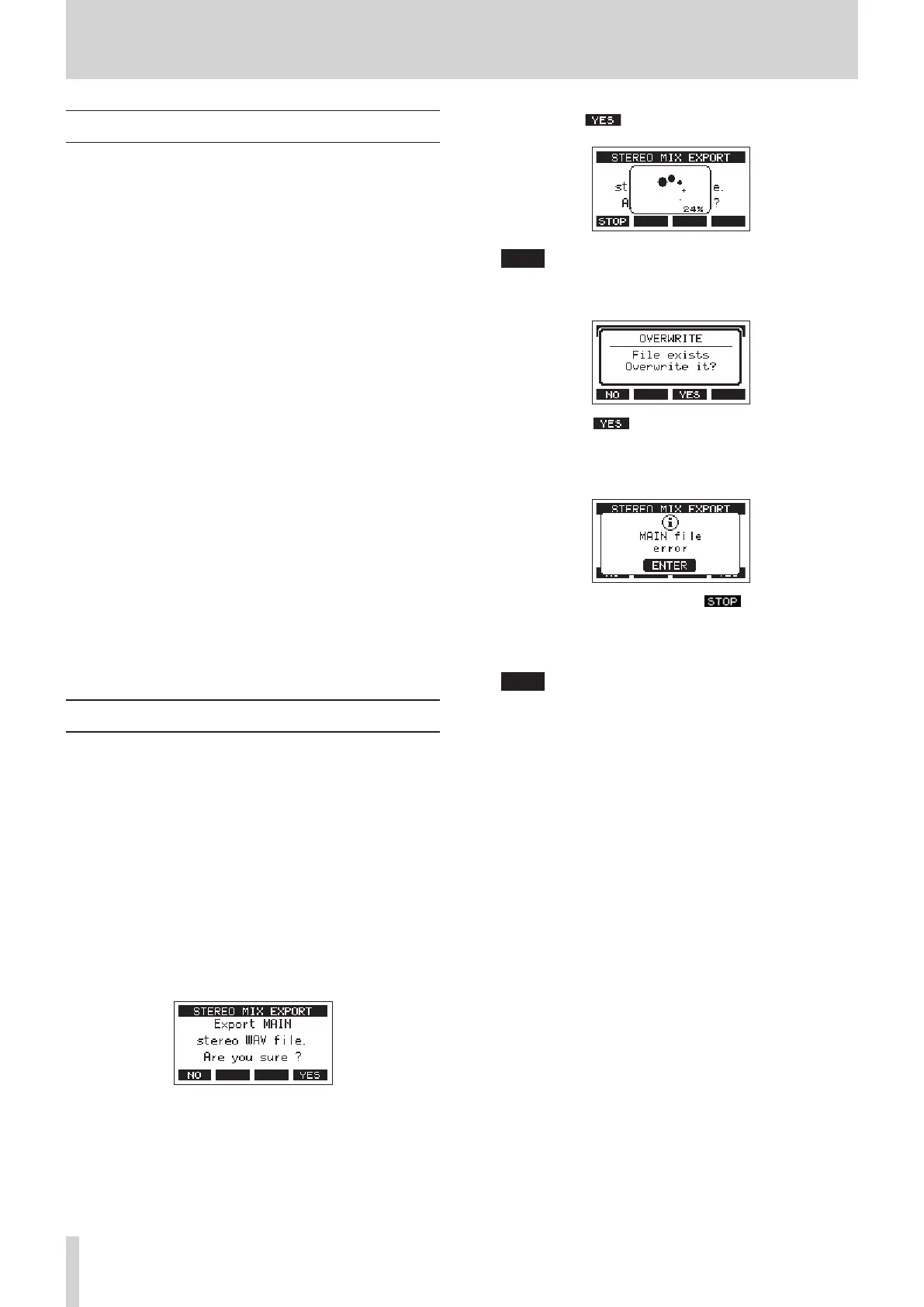
2. When the recorder is stopped, select STEREO MIX EXPORT
on the MENU Screen, and open the STEREO MIX EXPORT
Screen. (see "Menu operation procedures" on page 18.)
3. Press the F4 button to start conversion.
NOTE
i If a converted le already exists, a message to conrm
overriding appears.
Press the F3 button to delete the existing le and
start conversion. This operation cannot be undone.
i Conversion is not possible if no MAIN MIX L/R bus le has
been recorded. The message shown below will appear.
i During conversion, press the F1 button to cancel
conversion. A le with the part converted before canceling
will remain.
4. When conversion completes, the MENU Screen will reopen.
NOTE
Converted les can be played using this unit’s SD PLAY mode.
For details about playback with the SD PLAY mode, see
“Playing WAV les on SD cards (SD PLAY mode)” on page
53.
40 TASCAM Model 2400



 To Next Page