9 - Other functions
MASTER BUS PROCESSOR functions
Using the MASTER BUS PROCESSOR, a 4-band digital equalizer
and stereo compressor can be applied to MAIN MIX L/R bus
signals and then output from the MAIN OUTPUT jacks. In
addition, playback of stereo master les recorded to the SD card
can also be output from the MAIN OUTPUT jacks.
Outputting signals from the MAIN
OUTPUT jacks after they pass through
the MASTER BUS PROCESSOR
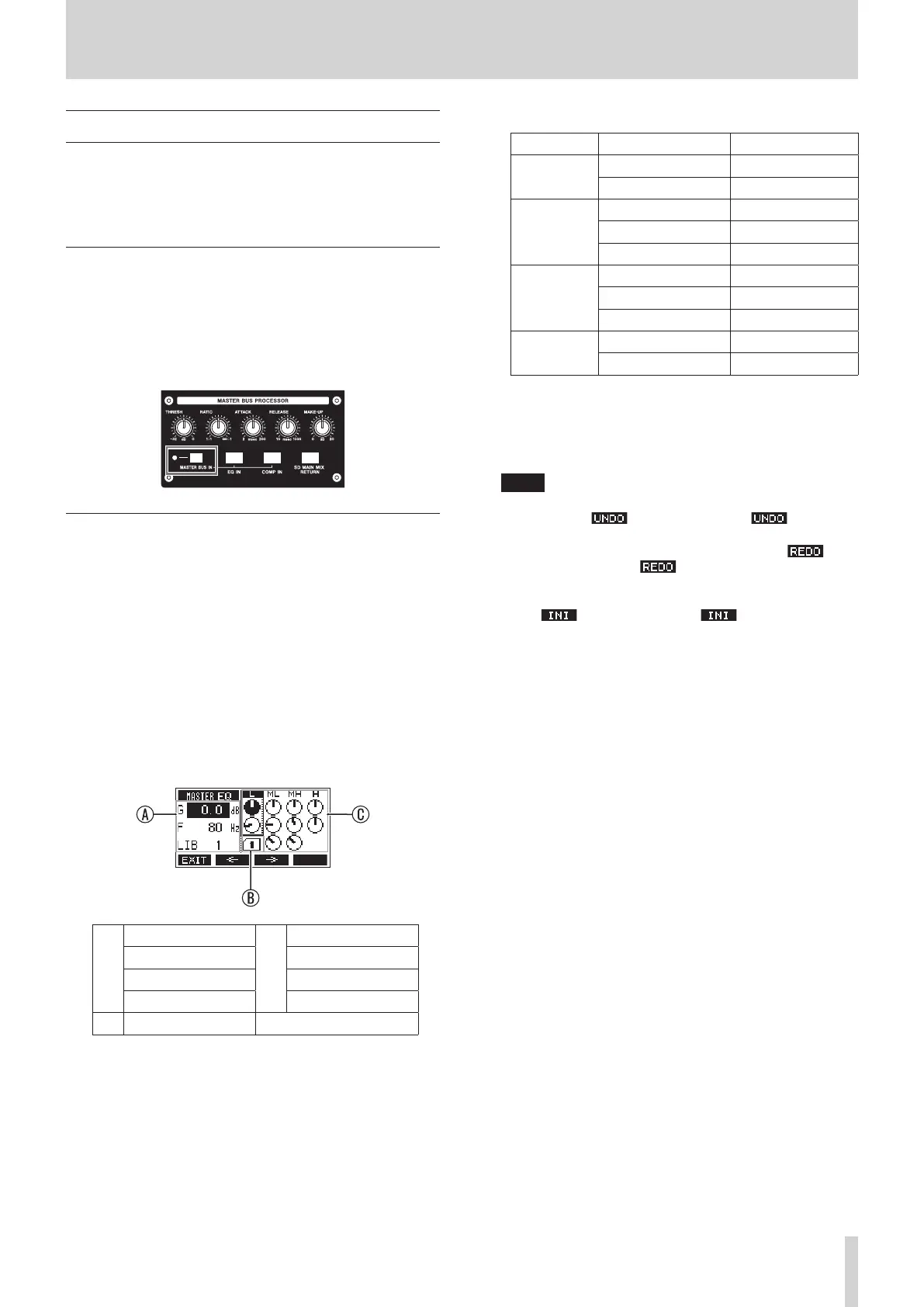
When the MASTER BUS IN switch is on, signals will be output
from the MAIN OUTPUT jacks after passing through the MASTER
BUS PROCESSOR. The indicator lights when this switch is on.
Setting the MASTER BUS PROCESSOR
equalizer (master section equalizer)
The LOW and HIGH EQ bands are shelving while the MID-LOW
and MID-HIGH bands are parametric.
Turning on/o the master section equalizer
Briey press the EQ IN button to switch on/o the master
section equalizer. The EQ IN button will light when the equalizer
is on.
Adjusting the master section equalizer
1. When the Home Screen is open, press and hold the EQ IN
button to open the MASTER EQ Screen where the MASTER
BUS PROCESSOR equalizer can be adjusted.
A
G: Gain
C
L: LOW
F: Central frequency ML: MID LOW
Q: Band width MH: MID HIGH
LIB: Library number H: HIGH
B
Library number
The setting values of the band framed by the rectangle are
shown in the left area.
2. Turn the MULTI JOG dial to change the selected parameter.
Band Parameter Range
HIGH
Gain −12 dB – +12 dB
Cuto frequency 1.7 kHz – 18 kHz
MID HIGH
Gain −12 dB – +12 dB
Central frequency 32 Hz – 18 kHz
Band width 0.10 – 17.31
MID LOW
Gain −12 dB – +12 dB
Central frequency 32 Hz – 18 kHz
Band width 0.10 – 17.31
LOW
Gain −12 dB – +12 dB
Cuto frequency 32 Hz – 1.6 kHz
3. Press the MULTI JOG dial to move the selection down.
i Use the F2 and F3 buttons to move the selection left
and right.
4. Repeat step 2 and 3 as necessary to adjust the equalizer.
NOTE
i When the MULTI JOG dial is turned, the F4 button will
become the button. Press the F4 button to
return to the state before turning the MULTI JOG dial.
i After undoing, the F4 button will become the
button. Press the F4 button to return to the state
before undoing.
i While the SHIFT button is pressed, the F4 button becomes
the button. Press the F4 button to set a
parameter value to its default.
TASCAM Model 2400 49



 To Next Page