9 - Other functions
Setting the MASTER BUS PROCESSOR
compressor (master section compressor)
Turning on/o the master section compressor
Briey press the COMP IN button to switch on/o the master
section compressor. The COMP IN button will light when the
compressor is on.
Adjusting the master section compressor
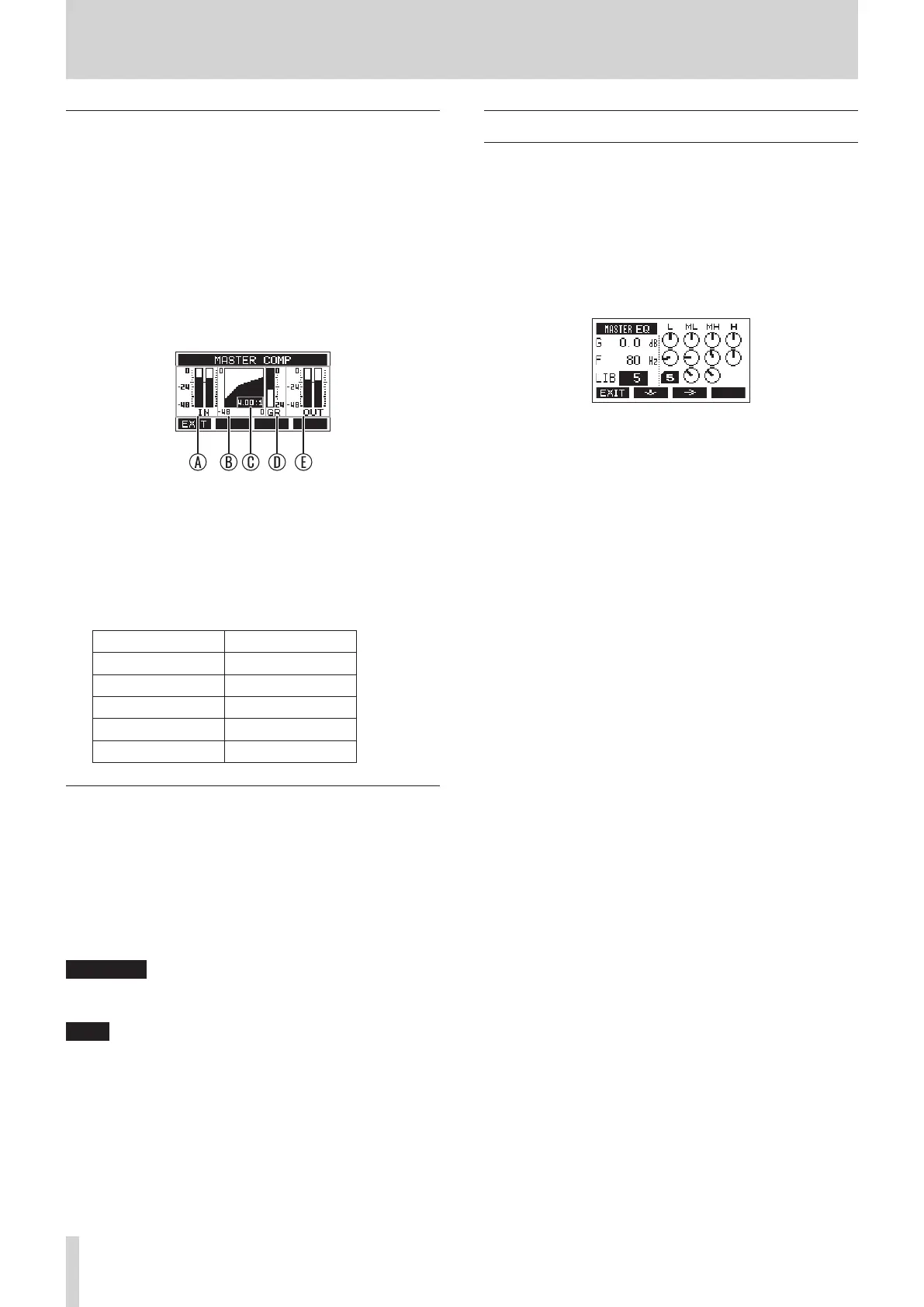
1. When the Home Screen is open, press and hold the COMP
IN button to open the MASTER COMP Screen where the
MASTER BUS PROCESSOR compressor can be adjusted.
A: Signal levels input to compressor
B: Compressor setting graph
C: Ratio setting value
D: Gain reduction level
E: Signal level after compressor
2. Use the THRESH (threshold level), RATIO, ATTACK (attack
time), RELEASE (release time) and MAKE-UP (make-up gain)
knobs to adjust the compressor.
Parameter Range
Threshold −32 – 0 dB
Ratio 1:1 – ∞:1
Attack 2 – 200 ms
Release 10 – 1000 ms
Make-up gain 0 – 20 dB
Using the SD MAIN MIX RETURN function
Using the SD MAIN MIX RETURN function, playback of stereo
master les recorded on the SD card can be output from the
MAIN OUTPUT jacks.
o Press the SD MAIN MIX RETURN button to turn on the SD
MAIN MIX RETURN function. This will input the playback of
the stereo master le recorded on the SD card to the MASTER
BUS PROCESSOR. The SD MAIN MIX RETURN button will light
when the SD MAIN MIX RETURN function is on.
ATTENTION
Be aware that when this switch is on (pushed in), the sound of
the MAIN MIX L/R bus is not output.
NOTE
The SD MAIN MIX RETURN function cannot be used when in SD
PLAY mode.
Using the library
This master section equalizer has a library function that allows
up to 10 setting presets to be saved.
Saving equalizer settings in the library
1. Open the MASTER EQ Screen.
2. Move the selection to the LIB item.
3. Turn the MULTI JOG dial to select the library number you
want to use for saving.
4. Follow the procedures in “Setting the MASTER BUS
PROCESSOR equalizer” to set the equalizer.
This saves the equalizer settings in the library.
Using equalizer settings saved in the library
1. Open the MASTER EQ Screen.
2. Move the selection to the LIB item.
3. Turn the MULTI JOG dial to select the library number with
the saved equalizer settings you want to use.
These settings will be applied to the master bus equalizer.
50 TASCAM Model 2400


 To Next Page