7 - Track editing
Normalization function
By using the normalization function, the maximum levels of
tracks recorded by the MTR can be readjusted within a range of
0 to −20 dB.
Adjusting level dierences between tracks makes mixing down
easier. Imported tracks and MAIN MIX L/R bus recording les can
also be normalized.
Using the normalization function
1. When the recorder is stopped, select MTR on the MENU
Screen, and open the MTR Screen. (see "Menu operation
procedures" on page 18.)
2. Select TRACK EDIT on the MTR Screen, and open the TRACK
EDIT Screen.
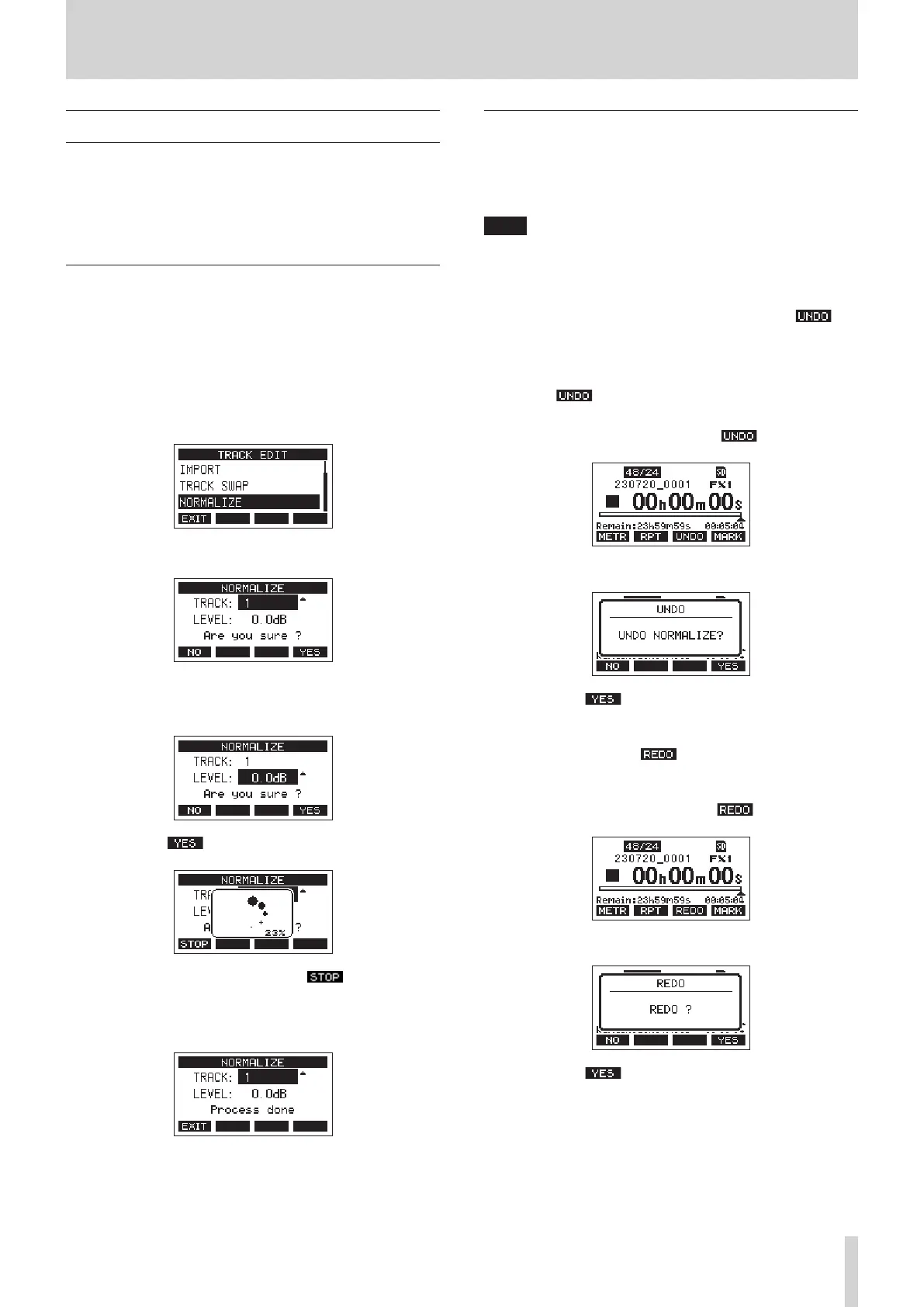
3. On the TRACK EDIT Screen, select NORMALIZE and open the
NORMALIZE Screen.
4. Turn the MULTI JOG dial to select a track to normalize.
5. Turn the MULTI JOG dial to select the normalization level.
Options: 0 – −20 dB (default: 0 dB)
6. Press the F4 button to normalize the specied track.
i During conversion, press the F1 button to
cancel processing. Normalization will not be conducted
if canceled.
A “Process done” message will appear after it completes.
7. Turning the MULTI JOG dial to change the track or level will
restore the screen to its state in step 4.
To continue normalizing other tracks, repeat the procedures
from step 4.
Reversing normalization
Tracks that have been normalized can be restored to their
previous state by using the undo function. Moreover, after
undoing to reverse normalization, the redo function can be used
to restore it.
NOTE
If a song is loaded or the unit is turned o, information
necessary for undoing and redoing will be lost, so undoing and
redoing previous operations will no longer be possible.
o After normalizing, if the F3 function button shows on
the Home Screen, the previous normalization operation can
be reversed.
If normalization was canceled or the maximum volume of the
track before normalization was the same as the normalized
level, the button will not be shown.
1. To undo the operation, press the F3 button.
The following conrmation pop-up message will appear.
2. Press the F4 button to restore the track to the
volume it had before normalization.
o After undoing, if the F3 function button shows on the
Home Screen, the previous undo operation can be reversed.
1. To redo the operation, press the F3 button.
The following conrmation pop-up message will appear.
2. Press the F4 button to restore the result of
normalization that was undone, reverting to the normalized
track volume.
TASCAM Model 2400 39


 To Next Page