2 - Names and Functions of Parts
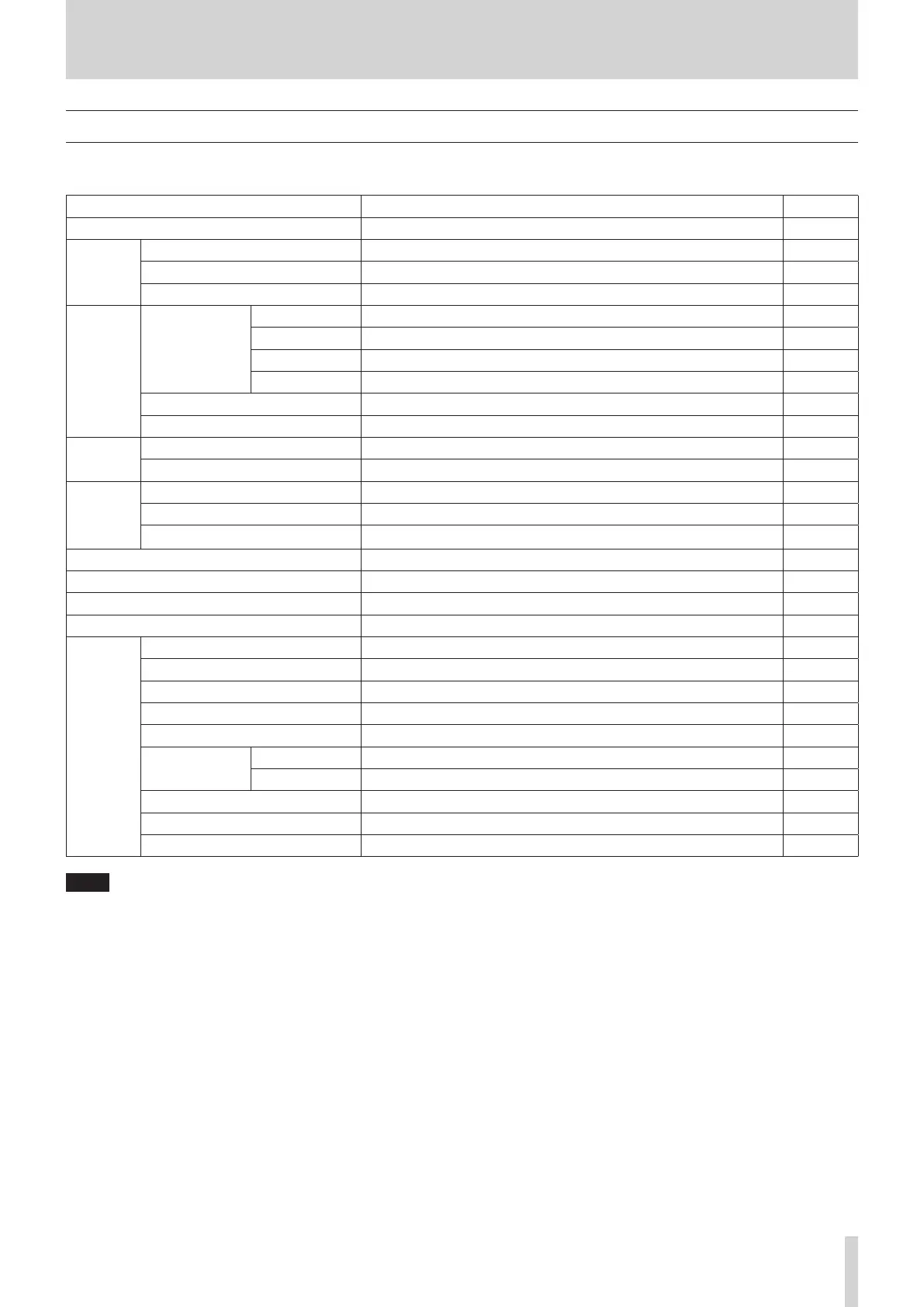
Menu structure
When the Home Screen is open, press the MENU button to open the MENU Screen.
The various menu items are as follows.
Menu item Function Page
SONG SONG Work with songs on an SD card page 24
CLICK
SETTING Set click sound operation and output destination page 42
METRONOME Make specic metronome settings page 43
COUNT IN Set the count in function page 44
MTR
TRACK EDIT
TRACK CLEAR Clear specic tracks or all tracks page 37
IMPORT Import chosen WAV les to song tracks page 37
TRACK SWAP Swap song recording les page 38
NORMALIZE Use the normalize function page 39
AUTO PUNCH Set the auto punch in/out function page 35
A.PUNCH PRE ROLL Set the pre-roll point page 35
MIDI
MIDI TIMECODE Set the MIDI time code page 45
MIDI CLOCK/SPP Set MIDI clock and song position pointer page 45
MIXER
MASTER EQ Set the MASTER EQ page 49
MASTER COMP Check the MASTER COMP level and other settings page 50
MAIN REC POS Set the MAIN MIX L/R bus signal that is recorded to the SD card page 46
STEREO MIX EXPORT Use stereo mix export function page 40
SD PLAY Play WAV les on an SD card page 53
STORAGE SD cards can be accessed from a computer page 54
DAW CONTROLLER Set the DAW control mode page 48
SYSTEM
INFORMATION View information about SD cards, songs and the system page 51
DATE/TIME Date and time settings page 22
SONG NAME Set the song name format page 51
DISPLAY Adjust the display page 23
FOOTSW Make footswitch settings page 47
USB AUDIO
PC s
Set the USB audio mode page 61
PC CH1/2 w
Set the USB return channel function page 62
USB OUTPUT DELAY Set the OUTPUT DELAY function page 64
INITIALIZE Restore factory default settings page 52
MEDIA FORMAT Format the SD card page 52
NOTE
The settings for all menu items are retained even when the unit is turned o.
TASCAM Model 2400 17


 To Next Page