1 - Introduction
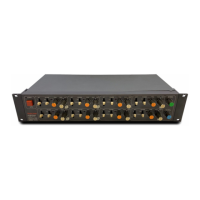
Thank you very much for purchasing the TASCAM Model 2400
Multitrack Recording Console.
Before using this unit, read this Owner’s Manual carefully so that
you will be able to use it correctly and enjoy working with it for
many years. After you have nished reading this manual, please
keep it in a safe place for future reference.
You can also download this Owner’s Manual from the TEAC
Global Site (https://teac-global.com/).
Features
o 22 input analog mixer with 22 line and 12 mic inputs
o Multitrack recording and playback with 24-track recording
(input channels 1–12 and 13/14–21/22 and MAIN MIX L/R
bus)
o USB audio interface functions built-in
i 24 inputs (22 input channels and MAIN MIX L/R bus) can
be input to a computer
i 22 outputs and computer outputs can be assigned to
channel inputs (channels 1–12 and 13/14–21/22)
i Supports USB 2.0 audio with resolutions up to 24-bit and
48 kHz sampling frequency
o Ultra-HDDA mic preamps built-in (for channels 1–12)
o Phantom power (+48V) can be turned on/o in groups of 4
channels
o Mono input channels 1–12 have inserts, analog compressors
and 3-band semi-parametric EQs
o Mono input channels 1–2 have TRS jacks that support high-
impedance (Hi-Z) input
o Stereo input channels 13/14–19/20 have 3-band EQs
o REC-OUT (POST-EQ) switches enable recording audio with EQ
o BYPASS switches can be used to bypass COMP/EQ on
channels
o Numerous buses include stereo main (MAIN MIX L/R) and
stereo sub (SUB 1–2, 3–4, 5–6 and 7–8) buses
o 5 AUX sends include AUX 1, AUX 2, AUX 3, AUX 4 (Pre/Post)
and AUX 5 (combined with FX)
o MASTER BUS PROCESSOR with 4-band digital equalizer and
compressor on MAIN output
o MAIN OUTPUT has bus insert jacks
o Input channels and the FX return have PFL, and the AUX
masters, SUB buses and MAIN have AFL
o TALKBACK jack connected to MAIN and AUX 1–4
o 100mm faders enable precise adjustments
o Track swap function that replaces tracks recorded on SD
cards
o Punching in and out function per track (including punching
in and out automatically and with footswitches)
o DAW transport control and track recording control functions
with HUI/MCU emulation supported by major DAWs
o MIDI interface function enables MIDI keyboard input when
using a DAW, output to connected MIDI sound sources, and
output to drum machines and sequencers with MTC/MIDI
CLOCK output
o 16 TASCAM preset eects support precise parameter
adjustments
o CLICK output that supports TAP TEMPO
o Multiple footswitch functions available (select play/pause,
eect muting or punch in/out)
o Audio playback and recording from devices connected by
Bluetooth® supported
o Audio delay for USB output can be adjusted (0–2000 ms)
o 2 headphone output jacks
o Free Settings Panel app (Windows/Mac) includes a metering
screen that can be adjusted for size
Conventions used in this manual
In this manual, we use the following conventions:
o The four buttons under the display are called the function
buttons. From left to right, they are shown as buttons F1, F2,
F3 and F4. Moreover, the functions at the bottoms of the
screens will be shown after the button names.
Examples: F1 button, F4 button
o SD/SDHC/SDXC memory cards are referred to as “SD cards”.
o Computers, portable audio devices and other equipment
connected to this unit using Bluetooth are called “Bluetooth
devices”.
o Groups of recorded data are referred to as “songs”.
o The song that is currently selected is called the “current song”.
o Information shown on a computer display is written like this:
“ O K ”.
o References to “iOS” in this document also include “iPad OS”.
o Additional information is introduced in the styles below
when needed:
TIP
These are tips about how to use the unit.
NOTE
These provide additional explanations and describe special
cases.
ATTENTION
Failure to follow these instructions could result in damage to
equipment or lost data, for example.
V
CAUTION
Failure to follow these instructions could result in injury.
4 TASCAM Model 2400



 To Next Page