9 - Other functions
Footswitch functions
Setting up the footswitch
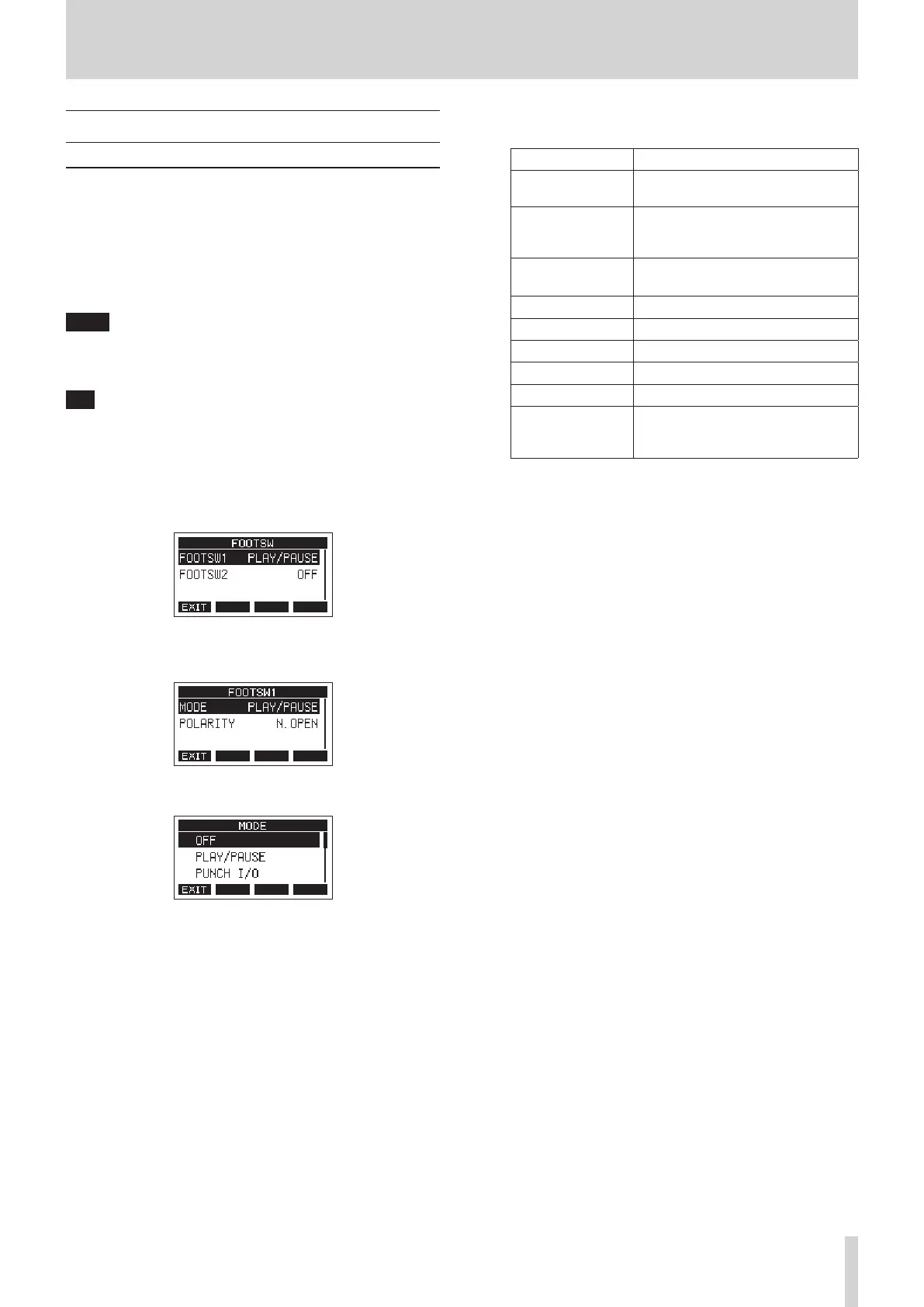
Use the FOOTSW Screen to set the footswitch.
Two footswitches can be connected by using a commercially-
available Y-cable.* The function and polarity can be set
separately for each footswitch.
* Y-cable with 1 standard TRS plug (male) and 2 standard TS
jacks (female) (tip/ring split)
NOTE
When connecting a footswitch directly without using a Y-cable,
the FOOTSW1 settings will be used. In this case, set FOOTSW2 to
OFF.
TIP
Dual-type unlatched footswitches with standard TRS plugs can
also be used.
1. When the recorder is stopped, select FOOTSW on the
SYSTEM Screen, and open the FOOTSW Screen. (see "Menu
operation procedures" on page 18.)
2. Select FOOTSW1 or FOOTSW2 from the list, and open the
corresponding footswitch settings screen.
3. Select the MODE item, and open the MODE Screen.
4. Turn the MULTI JOG dial to select the function to assign to
the footswitch.
Option Meaning
OFF
No function is assigned to the
footswitch.
PLAY/PAUSE
(default)
Press to start playback when
stopped or paused. Press to pause
when playing.
PUNCH I/O
Press during playback to punch in.
Press when recording to punch out.
FX MUTE Mute the built-in eect signal.
REC/STOP Start/stop recording.
MARKER Add a mark to the song.
MARK SKIP Move to the next mark.
LOAD NEXT SONG Load the next song.
TAP
Use in the same way as the CLICK
button on the EFFECT and TEMPO
screens.
5. Press the MULTI JOG dial to conrm the assigned function.
The FOOTSW screen reopens.
TASCAM Model 2400 47



 To Next Page