2 - Names and Functions of Parts
Meters Screen
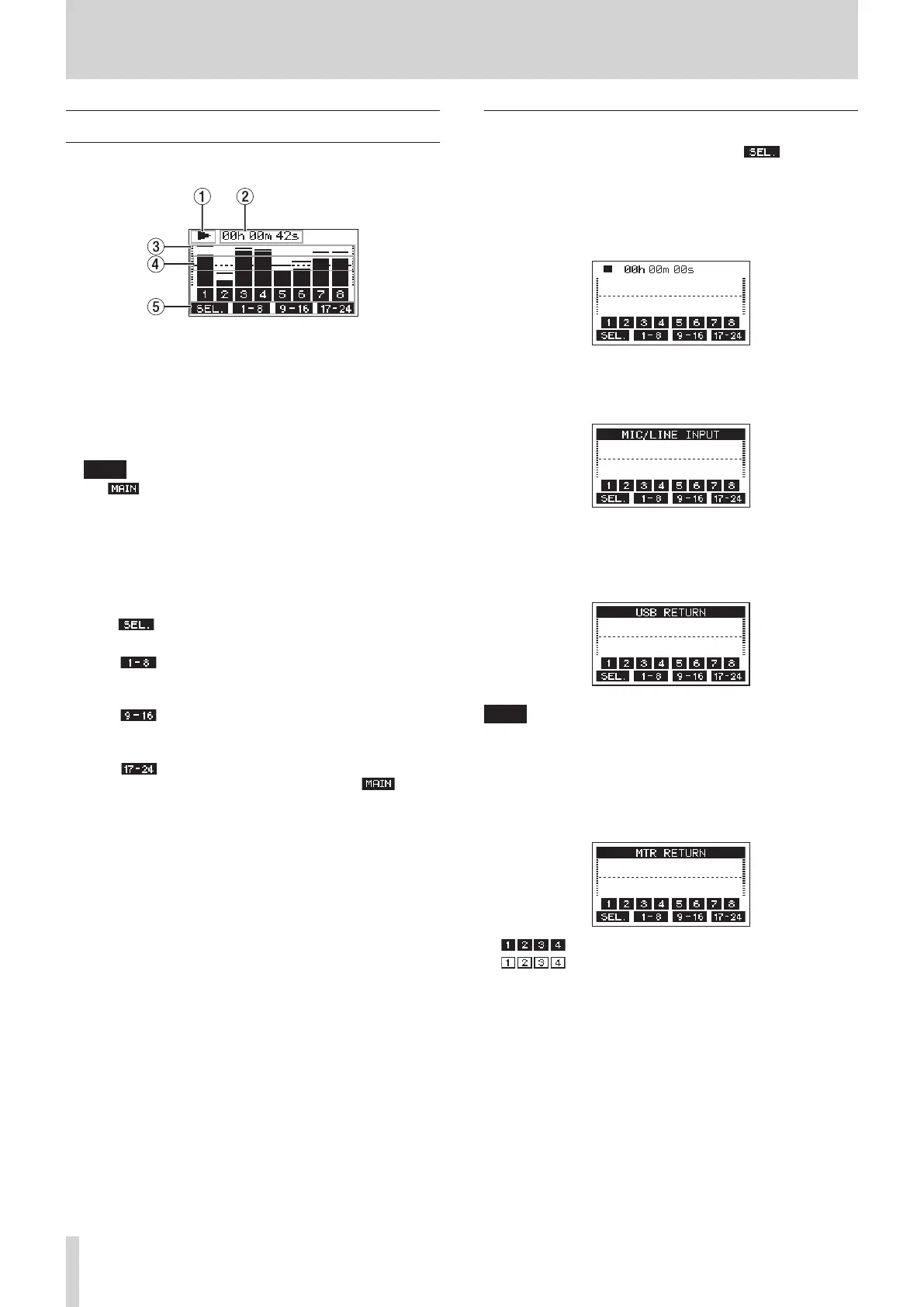
This shows the levels of the signals being input to the unit.
1 Transport status
This icon shows the recorder operation status.
2 Recorder time counter
This shows the elapsed time from the beginning of the song.
3 Track level meters
These show the signal levels of each channel.
NOTE
The channels show the MAIN MIX L/R bus levels.
4 Level meter guide
This provides guidance for level adjustment. The guide is
shown at the −18dB level.
5 Function button functions
This shows the functions assigned to the function button on
the Meter Screen.
o F1 button: Press to change the input sources shown
on the Meter Screen.
o F2 button: Press to show the level meters for
channel 1–8 signals on the Meter
Screen.
o F3 button: Press to show the level meters for
channel 9–16 signals on the Meter
Screen.
o F4 button: Press to show the level meters for
channel 17–22 signals and
channel signals on the Meter Screen.
Meter Screen details
When the Meter Screen is open, press the F1 button to
change the signal sources shown by the meters.
Channel input level screens
The levels of signals input on each channel are shown
depending on their INPUT SEL switch settings.
MIC/LINE INPUT Screen
This shows the levels of signals being input to the input jacks.
USB RETURN Screen
This shows the levels of signals output from a computer when
used as a USB audio interface.
NOTE
Output from the computer, including from Windows Media
Player and iTunes, is sent to channels 1–2.
MTR RETURN Screen
This shows the playback signal levels of songs recorded on SD
cards.
Channels that have recording data in the song
Channels that do not have recording data in the
song
16 TASCAM Model 2400


 To Next Page