9 - Other functions
Setting the footswitch polarity
The setting of this unit can be changed according to the polarity
of the footswitch being used.
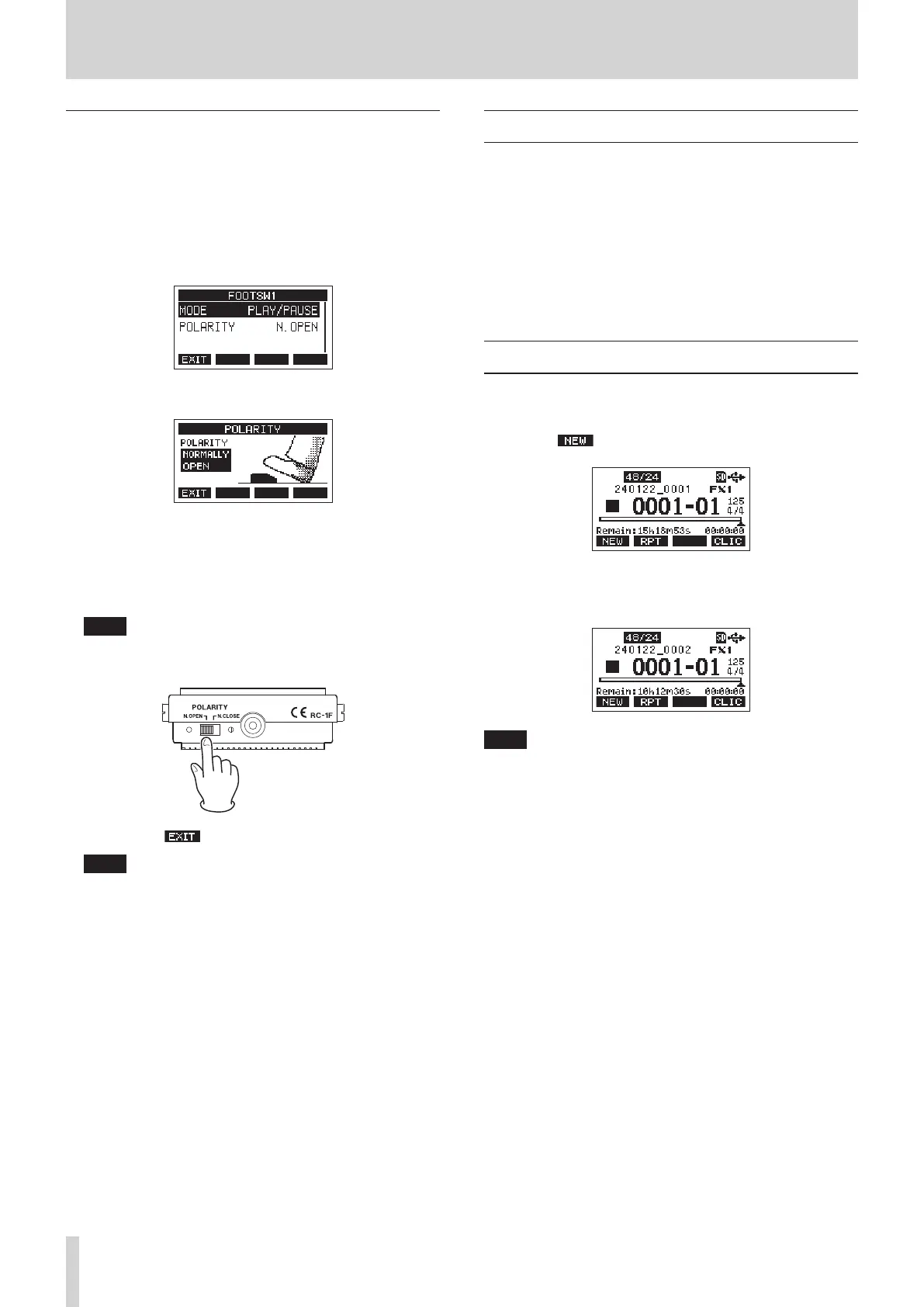
1. When the recorder is stopped, select FOOTSW on the
SYSTEM Screen, and open the FOOTSW Screen. (see "Menu
operation procedures" on page 18.)
2. Select FOOTSW1 or FOOTSW2 from the list, and open the
corresponding footswitch settings screen.
3. Select the POLARITY item, and open the POLARITY Screen.
4. Turn the MULTI JOG dial to set the footswitch polarity.
Select “NORMALLY OPEN” or “NORMALLY CLOSED” so that
the actual footswitch movement matches that shown by
the illustration on the screen.
Options: NORMALLY OPEN (default), NORMALLY CLOSED
NOTE
When using a TASCAM RC-1F, set the POLARITY switch to
“N.OPEN”.
5. Press the F1 button to return to the FOOTSW Screen.
NOTE
Dual-type footswitches can also be connected.
Refer to the operation manual of the footswitch for how to
connect and set it.
DAW CONTROL
This unit has DAW control functions. By setting it to DAW control
mode, the controls of this unit can be used for basic operation of
the DAW application. This includes recording, playing, stopping
and other transport functions.
Mackie Control and HUI protocol emulation are supported, so
Cubase, Digital Performer, Logic, Live, Pro Tools, Cakewalk and
other major DAW applications can be controlled.
For details about DAW control mode, download the DAW
Control Mode Manual from the page for this product on the
TEAC Global Site (https://teac-global.com/).
Quick song creation function
The quick song creation function can be used to easily create
new songs without working with the SONG Screen in the menu.
When the recorder is stopped and the Home Screen is open,
press the F1 button while pressing the SHIFT button.
This will create and load a new song that uses the same
sampling frequency, bit length and metronome settings of the
currently loaded song.
NOTE
If a song is created using the quick song creation function when
no song is loaded, the song will be created using the sampling
frequency, bit length and metronome settings currently used by
the unit.
48 TASCAM Model 2400


 To Next Page