Version: 1.06 102
Previous to create Remote Tags you have to create the equipment you are going to
communicate with.
14.2. Creating a Remote Device
From the Project Workspace,
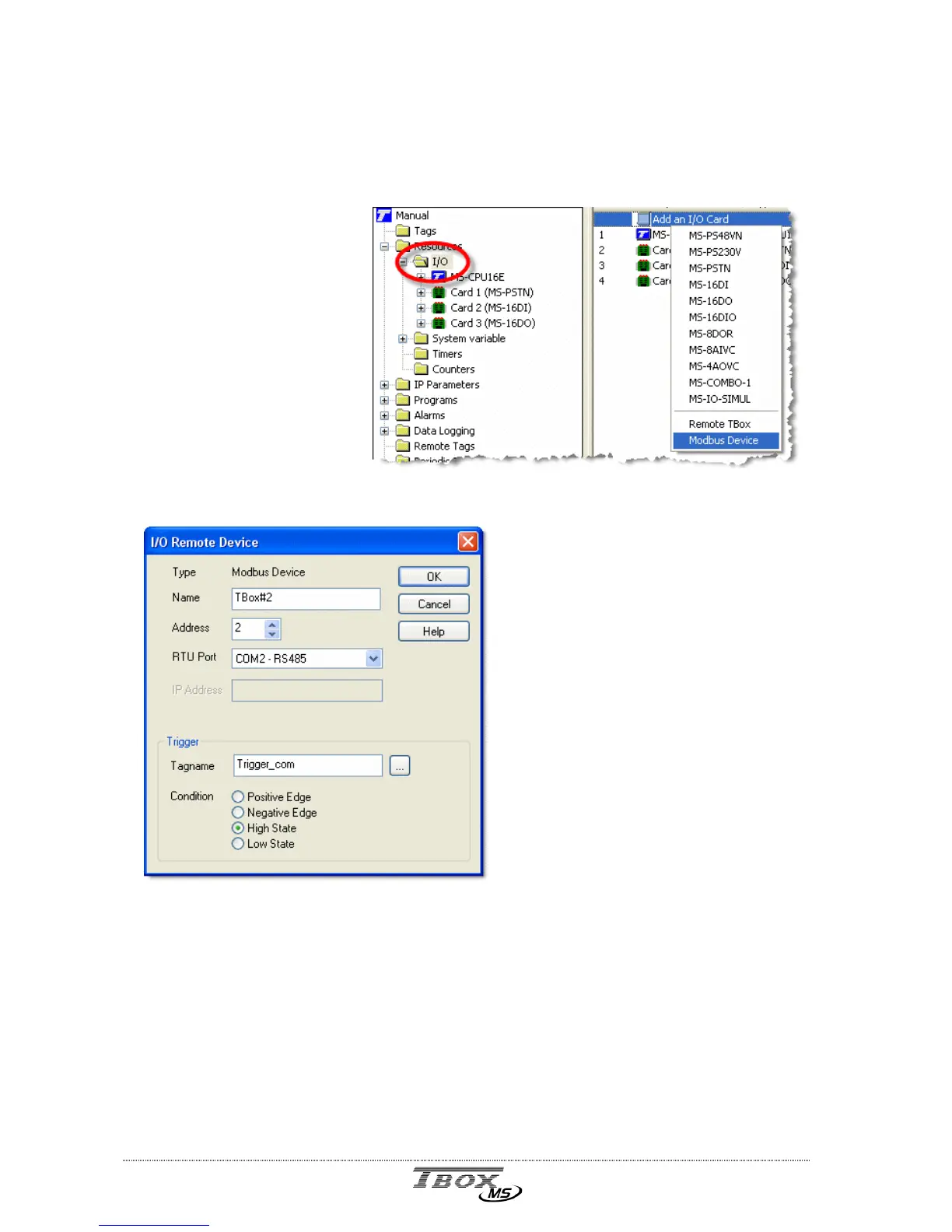
select ‘Resources’ ‘I/O’.
Click ‘I/O’ and in the list of
I/O, click ‘Add an I/O card’.
Remote TBox: a
A
(CPU-3)
ModBus device: a TB
OX
MS,
TBox-LT or any ModBus device
Example with a remote
TB
OX
MS.
Name: You type any name. It will be
available in a list of available
equipment when creating ‘Remote
Tags’ (see next).
Address: It is the ModBus address of the
Remote equipment. It must be
different of the TB
OX
MS and
of possible other equipment
on the same network.
RTU Port: The communication port used
by TB
OX
MS to communicate
with the remote equipment.
Trigger: Select a digital Tag that will trigger the communication, according to a
‘Condition’ (see next). Working with several equipment, you can declare
different Tags and then monitor differently the communication to each
equipment.
The Trigger must be a digital variable (DIV).
Condition: Condition of Tag ‘Trigger’ to start communication. Typically, you will work with
a permanent connection (Trigger in High or Low state). Or you can decide
to execute one-shot communication, on edge changing of the Tag Trigger.
The changing of state of the Tag can be controlled by BASIC, Ladder, or
Periodic events.



 To Next Page