Version: 1.06 112
The utility program
Password
generates access codes.
17.2. Password utility
When installing
TWinSoft Suite
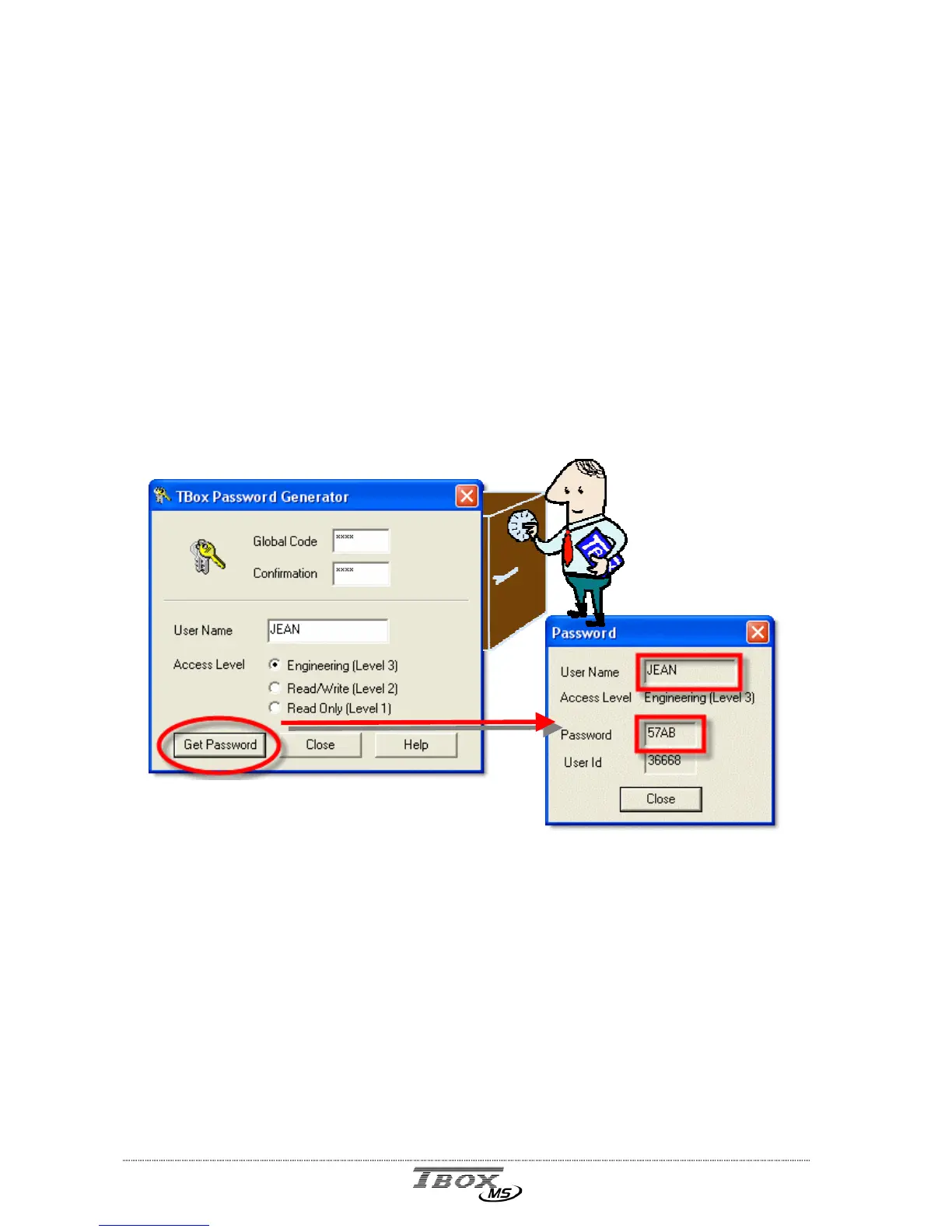
a password-creation program named PASSWORD is
installed in the same directory as TWinSoft. It can be started from the 'Start' button of
Windows and is located in the group of programs “Techno Trade” “Accessories” created
while installing TWinSoft.
This program generates a password that will be necessary to Login to the TB
OX
MS (see
next).
This password is composed of 4 hexadecimal characters in response to information’s related
to the user. It is based on a complex algorithm using the global code, the user’s name
and the access level. A 5-digit number that identifies persons who have accessed the
TB
OX
MS accompanies the password. This information can be used to trace users for
example by inserting this number into a database, with the help of Analog Communication
Variables (see chapter 8.3).
Global code This hexadecimal code of 4 characters is the basis for password generation.
It is typed in the ‘RTU Properties’ (see above) of TWinSoft and sent to the
TB
OX
MS. When a user logs in, TB
OX
MS checks whether NAME and
PASSWORD fit with the global code. This means that if different users with
different access levels must communicate with TB
OX
MS, the global code
used to generate passwords must be the same.
User name The NAME you use as login.



 To Next Page