Version: 1.06 103
14.3. Creating Remote Tag
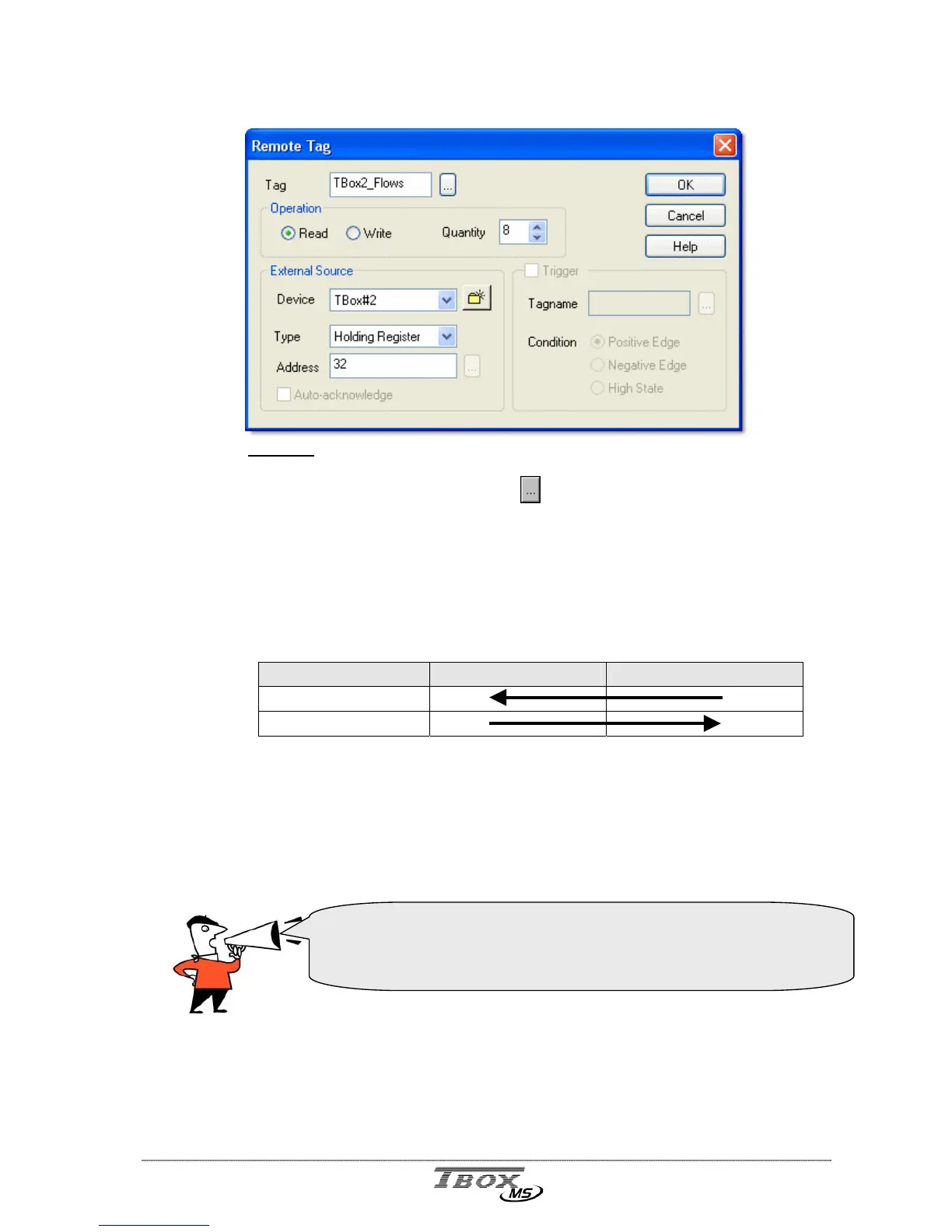
Example: reading of 8 ‘floating’ variables in TBox#2 at address 32
Tag: Select an existing Tag by clicking the
button. Be sure you select a Tag of the
same type of the address you want to access in the ‘Slave’ (Byte, Word or Float).
If the Tag does not exist, you can create it after having clicked the button. It is
the Tag of the Master; it contains the value you want to write in a Slave or it is
a register that contains the value that Master reads in a Slave.
In case of block communication (with a quantity > 1), this Tag is the one of first
ModBus address.
Operation :
Operations MASTER (Tag) SLAVE (Address)
READ
WRITE
Read : the Master executes a reading in the Slave.
Write : the Master executes writing in the Slave.
Quantity : Quantity of variables of successive addresses that are read (or written) in the
Slave. It depends on the External source, the types of variable and the ModBus
function used (see tables below).
ModBus protocol handles only words (16 bits). When working with 32
bits, TWinSoft adapts the quantity to double the number of words.
32 bits are handled with:
<Hi word1><Lo word1><Hi word2><Lo word2>…



 To Next Page