Version: 1.06 95
yyyyy: represents the ModBus address of the variable. It can be checked from the list
of Tags (see chapter 10.3.
ModBus address
)
Examples of message Messages sent
ANA0=~B64~too high ANA0=234 too high
Register AIR0=~W20480~ Register AIR0=24563
Motor is ~o32~ Motor is OFF
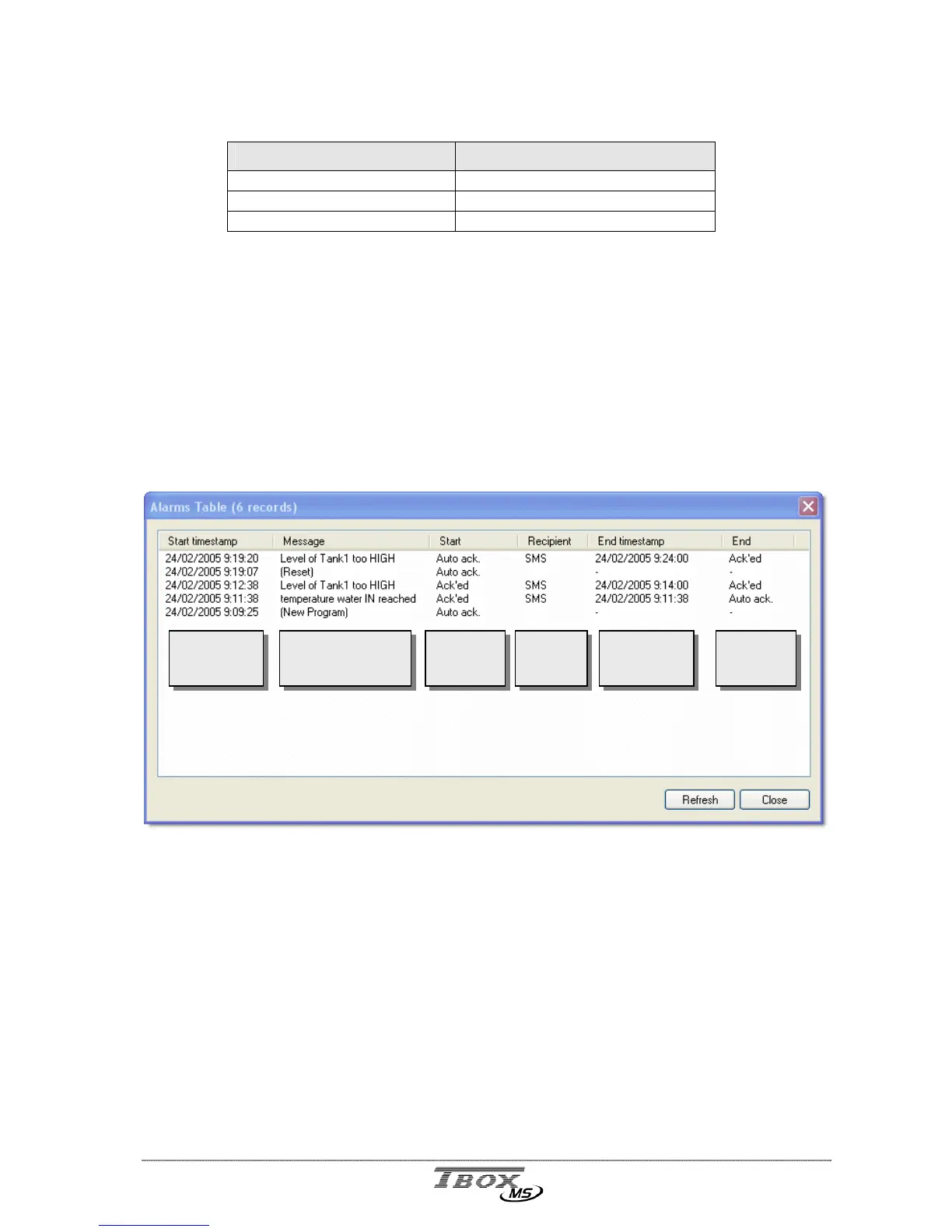
12.7. Alarms table
The Alarms table displays the Events stack of TB
OX
MS.
The Events stack is the visible part of the handling of alarms in TB
OX
MS.
The internal alarms queue is not accessible.
You access the Alarms table from the main menu: Communication Download Alarms
The Alarms table does not only display alarms generated in TB
OX
MS, but also system
events like start-up of the program, Reset of the TB
OX
MS, …
Date/Time of the
start of the
condition
Message
Acknowledg.
Status of the
Start
Recipient
Date/Time of the
end of the
condition
Acknowledg.
Status of the
End



 To Next Page