Version: 1.06 55
9.2.1. Adding an I/O card
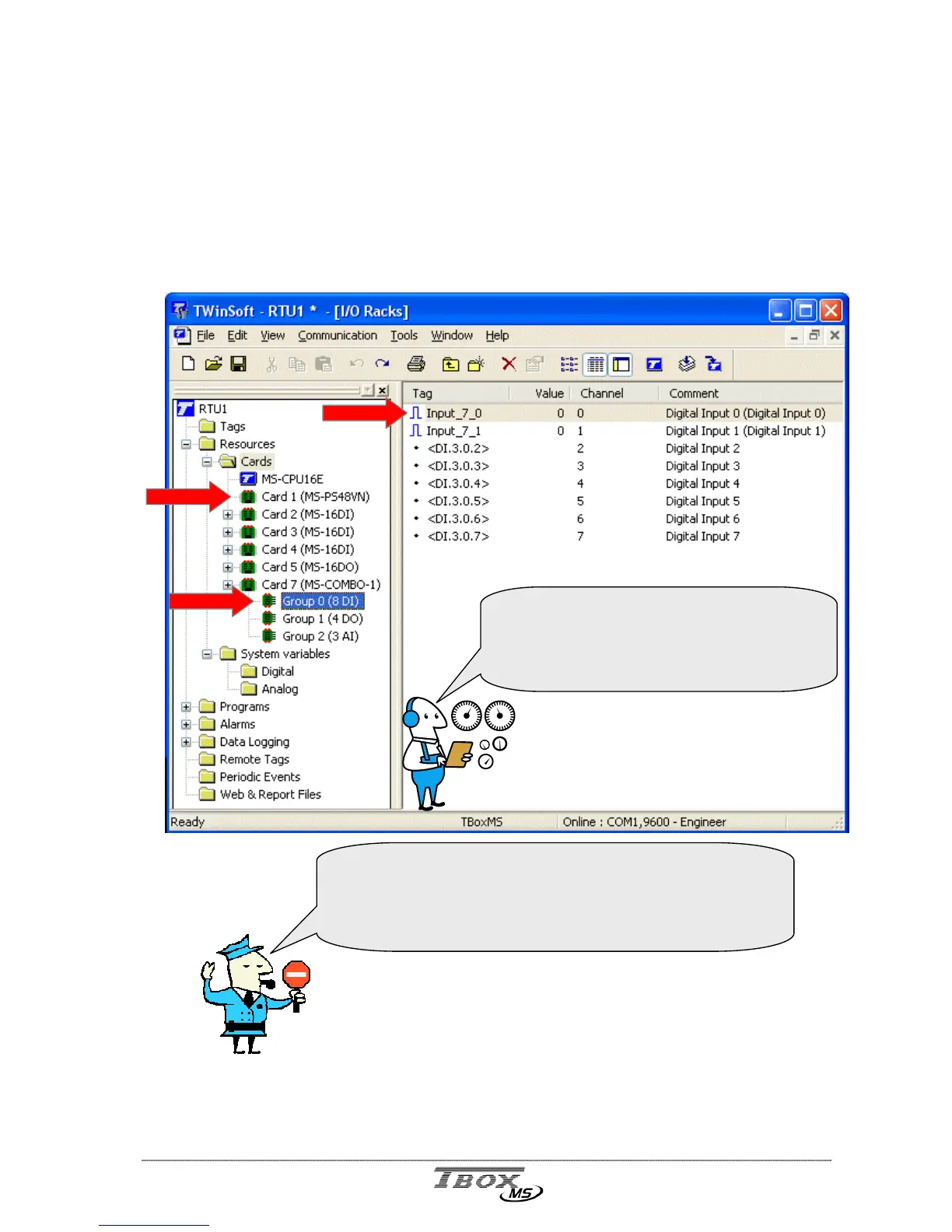
The Hardware is represented in TWinSoft with a hierarchy of 3 levels:
CARD : CPU card, 16 DI card, COMBO card, Modem card, …
GROUP : when there are several types of I/O on a Card, they are separated into
Groups: group of DI, group of DO, group of AI, …
CHANNEL : each physical connection, within a Group, corresponds to a channel.
See technical specifications of all I/O cards at the end of the manual.
GROUP
CARD
CHANNEL
When connected to a TB
OX
MS, the column
‘Value’ displays the current value, when the
channel has been declared as a Tag.
(see chapter 10 : ‘Tags’)
When adding a Card, its Id number must correspond to its
position on the Rack.
Check the slot index written in the Rack.
See exam



 To Next Page