Configuration of sensor using service adapter / User interface and initial setup
DUT-E fuel level sensors. Operation manual. Version 8.1
© Technoton, 2020 64
3.8 User interface and initial setup
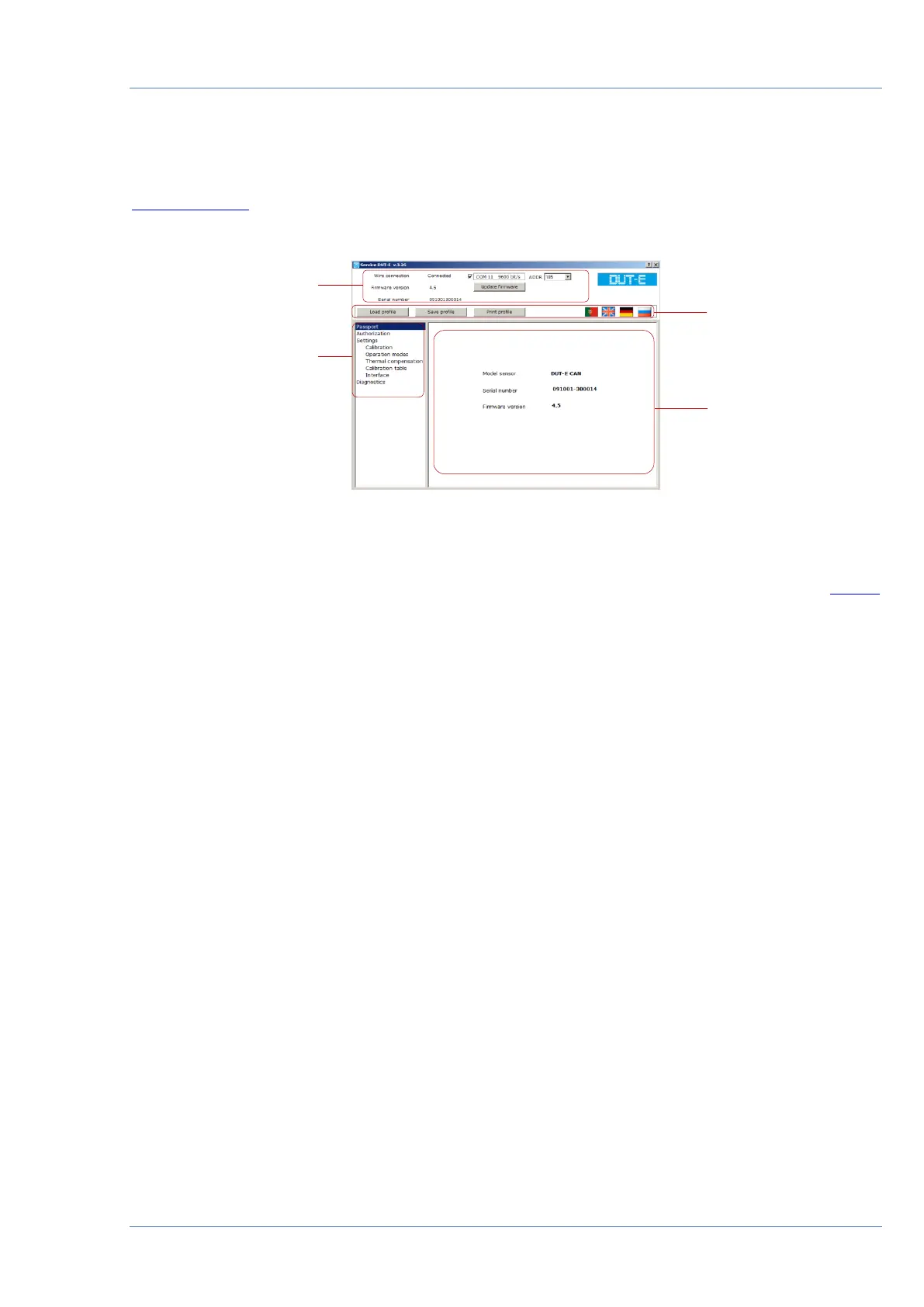
Service DUT-E user interface consists of Horizontal menu, Vertical menu, Connection
status area and Information and configuration area (see figure 40)
Figure 40 — Service DUT-E user interface
The top left area is Connection status area which displays current connection status of the
sensor (Connected/Disconnected), firmware version and serial number of the connected DUT-E
sensor, network address selection drop-down list (ADDR) and firmware update button.
Note — network address selection drop-down list (ADDR) is not displayed when
DUT-E 232/485 connected.
Horizontal menu located under Connection status area provides following options:
• profile options (loading profile, saving profile, printing profile);
• selection of interface language.
Vertical menu is located at the left side of the window and used for selection of sensor profile
entries which are displayed in Information and configuration area at the right side of the
window. Vertical menu also contains Diagnostics and Fuel tank calibration entries.
The only initial setting required is selection of user interface language.


 To Next Page