Configuration of sensor using service adapter
/ Firmware update
DUT-E fuel level sensors. Operation manual. Version 8.1
© Technoton, 2020 83
3.11 Firmware update
ATTENTION: DUT-E firmware update should be done only to apply changes
recommended by the Manufacturer.
DUT-E firmware update procedure is started on button click. The button is located
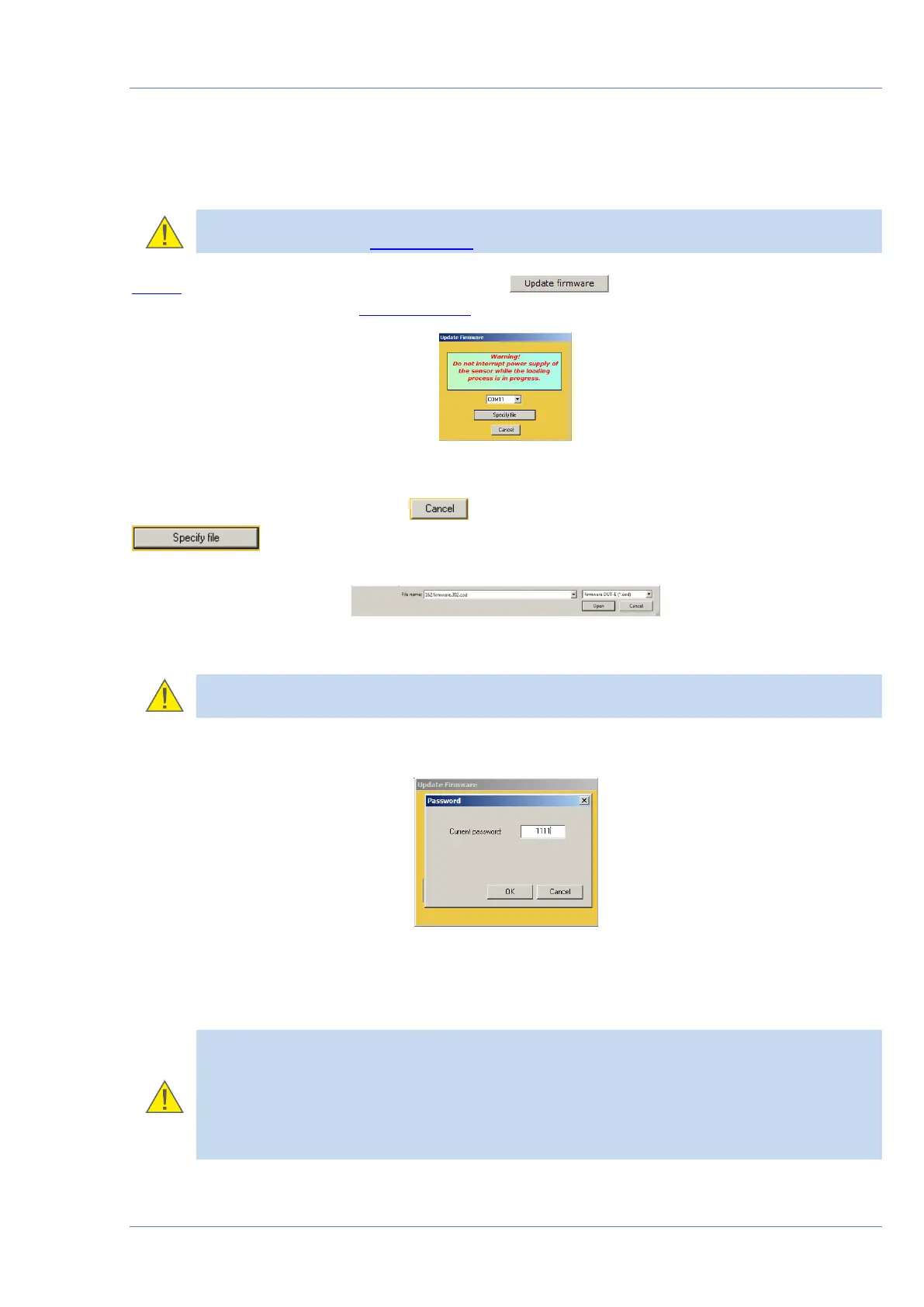
at Connection status area of Service DUT-E window (see figure 56).
Figure 56 — Firmware update window
To cancel firmware update click button. To continue with firmware update, click
and select firmware file (*.cod) from the PC hard drive (see figure 57).
Figure 57 — Opening firmware file
ATTENTION: Check the details of firmware file to make sure it matches DUT-E
modification!
Enter sensor password into the prompted dialogue window (see figure 58).
Figure 58 — Password request window
Firmware update process can last for several minutes (see figure 59).
ATTENTION:
Before the end of the update process it is forbidden to
1) Disconnect DUT-E from the adapter.
2) Disconnect adapter from the PC.
3) Power down the PC.
4) Run any resource-intensive applications on the PC.


 To Next Page