INTRODUCTION
7
98-05311-ENUS R2
DATA APPENDIX SETTINGSTOOLS CONSOLE
Radion 8140 Automatic Sprayer Control
OPERATION
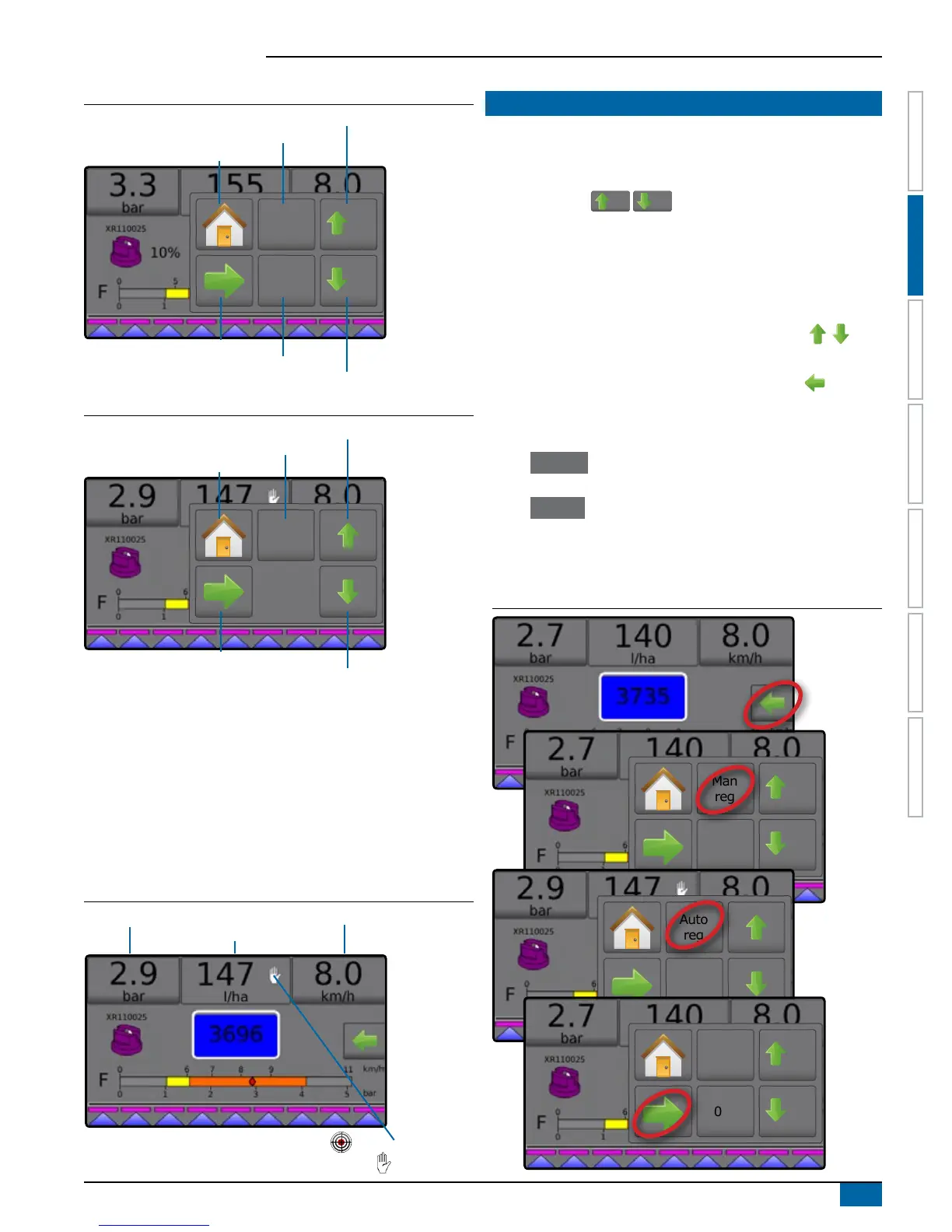
Figure 2-2: Options Tab – Automatic Mode
0%
Man
reg
5%
5%
Regulation Mode
Target Rate Reset
Boost/Step Percent Increase
Boost/Step Percent Decrease
Home
Close Menu
Figure 2-3: Options Tab – Manual Mode
Auto
reg
Regulation Mode
Valve Open
Valve Close
Home
Close Menu
Information Bar
The Information Bar displays:
►Application Rate – displays the actual Application Rate or
Target Application Rate and accesses the Preset Target
Application Rates options menu.
►Selectable Information – displays user-selected information
including Volume Applied, Flow Rate, Flow Pressure, Speed,
Total Area Applied and Job Number.
Figure 2-4: Information Bar
Selectable Information Selectable Information
Application Rate
Target Application Rate
Manual Mode
REGULATION MODES
Automatic Regulation mode will automatically adjust the Application
Rate based on the current speed in reference to the Target Rate. The
Target Rate can be adjusted using the Boost/Step percent increase/
decrease buttons
5%
/
5%
on the Operation menu. Preset
Application Rates dene up to three (3) Target Rates for product being
applied per hectare/acre. These can be toggled using the Application
Rate section on the Information bar on the Operation screen.
Manual regulation mode will retain an established regulation valve
setting regardless of speed. The regulation valve setting can be
adjusted using the Regulation valve open/close buttons on
the Operation menu.
1. From the Operation screen, press the OPTIONS tab to
display the Operation menu.
2. Select from:
► Auto reg to change from Manual Regulation Mode to
Automatic Regulation Mode:
► Man reg to change from Automatic Regulation Mode to
Manual Regulation Mode:
NOTE: The Regulation button displays the regulation mode that may
be selected not the active regulation mode.
Figure 2-5: Regulation Options: Automatic / Manual
0%
Man
reg
5%
5%
Auto
reg
0%
Man
reg
5%
5%


 To Next Page