34
INTRODUCTION
www.teejet.com
OPERATION DATA APPENDIXTOOLSCONSOLE
Radion 8140 Automatic Sprayer Control
SETTINGS
OEM
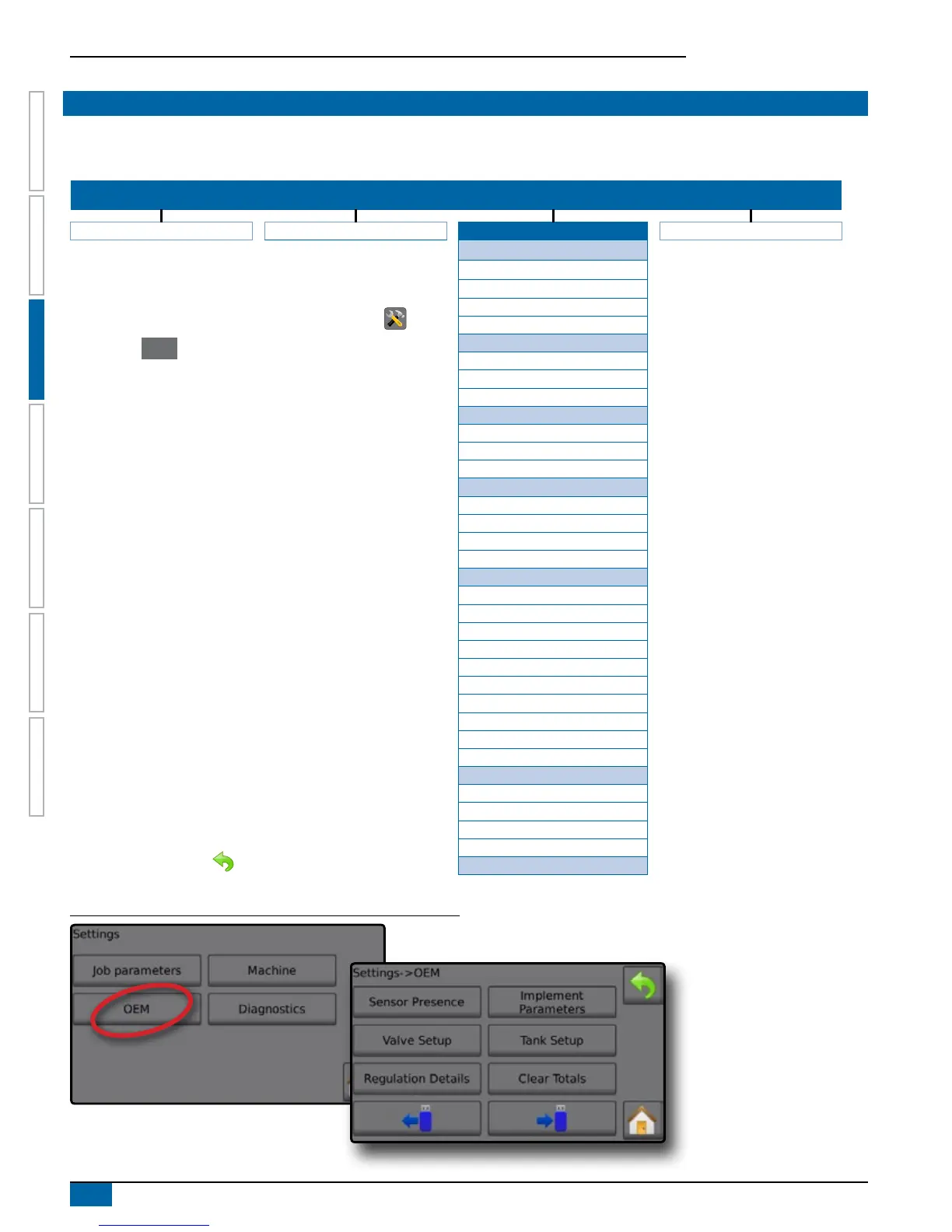
The OEM menu is password protected and the settings in this menu directly relate to the tted OEM equipment. Once the OEM menu is
unlocked, it will remain unlocked until the Radion 8140 is powered off. To access the OEM screens, follow the steps below.
SETTINGS MENU STRUCTURE
| | | |
Job Parameters Machine OEM Diagnostics
Sensor Presence
Flow Sensor
1. From the Home screen, press the SETTINGS button .
2. Press the
OEM button.
◄Enter the OEM menu password
3. Select from:
►Sensor Presence – establishes sensors for Flow, Liquid
Pressure, Fill ow and the Tank
►Implement Parameters – establishes the Number of
Sections, Circulation option on/off and Display Rate
Smoothing
►Valve Setup – establishes the Regulation Valve Type,
Section Valve Type and Section Valve Behavior
►Tank Setup – establishes the Maximum tank content,
Minimum Tank Content, Automatic Filling and Automatic
Filling Offset
►Regulation Details – adjusts the control of the regulation
valve including Minimum Regulation Pressure, Maximum
Regulation Pressure, Regulation Valve Time, Minimum
Regulation Voltage, Regulation Deadband, Regulation
Valve Capacity, Regulation Start Delay, Manual Regulation
Speed, Restrictor Plate Flow and Default Valve Position
►Clear Totals – deletes total count system counters for
Area, volume and Time back to default settings
►Import Data – imports/replaces congure/calibrate data
►Export Data – exports/overwrites existing USB le
4. Press RETURN arrow to return to the main Settings
screen.
Liquid Pressure Sensor
Fill Flow Sensor
Tank Sensor
Implement Parameters
Number of Sections
Circulation
Display Rate Smoothing
Valve Setup
Regulation Valve Type
Section Valve Type
Section Valve Behavior
Tank Setup
Maximum tank content
Minimum Tank Content
Automatic Filling
Automatic Filling Offset
Regulation Details
Minimum Regulation Pressure
Maximum Regulation Pressure
Regulation Valve Time
Minimum Regulation Voltage
Regulation Deadband
Regulation Valve Capacity
Regulation Start Delay
Manual Regulation Speed
Restrictor Plate Flow
Default Valve Position
Clear Totals
Area Counter
Volume Counter
Time Counter
Clear All Total Counters
Import/Export Calibrations
OEM menu is password protected.
Figure 3-38: Settings Options



 To Next Page