26
INTRODUCTION
www.teejet.com
OPERATION DATA APPENDIXTOOLSCONSOLE
Radion 8140 Automatic Sprayer Control
SETTINGS
Implement Speed Sensor
The Implement Speed Sensor establishes the wheel pulses over
a specied distance. Establish the value manually or automatically
calibrate the value.
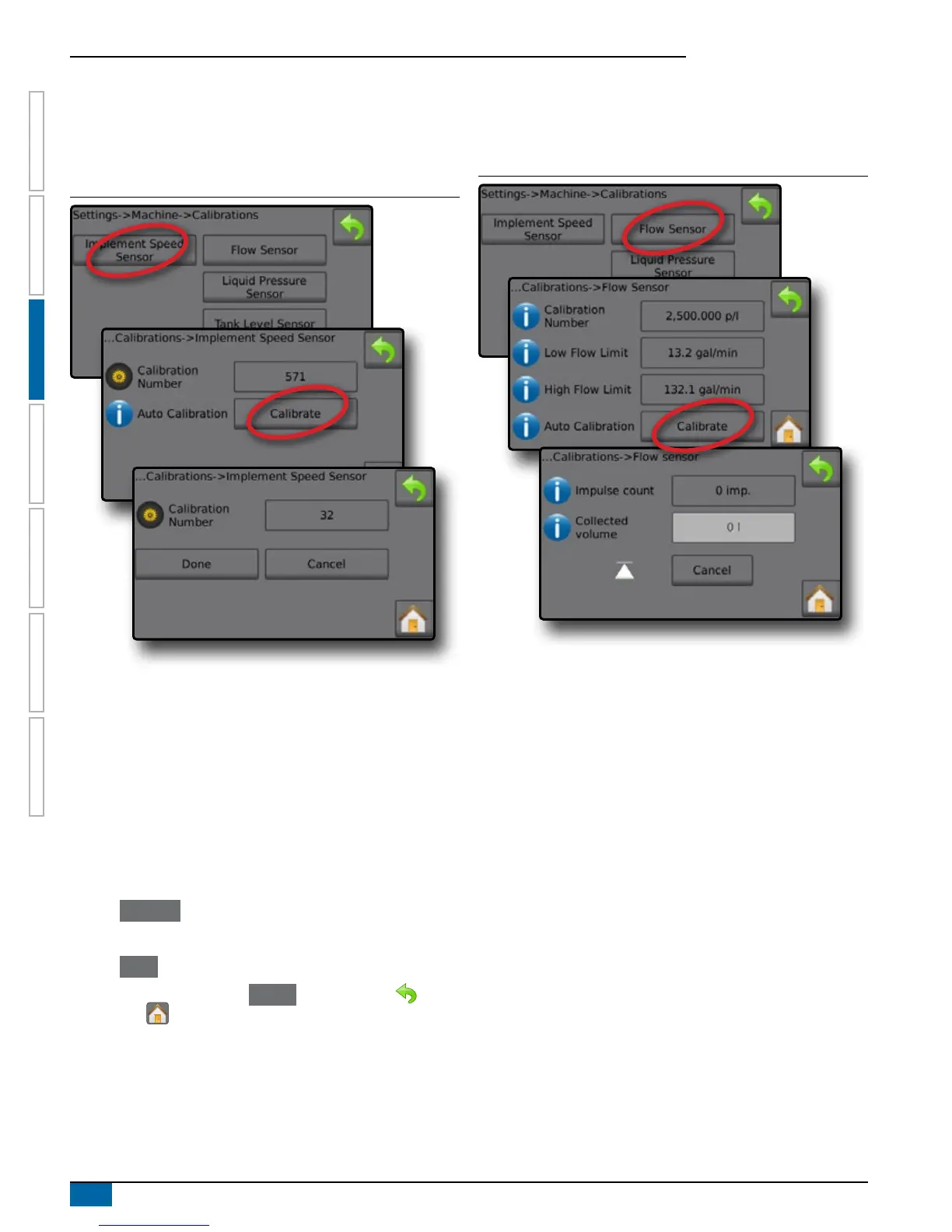
Figure 3-16: Implement Speed Sensor
Calibration Number
Automatic Calibration will determine the number of pulses counted
while driving 300 feet (100 meters in metric mode) and convert the
calibration number to the correct units. In manual calibration, enter
the calibration number in pulses per 300 feet (100 meters in metric
mode). Range is 0 to 65,000 pulses.
Automatic Calibration
Automatic Calibration establishes the pulses using the automatic
calibration function.
Implement Speed Sensor Automatic Calibration
1. Press Calibrate to start an automatic sensor calibration.
2. Drive a distance of 300 feet (100 meters in metric mode).
3. Press Done when complete.
To cancel the calibration, press Cancel , RETURN arrow or the
Home button .
The counted wheel pulses will be displayed during the automatic
calibration.
Flow Sensor
The Flow Sensor establishes the pulses per litre. Establish the value
manually or automatically calibrate the value.
Figure 3-17: Flow Sensor
Calibration Number
Enter the amount of pulses counted while running 1 litre of
water through the ow sensor. Use Automatic Calibration to
calculate pulses automatically. Manual calibration establishes
the calibration and limits based on user-entered values. Range is
10 to 4,900 pulses.
Low Flow Limit
Enter the ow sensors low limit value.
Range is 0 to 26.39 gallons/minute / 99.9 liters/minute.
High Flow Limit
Enter the ow sensors high limit value.
Range is 0 to 264.17 gallons / 999.9 liters/minutes.
Automatic Calibration
Automatic Calibration establishes the calibration and limits if the
number of pulses per litre for the ow meter is unknown or to make
sure the value is correct.
Pulse Count
Shows the number of pulses during calibration. Minimum of
10 pulses needed to do a calibration.
Collected Volume
Enter the volume passed through the ow sensor during the
calibration. Once encoded, a new ow sensor calibration value is
calculated. Range is 0.00 to 2,641.72 gallons / 9,999.99 liters.



 To Next Page