INTRODUCTION
27
98-05311-ENUS R2
OPERATIONDATA APPENDIX TOOLS CONSOLE
Radion 8140 Automatic Sprayer Control
SETTINGS
Master Switch Status / Cancel
Shows if the Master Switch is off or on .
Press the Cancel to cancel the calibration and return to the Flow
Sensor screen.
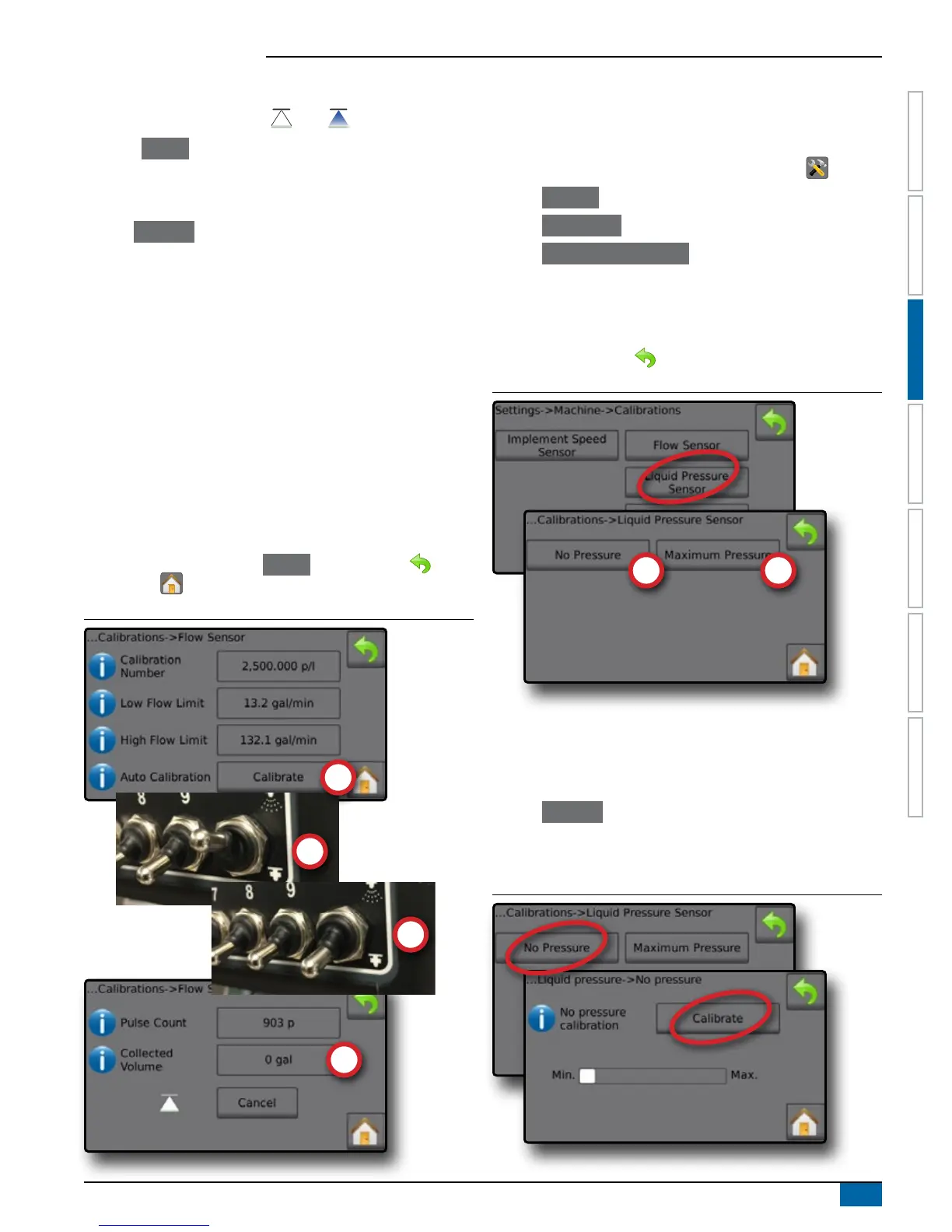
Flow Sensor Automatic Calibration
1. Press Calibrate to enter automatic calibration mode.
2. Prepare to collect the 'medium' via the Flow Sensor (minimum
25.0 gallons / 100 liters).
3. Make sure the controller is in manual mode and ow is not
regulated down.
4. Turn on the Master Switch to start ow and calibration.
◄Pulses counted display during the automatic calibration
5. Once at the minimum 25.0 gallons / 100 liters has distributed, turn
off Master Switch to stop calibration.
6. Press the Collected Volume value .
7. Enter the precise volume which passed through the Flow Sensor
during the calibration.
Once encoded, a new ow sensor calibration value is calculated.
To cancel the calibration, press Cancel , RETURN arrow or the
Home button .
Figure 3-18: Automatic Calibration
Liquid Pressure Sensor
The Liquid Pressure Sensor settings establish the maximum pressure
limit and no pressure calibration for the Liquid Pressure Sensor.
1. From the Home screen, press the SETTINGS button .
2. Press Machine .
3. Press Calibrations .
4. Press Liquid Pressure Sensor .
5. Calibrate each option in the following order:
No Pressure
Maximum Pressure
6. Press RETURN arrow to return to the Calibrations screen.
Figure 3-19: Liquid Pressure Sensor
No pressure
Liquid Pressure Sensor->No pressure establishes the calibration
while NO pressure is applied to the Liquid Pressure Sensor.
1. Remove all pressure from the system.
2. Press Calibrate to record a new calibration value and nalize the
calibration.
NOTE: Manual calibration is not available.
Figure 3-20: Liquid Pressure Sensor->No Pressure



 To Next Page