INTRODUCTION
23
98-05311-ENUS R2
OPERATIONDATA APPENDIX TOOLS CONSOLE
Radion 8140 Automatic Sprayer Control
SETTINGS
Screen (1)
Tip Preset
Tip Preset allows saving of up to ve (5) tips for quick recall. Each
preset tip can be selected to establish different tip options.
Tip Series
Tip Series selects the tip series from a general selection of
established tips or an optional user dened tip.
Tip Capacity
Tip Capacity selects the tip capacity from a list of established sizes.
When the tip series is user-dened, tip capacity will need to be
encoded manually.
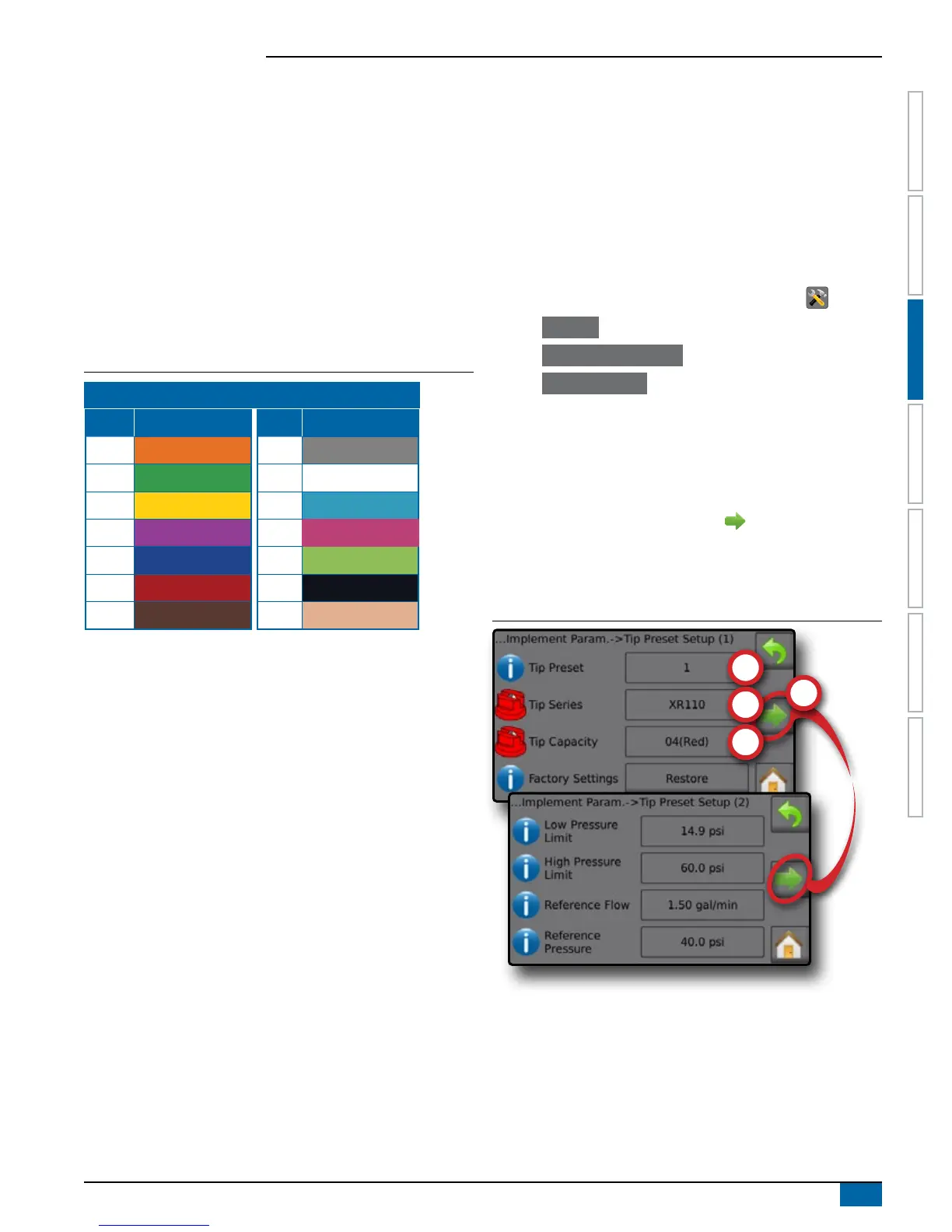
Table 3-1: Tip Sizes and Associated Colors
Established Tip Capacities and Colors
Size Color Size Color
01 Orange 06 Gray
015 Green 08 White
02 Yellow 10 Light Blue
025 Purple
12 Telemagenta
03 Blue 15 Light Green
04 Red 20 Black
05 Brown 30 Beige
Factory Settings
Factory Settings resets all tip settings (Low Pressure Limit, High
Pressure Limit, Reference Flow and Reference Pressure) to the
default settings for the selected tip capacity and series.
Screen (2)
When an established tip series and capacity is selected, the Low
Pressure Limit, High Pressure Limit, Reference Flow and Reference
Pressure elds automatically establishes standard settings for
the specic tip chosen. These settings can be manually adjusted.
Restore standard settings to all tips using the Factory Settings
Restore button on Screen (1).
IMPORTANT! Always refer to supplier recommended tip pressure
values when setting tip pressure.
Low Pressure Limit
Low Pressure Limit establishes the limit for the lowest allowed
operating pressure for the selected tip capacity. Range is 0.0 to
369.8 psi / 25.5 bar.
High Pressure Limit
High Pressure Limit establishes the limit for the highest allowed
operating pressure for the selected tip capacity. Range is0.0 to
369.8 psi / 25.5 bar.
Reference Flow
Reference Flow establishes the value for the volume applied over a
specic time. Range is 0 to 26.42 gallons/minute / 100 liters/minute.
Reference Pressure
Reference Pressure establishes the pressure value at which
the target application rate is true (ISO = 2 bar). Range is1.2 to
1,450.2 psi / 0.10 to 99.99 bar.
Establish Tip Presets
1. From the Home screen, press the SETTINGS button .
2. Press Machine .
3. Press Implement Parameters .
4. Press Tip Preset Setup .
5. Select Tip Preset number 1 .
6. Select Tip Series .
7. Select Tip Capacity .
8. Repeat steps 5, 6 and 7 for Tip Preset numbers 2 to 5.
9. OPTIONAL: Press NEXT PAGE arrow to adjust the
settings for Low Pressure Limit, High Pressure Limit, Reference
Flow and Reference Pressure. Each of these settings are specic
to the current tip preset number.
Figure 3-13: Establish Tip Presets


 To Next Page