INTRODUCTION
51
98-05311-ENUS R2
OPERATIONAPPENDIX SETTINGSTOOLS CONSOLE
Radion 8140 Automatic Sprayer Control
DATA
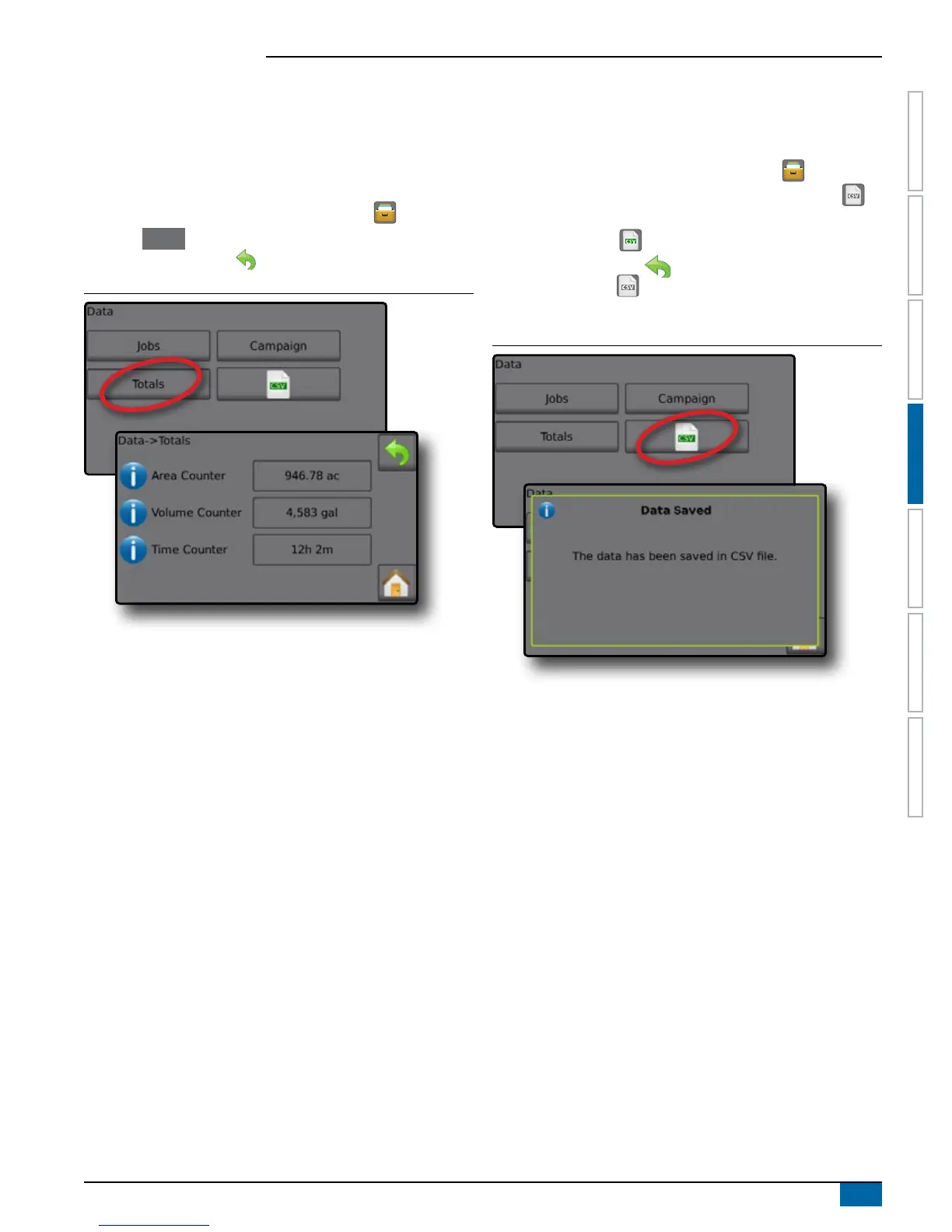
Totals
Total Counters displays information for all activity on the console
regarding Applied Coverage Area, Volume of Material Applied, and
Time Traveled for all jobs. Total Counters may only be cleared in the
OEM menu.
1. From the Home screen, press the DATA button .
2. Press Totals .
3. Press RETURN arrow to return to the main Data screen.
Figure 4-6: Total Data
CSV Report
The CSV button compiles active job information to be exported as a
CSV le.
1. From the Home screen, press the DATA button .
2. Insert USB drive into the console and wait for CSV button to
activate.
3. Press CSV button .
4. Press RETURN arrow to return to the main Data screen.
NOTE: The CSV icon is not available for selection (grayed out)
until a USB drive is inserted properly.
Figure 4-7: Job Data


 To Next Page