16
INTRODUCTION
www.teejet.com
OPERATION DATA APPENDIXTOOLSCONSOLE
Radion 8140 Automatic Sprayer Control
SETTINGS
JOB PARAMETERS
Job Parameters congures the Target Application Rate, Current Tip and Idle Pressure Settings. Selections are also active on the Operation
screen.
SETTINGS MENU STRUCTURE
| | | |
Job Parameters Machine OEM Diagnostics
Application Rate Number
Application Rate
Tip Type
*Idle Pressure *Menu settings directly relate to fitted OEM equipment
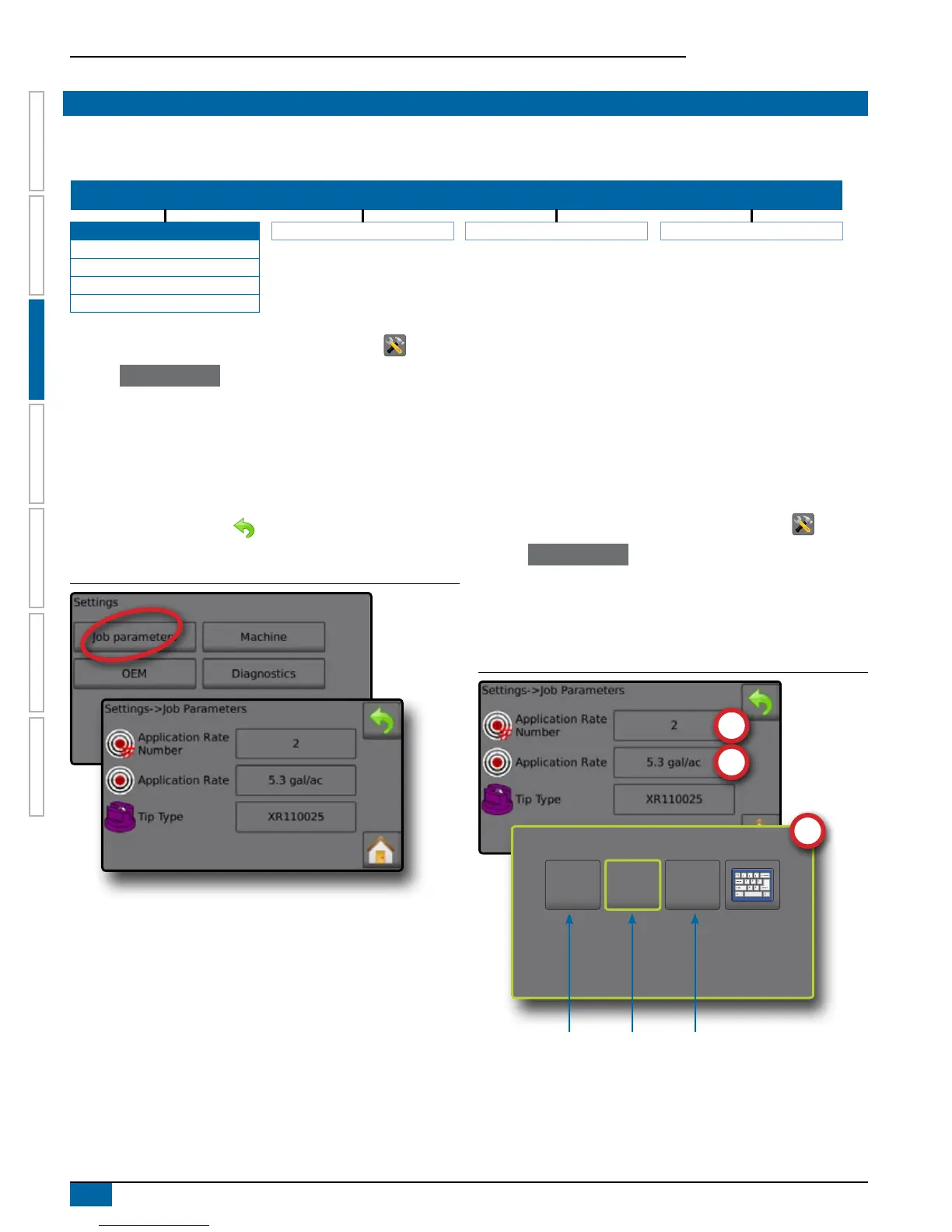
1. From the Home screen, press the SETTINGS button .
2. Press Job parameters .
3. Press a setting value to adjust settings as needed.
◄ Target Application Rate Number
◄ Target Application Rate
◄ Tip Type
◄ Idle Pressure (available when Liquid Pressure Sensor is active)
4. Press the RETURN arrow to return to the main Settings
screen.
Figure 3-2: Job Parameters
Target Application Rate Number
Target Application Rate Number species up to three (3) target
application rate presets from which to select.
Target Application Rate
Target Application Rate denes the target rate of product to apply for
the selected number. These settings will be the same for all active
jobs. Range is 0 to 700.6 gallons/acre / 6,554 liters/hectare.
Tip Type
Tip Type selects the current tip type from the ve (5) tip presets.
This selection is also active and adjustable on the Operation Screen.
This setting does not change with when the Target Application Rate
number changes.
Establish tip presets under Settings->Machine->
Implement Parameters->Tip Preset Setup.
Idle Pressure
Idle Pressure value sets the minimum pressure when the master
valve is off when using a non-circulation system and a Liquid
Pressure Sensor is present. Range is 0.00 to 50.00 bar.
Establish Preset Target Application Rates
1. From the Home screen, press the SETTINGS button .
2. Press Job Parameters .
3. Select Application Rate Number 1 .
4. Select an Application Rate to be associated with Number 1.
5. Repeat steps 3 and 4 for Application Rate Numbers 2 and 3.
Figure 3-3: Establish Preset Target Application Rate 2
225
l/ha
50
l/ha
100
l/ha
Application
Rate no. 1
Application
Rate no. 2
Application
Rate no. 3
The Target Application Rates are accessed on the Operation screen
by pressing the Application Rate Section of the Information bar.



 To Next Page