24
INTRODUCTION
www.teejet.com
OPERATION DATA APPENDIXTOOLSCONSOLE
Radion 8140 Automatic Sprayer Control
SETTINGS
Regulation Parameters
Regulation Parameters establishes adjustments to the Valve
Calibrations, Tip Spacing and Regulations Mode.
NOTE: Adjusting the Valve calibration settings involves significant
changes so adjustments should be made in small steps.
1. From the Home screen, press the SETTINGS button .
2. Press Machine .
3. Press Implement Parameters .
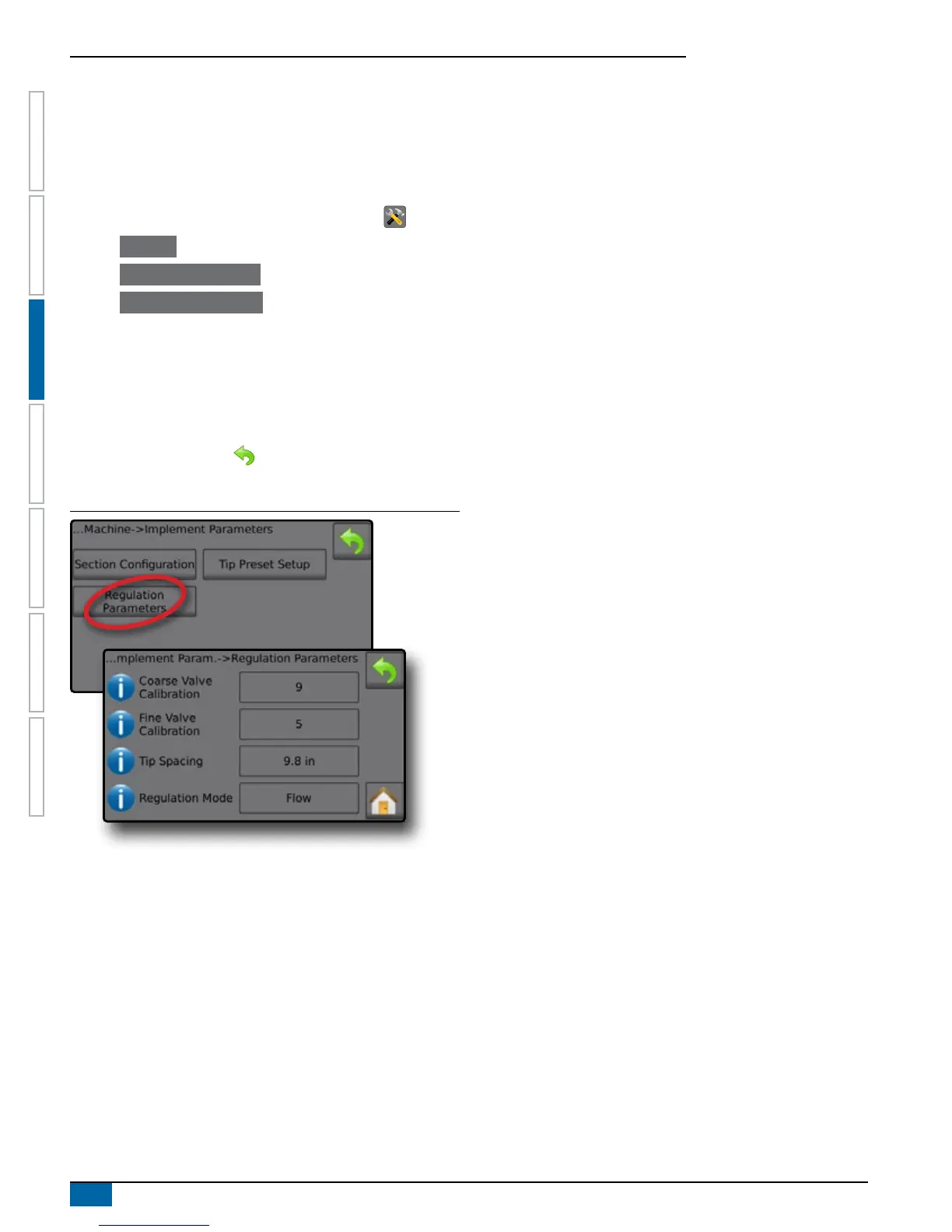
4. Press Regulation Parameters .
5. Press setting value to adjust settings as needed:
◄Coarse Valve Calibration
◄Fine Valve Calibration
◄Tip Spacing
◄Regulation Mode
6. Press the RETURN arrow to return to the Implement
Parameters screen.
Figure 3-14: Regulation Parameters
Coarse Valve Calibration
Coarse regulation value calibration allows regulating the setting of
the regulating valve to accommodate different application needs.
Operating conditions may necessitate a higher or lower response
setting for the regulating valve. This value adjusts the setting for
coarse adjustments in relation to a large percentage outside of the
target application rate. Range is 0 to 19.
►If the system is too slow in nding the correct rate, values
should be increased
►If the system is too unstable, values should be decreased
TIPS: If the system is plumbed in a bypass mode, valve setting
number 9 works very well in most applications.
If the system is plumbed in a throttling mode, start with
valve setting number 3 and adjust the number according to
application requirements.
Low flow situations require a slower response time. Adjusting
agitation volumes, to accommodate the regulating valve
to work in a more fully open position, allows for a faster
response time with little to no searching.
NOTE: Adjust the setting valve to optimize system performance. If
the valve seems to “search” for the programmed application
rate by continuously cycling pressure up/down, reduce
the number until “searching” is minimized or eliminated.
Conversely, a higher number increases the valve response
time and “speeds up” the rate of adjustment.
Fine Valve Calibration
Fine regulation value calibration allows setting the regulating valve
to accommodate different application needs. Operating conditions
may necessitate a higher or lower response setting for the regulating
valve. Fine valve calibration adjusts the setting for the ne tune
adjustment in relation to a small percentage close to the target
application rate. Range is 0 to 9.
►If the system is too slow in nding the correct rate, increase
values.
►If the system is too unstable, decrease values.
TIPS: If the system is plumbed in a bypass mode, valve setting
number 5 works very well in most applications.
If the system is plumbed in a throttling mode, start with a
valve setting number 3 and adjust the number according to
application requirements.
Low flow situations require a slower response time. Adjusting
agitation volumes to accommodate the regulating valve, to
work in a more fully open position, allows for faster response
time with little to no searching.
NOTE: This setting value can be adjusted to optimize system
performance. If the valve seems to “search” for the
programmed application rate by continuously cycling the
pressure up/down, reduce the number until “searching”
is minimized or eliminated. Conversely, a higher number
increases the valve response time and “speeds up” the rate
of adjustment.
Tip Spacing
Tip Spacing establishes the distance between the tips on the boom.
Range is 4 to 7,874 inches / 10 to 19,999 centimeters.
Regulation Mode
Regulation Mode determines if the rate control is pressure based or
ow based.



 To Next Page