INTRODUCTION
49
98-05311-ENUS R2
OPERATIONAPPENDIX SETTINGSTOOLS CONSOLE
Radion 8140 Automatic Sprayer Control
DATA
CHAPTER 4 – DATA
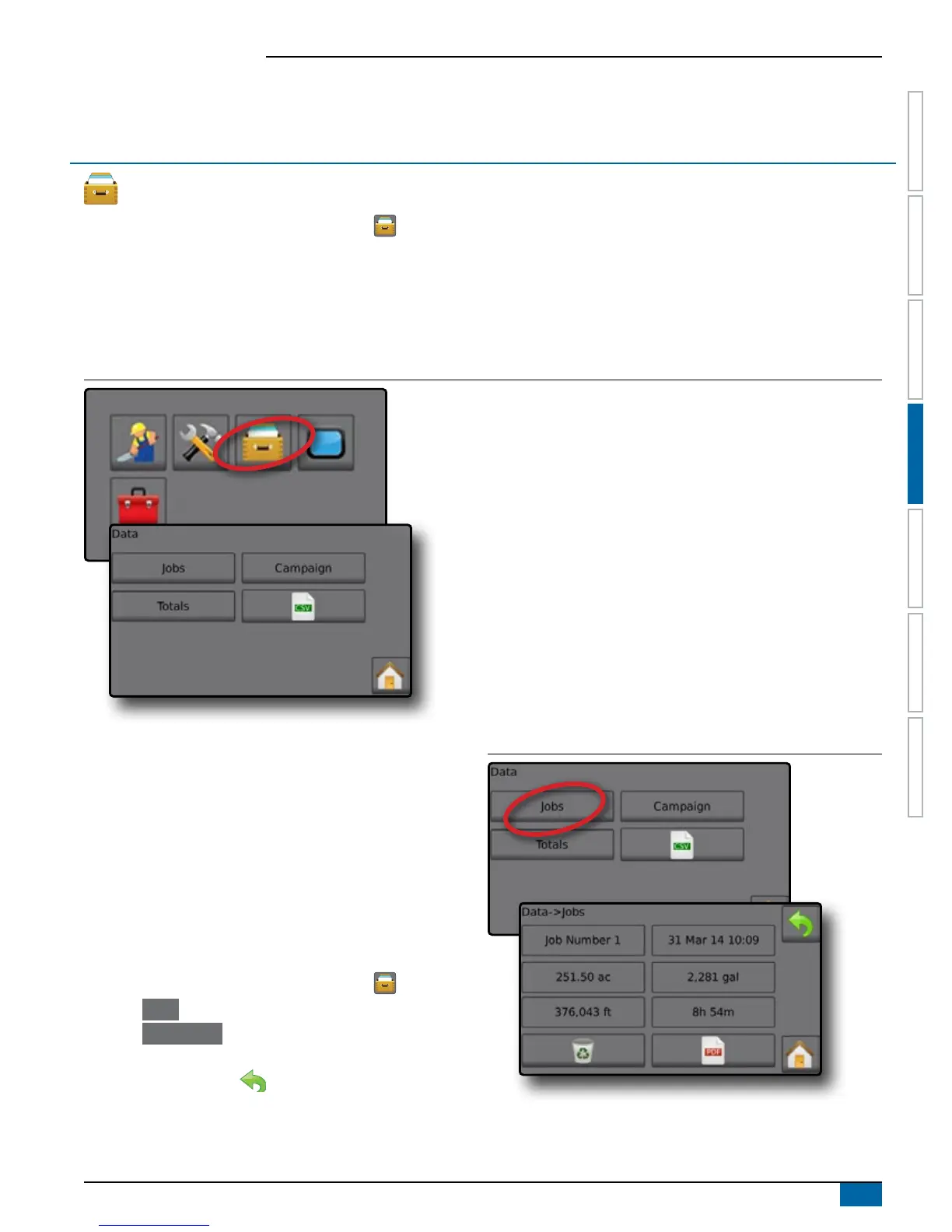
The Data option, provides an overview of various system counters including Job Counters, Campaign Counters and Total Counters.
From Data Options screens, export as either PDF or CSV reports.
1. From the Home screen, press the DATA button
2. Select from:
►Jobs – displays, deletes and reports on job information
►Campaign – displays and deletes campaign information
►Totals – displays all counter information
►CSV – compiles a CSV report of counters for all jobs, and for the campaign and console totals, then saves reports to a USB drive
Figure 4-1: Data Management Options
Jobs
One of up to ten (10) jobs may be selected to view job information.
The current job, displayed/active on the Operation screen, may be
exported as a PDF report.
Job information includes:
◄Job Number of Information Displayed
◄Current Date
◄Applied Area
◄Volume of Material Applied
◄Distance Traveled
◄Time Traveled
1. From the Home screen, press the DATA button
.
2. Press
Jobs .
3. Press Job Number to view information for a different job.
◄Enter any number to display another job
4. Press RETURN arrow to return to the main Data screen.
Figure 4-2: Job Data



 To Next Page