INTRODUCTION
29
98-05311-ENUS R2
OPERATIONDATA APPENDIX TOOLS CONSOLE
Radion 8140 Automatic Sprayer Control
SETTINGS
Maximum Pressure Manual Calibration
1. Press the Maximum Pressure value .
2. Enter the maximum allowed pressure limit for the Liquid Pressure
Sensor.
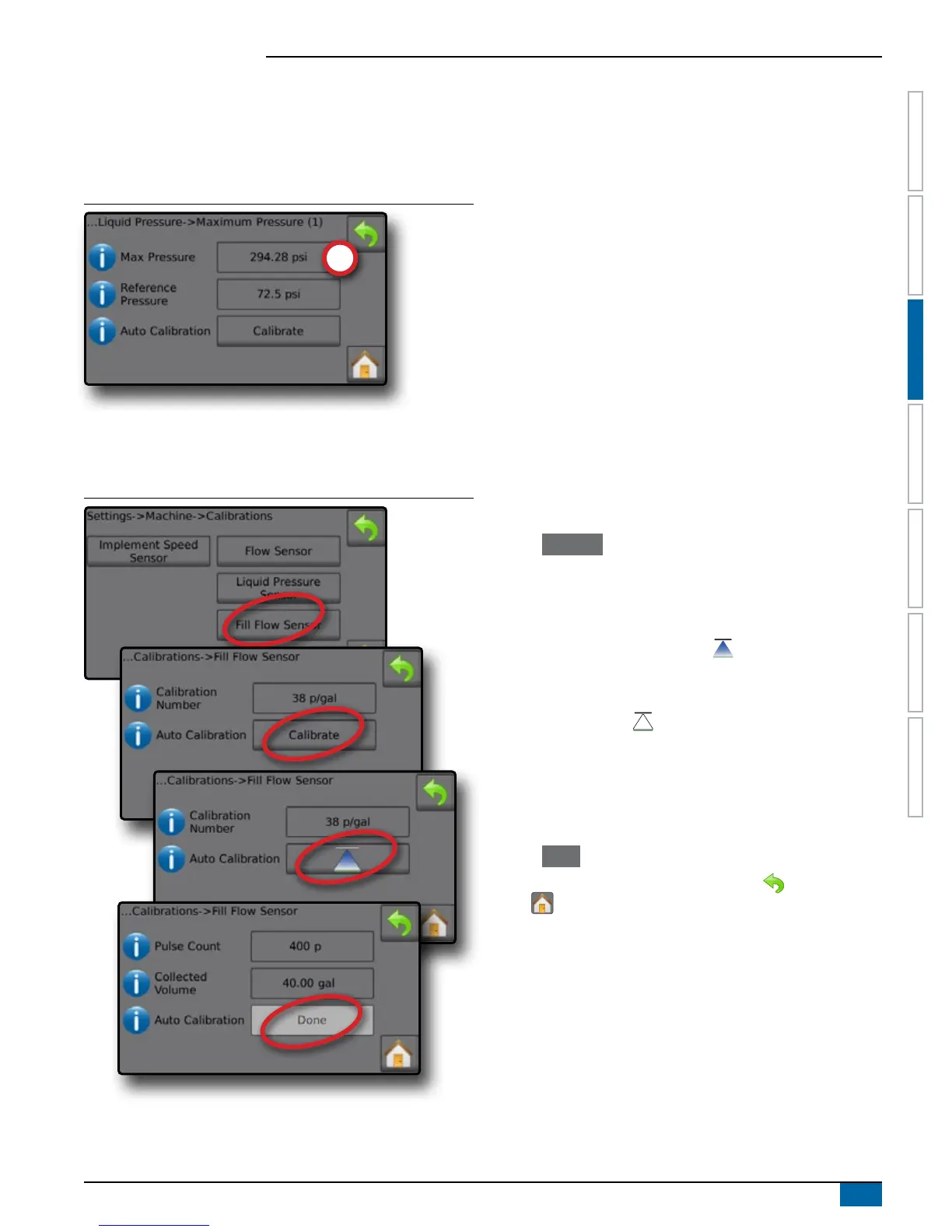
Figure 3-23: Manual Maximum Pressure
Fill Flow Sensor
The Fill Flow Sensor establishes the pulses per litre. The Fill ow
value can be established manually or automatically calibrated.
Figure 3-24: Fill Flow Sensor
Calibration Number
Enter the amount of pulses counted while running one (1) litre of
water through the Fill Flow Sensor. Use Automatic Calibration to
calculate the pulses automatically. Manual calibration establishes
the calibration and limits based on user entered values. Range is
10 to 4,900 pulses.
Automatic Calibration
Automatic Calibration establishes the calibration if the number of
pulses per litre for the Fill ow meter is unknown, or to make sure the
value is correct.
Pulse Count
The number of pulses calculated during automatic calibration.
Collected volume
Enter the collected volume. Range is 0.00 to 9,999.99 litres.
Automatic Calibration done
To complete the automatic calibration, press "Done" when collected
volume has been entered.
Fill Flow Sensor Automatic Calibration
1. Press Calibrate to enter automatic calibration mode.
2. Prepare to collect the 'medium' via the Fill Flow Sensor (minimum
of 100 litres).
3. Turn on Master Switch to start ow.
4. Press START CALIBRATION button .
◄Pulses counted display during automatic calibration
5. Once the desired amount has distributed, press the STOP
CALIBRATION button .
6. Turn off the Master Switch .
7. Press the Collected volume value .
8. Enter the precise volume passed through the Fill Flow Sensor
during the calibration.
9. Press Done to complete the automatic calibration.
To cancel the calibration, press RETURN arrow or the Home
button .



 To Next Page