INTRODUCTION
21
98-05311-ENUS R2
OPERATIONDATA APPENDIX TOOLS CONSOLE
Radion 8140 Automatic Sprayer Control
SETTINGS
Implement Parameters
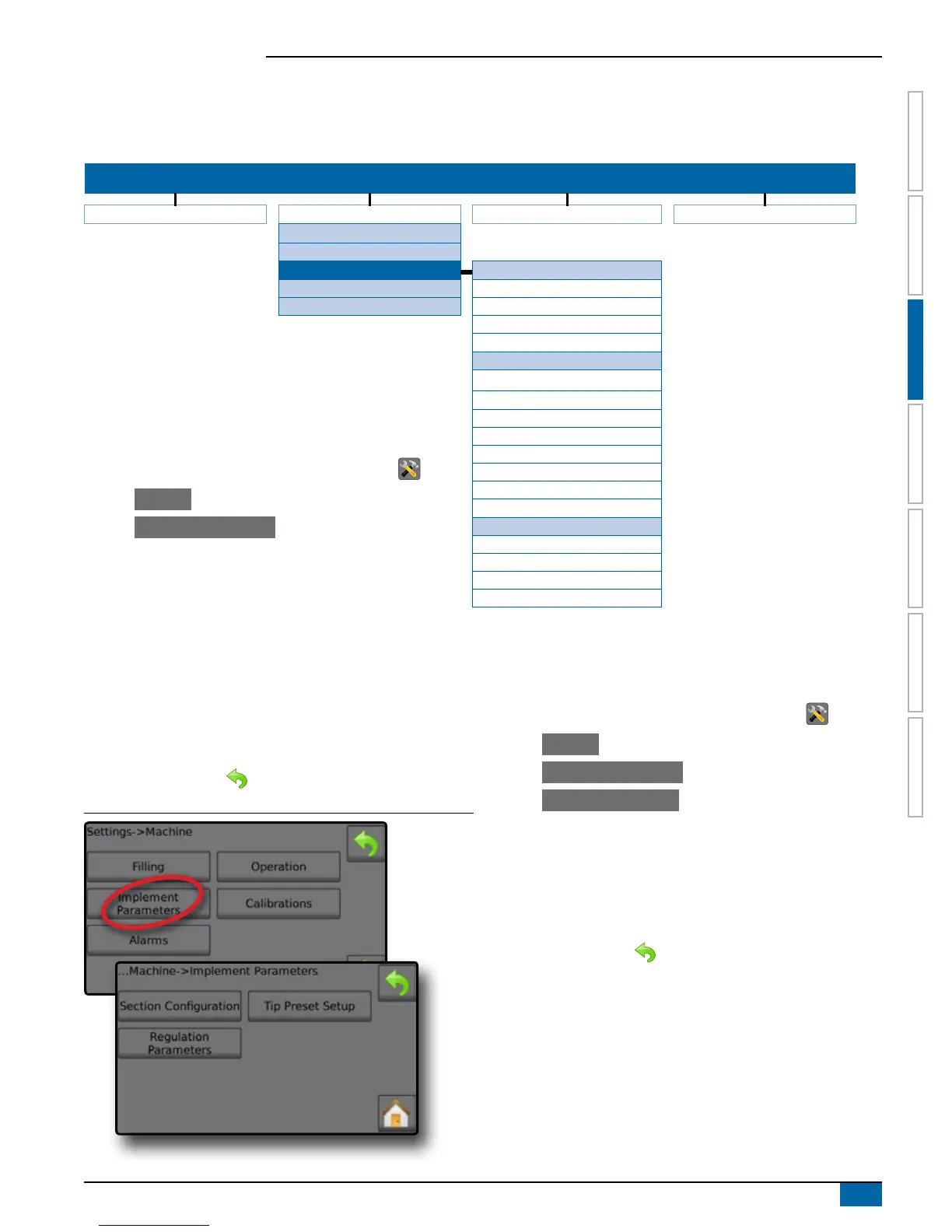
Implement Parameters establishes: the Section Conguration including the number of Tips per Section; Tip Conguration including up to
ve (5) presets; and Regulation Parameters including Valve Calibration, Tip Spacing and Regulation Mode.
SETTINGS MENU STRUCTURE
| | | |
Job Parameters Machine OEM Diagnostics
Filling
Operation
Implement Parameters
Section Conguration
Calibrations Section Number
Alarms Number of Tips
Copy Section
Section Width
Tip Preset Setup
Tip Preset
1. From the Home screen, press the SETTINGS button .
2. Press Machine .
3. Press Implement Parameters .
4. Select from:
►Section Conguration – sets the number of tips on
the boom which determines the spraying width during
application
Tip Series
Tip Capacity
Factory Settings
Low Pressure Limit
High Pressure Limit
Reference Flow
Reference Pressure
Regulation Parameters
Course Value Calibration
Fine Value Calibration
Tip Spacing
Regulation Mode
►Tip Preset Setup – where up to ve (5) sets of tip options
can be established to set the tip series, capacity, low/high
pressure limit, reference ow and reference pressure
►Regulation Parameters – where adjustments to the valve
calibration, tip spacing and regulations mode can be
established
5. Press RETURN arrow to return to the Machine screen.
Figure 3-9: Implement Parameters
Section Configuration
Section Conguration sets the number of tips on the boom which
determines the spraying width during application.
1. From the Home screen, press the SETTINGS button .
2. Press Machine .
3. Press Implement Parameters .
4. Press Section Conguration .
5. Press setting value to adjust settings as needed:
◄Section Number
◄Number of Tips
◄Copy Section
◄Section Width
6. Press RETURN arrow to return to the Implement Parameters
screen.


 To Next Page