46
INTRODUCTION
www.teejet.com
OPERATION DATA APPENDIXTOOLSCONSOLE
Radion 8140 Automatic Sprayer Control
SETTINGS
Alarm Log
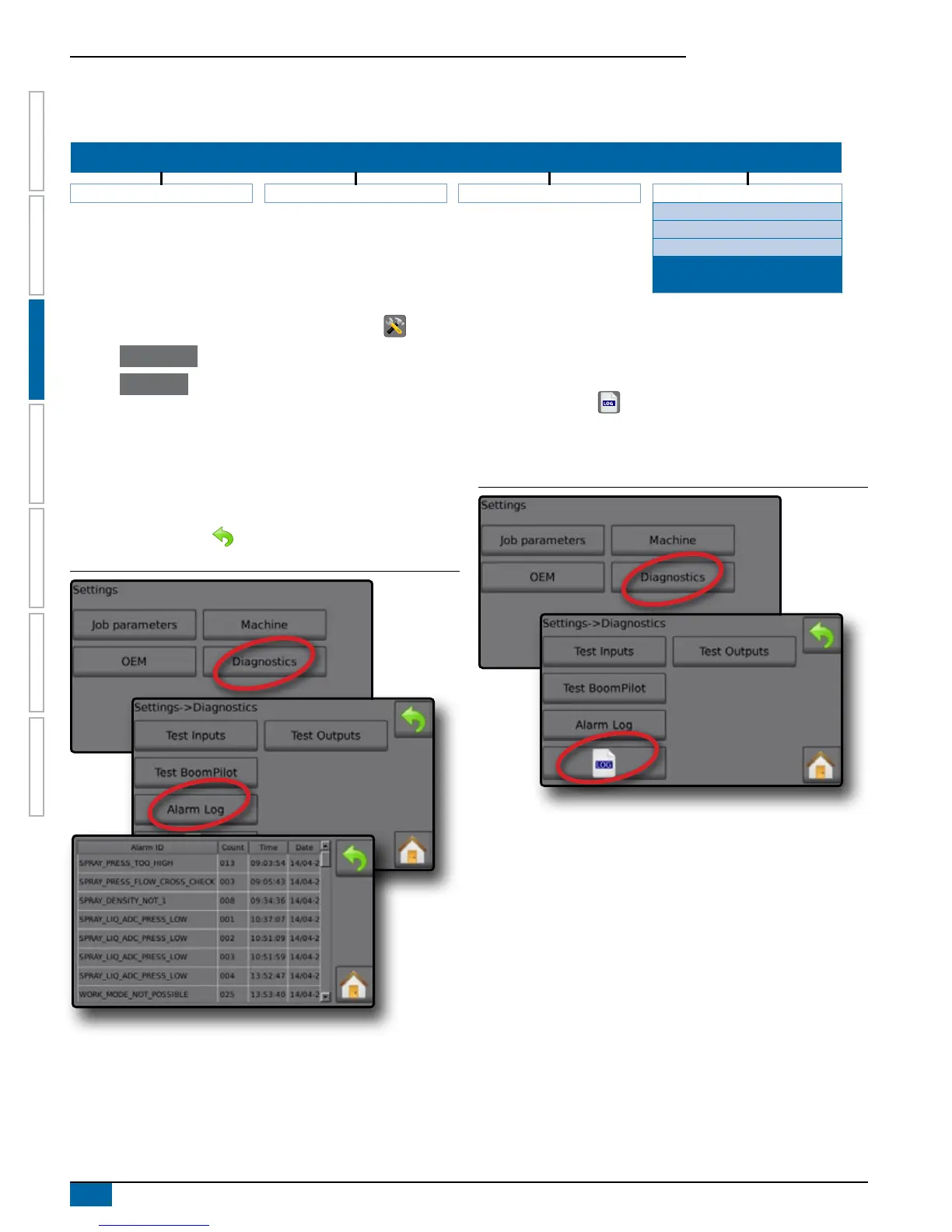
Alarm Log displays the last 50 alarms including how many times the alarm has been set off and the time and date of the last alarm.
SETTINGS MENU STRUCTURE
| | | |
Job Parameters Machine OEM Diagnostics
Test Inputs
Test Outputs
Test BoomPilot
Alarm Log
Save Alarm Log
1. From the Home screen, press the SETTINGS button .
2. Press Diagnostics .
3. Press Alarm Log .
4. View data log for:
►Alarm ID
►Count
►Time
►Date
5. Press RETURN arrow to return to the Diagnostics screen.
Figure 3-52: Alarm Log
Save Alarm Log
Saves the Alarm Log to a USB drive.
1. Insert USB drive into the unit.
2. Press LOG button .
3. Tap anywhere on the Log Data Saved screen to return to the
Diagnostics screen.
Figure 3-53: Alarm Log



 To Next Page