14
INTRODUCTION
www.teejet.com
DATA APPENDIXSETTINGS TOOLSCONSOLE
Radion 8140 Automatic Sprayer Control
OPERATION
BOOM SECTIONS & SWITCHES
The console operates with, nine (9), seven (7) or ve (5) section
switches (depending on console model) and one (1) Master Switch.
In the nine (9), seven (7) and ve (5) section switch models, each
section switch is associated with one of up to the same number of
sections on the boom and illustrated on the Operation screen.
Nine (9) switch consoles are capable of supporting up to 13 boom
sections. The boom sections are paired across the nine (9) switches
evenly but will work as individual sections in ASC mode.
NOTE: Although the Number of Sections range is up to 13, the max.
number of physical switches are still nine (9).
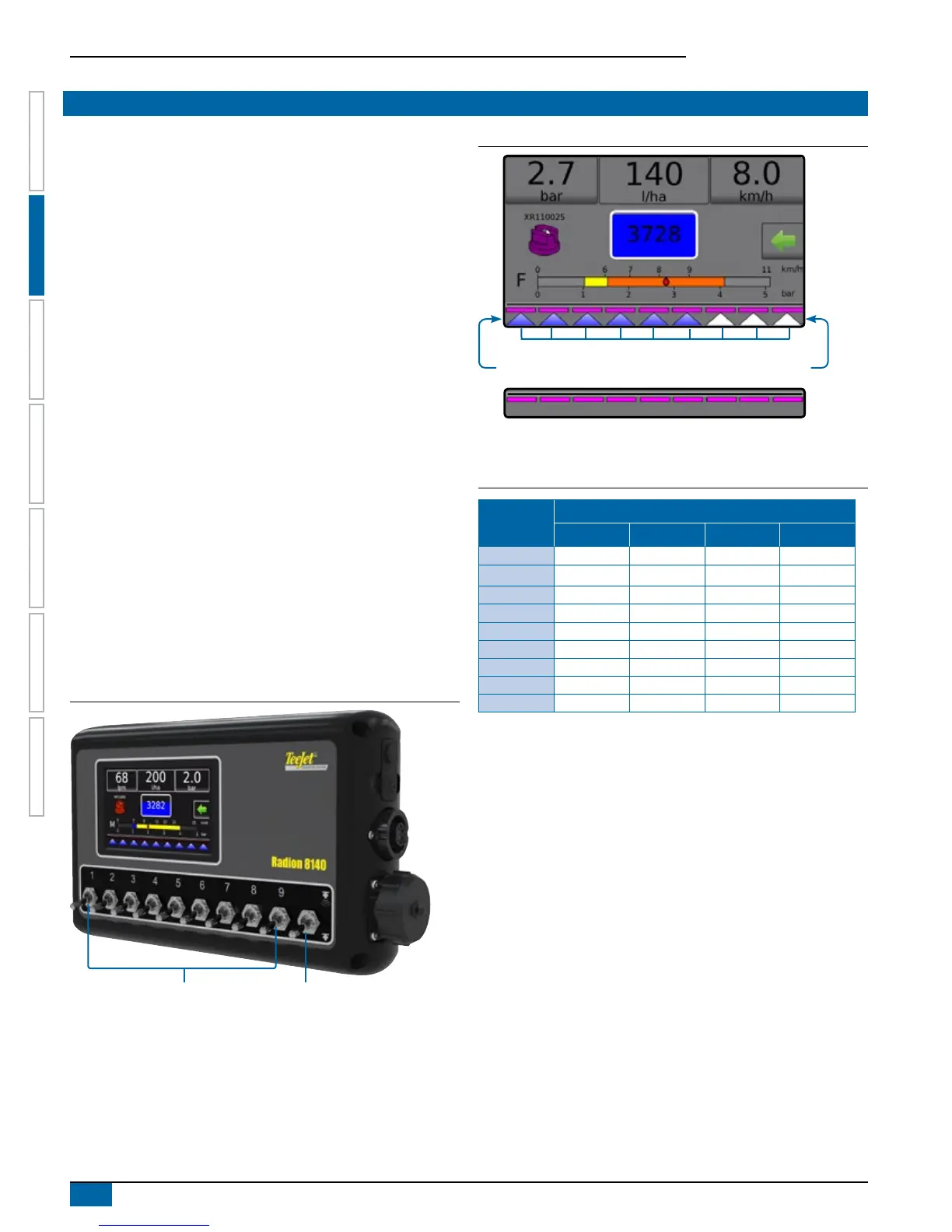
►Switches – control individual boom sections
◄On – Flip the switch up
◄Off – Flip the switch down
►Master Switch – opens/closes the main product valves and
enables/disables power to individual boom section on/off
switches
◄cannot be activated outside of the Operation screen
►Boom Sections Spray Status – displays the status of the
section switches in association to the master switch. Number
of Sections shown is established in Settings-> OEM-
>Implement Parameters.
◄Section On, Master Switch On – spray is blue
◄Section Off, Master Switch On – spray is white
◄Master Switch Off – spray not shown
Figure 2-23: Master Switch, 9 Section Switches
Master SwitchSection Switchs
Figure 2-24: Boom Sections
Boom Section Spray Status
Master Switch Off
Section On, Master Switch On Section Off, Master Switch On
Table 2-1: Pairing Key for 9 physical section switches operating with
10, 11, 12 and 13 Boom Sections
Section
Switches 1-9
Boom Section Pairing Greater Than 9 Boom Sections
10 Sections 11 Sections 12 Sections 13 Sections
1 1 1 1 1
2 2 2 2 2
3 3 3 3 3 and 4
4 4 4 and 5 4 and 5 5 and 6
5 5 and 6 6 6 and 7 7
6 7 7 and 8 8 and 9 8 and 9
7 8 9 10 10 and 11
8 9 10 11 12
9 10 11 12 13


 To Next Page