44
INTRODUCTION
www.teejet.com
OPERATION DATA APPENDIXTOOLSCONSOLE
Radion 8140 Automatic Sprayer Control
SETTINGS
Test Outputs
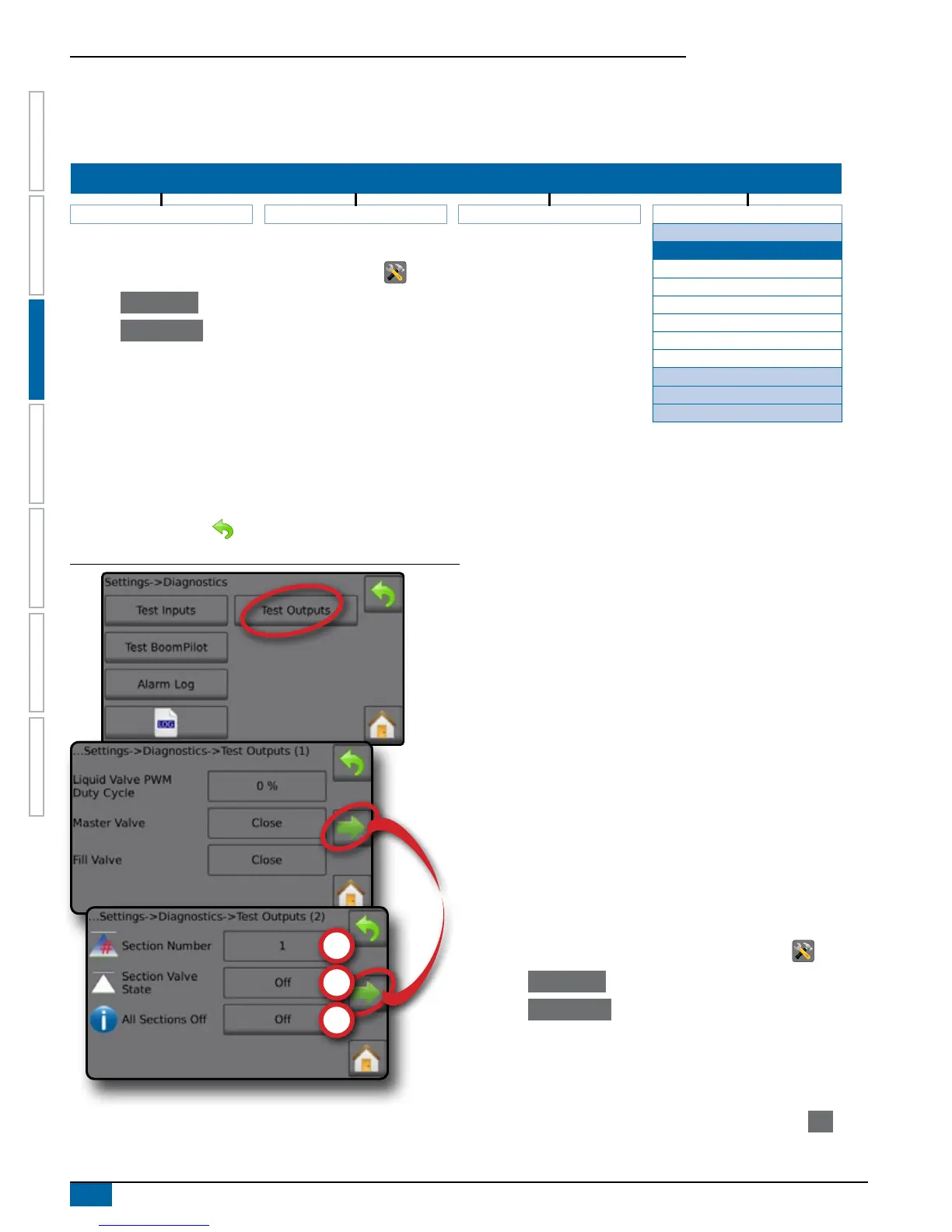
Test output sets the Liquid Valve PWM Duty Cycle percentage and checks if the Master Valve, Fill Valve and Section valves are open or
closed.
SETTINGS MENU STRUCTURE
| | | |
Job Parameters Machine OEM Diagnostics
Test Inputs
Test Outputs
1. From the Home screen, press the SETTINGS button .
2. Press Diagnostics .
3. Press Test Outputs .
4. View output data for:
►Liquid valve PWM cycle
►Master Valve
►Fill Valve
Liquid Valve PWM Duty Cycle
Master Valve
Fill Valve
Section Number
Section Valve State
All Sections Off
Test BoomPilot
Alarm Log
Save Alarm Log
►Section Number
►Section Valve State
►All Sections Off
5. Press RETURN arrow to return to the Diagnostics screen.
Figure 3-50: Test Outputs
Liquid Valve PWM Duty Cycle
Tests the regulation valve at different percentages of duty cycle.
100% equals full speed.
Master Valve
Tests if the Master Valve is operating correctly. Select if the Master
Valve is open/closed. Verify that the Master Valve is also open/
closed as selected.
Fill Valve
Tests if the Fill Valve is operating correctly. Select if the ll valve is
open/closed. Verify that the ll valve is also open/closed as selected.
Section Number
Selects the Section Number. Sections are numbered from left to right
while facing in the forward direction of the machine.
Section Valve State
Tests if the Section Valve is operating correctly. If changing the
setting to ON, the valve will open, if changing to OFF the valve will
close. Verify that the Section Valve is also open/closed as selected.
All Sections Off
Sets All Section Valves to OFF.
Verify section valve state
1. From the Home screen, press the SETTINGS button .
2. Press Diagnostics .
3. Press Test Outputs .
4. Select Section Number .
5. Set the Section Valve State for the selected Section Number.
6. Repeat steps 5 and 6 for additional Section Numbers as available.
7. OPTIONAL: To set all Section Valve States to off, press Off .



 To Next Page