INTRODUCTION
43
98-05311-ENUS R2
OPERATIONDATA APPENDIX TOOLS CONSOLE
Radion 8140 Automatic Sprayer Control
SETTINGS
Test Inputs
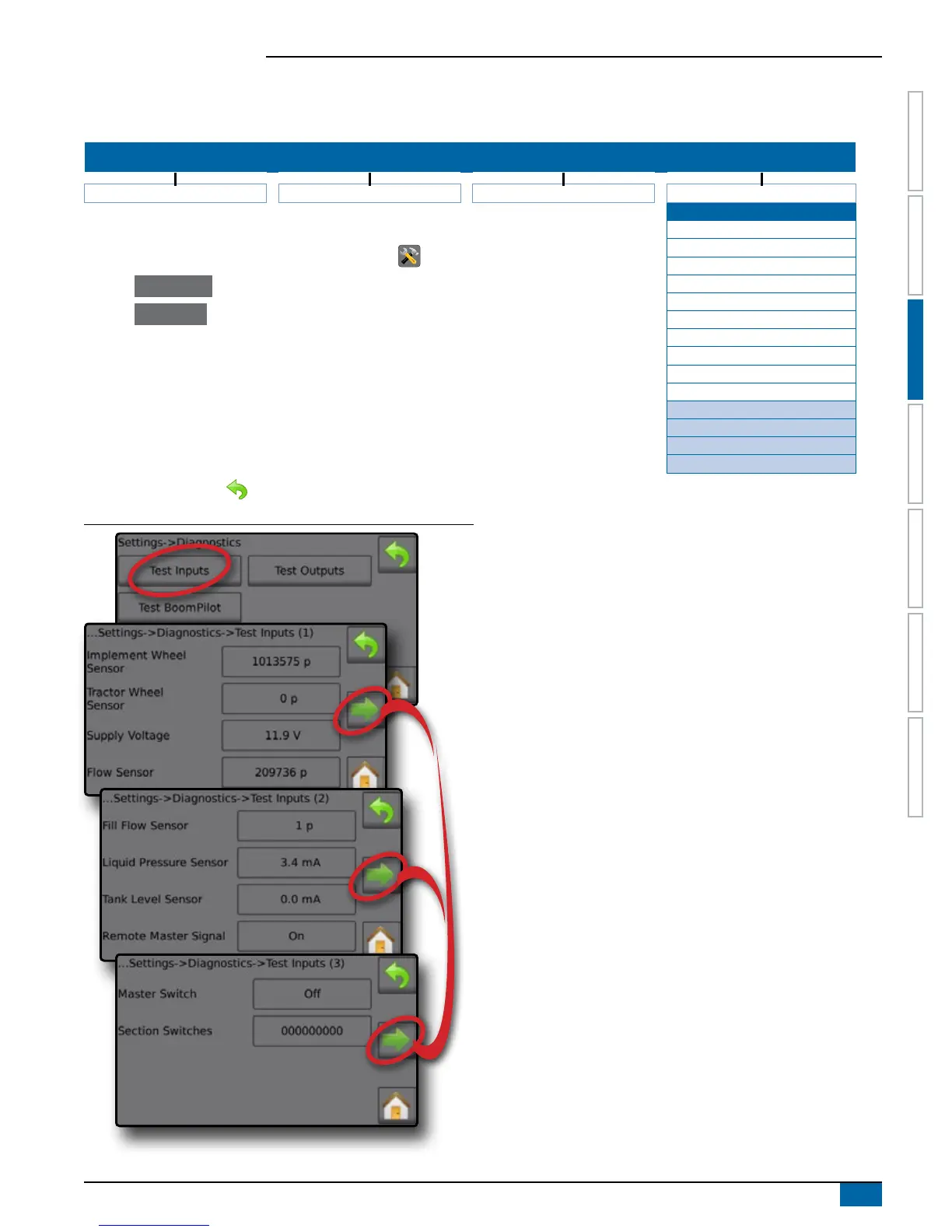
Test Inputs displays the input high and low values on the installed sensors. To reset all Test Input pulse counts to zero (0), press pulse value.
SETTINGS MENU STRUCTURE
| | | |
Job Parameters Machine OEM Diagnostics
Test Inputs
1. From the Home screen, press the SETTINGS button .
2. Press Diagnostics .
3. Press Test Inputs .
4. View input data for:
Implement Wheel Sensor
Tractor Wheel Sensor
Supply Voltage
Flow Sensor
Fill Flow Sensor
Liquid Pressure Sensor
Tank Level Sensor
►Implement Wheel Sensor
►Tractor Wheel Sensor
►Supply Voltage
►Flow Sensor
►Fill Flow Sensor
►Liquid Pressure Sensor
►Tank Level Sensor
►Remote Master Signal
►Master Switch
►Section Switches
Remote Master Signal
Master Switch
Section Switches
Test Outputs
Test BoomPilot
Alarm Log
Save Alarm Log
5. Press RETURN arrow to return to the Diagnostics screen.
Figure 3-49: Test Inputs
Implement Wheel Sensor
Test the Implement Wheel Sensor by activating it and watching the
pulse count increase.
Tractor Sensor
Test the Tractor Sensor by activating it and watching the pulse count
increase.
Supply Voltage
Displays the current given supply voltage.
Flow Sensor
Test the Flow Sensor by activating it and watching the pulse count
increase.
Fill Flow Sensor
Test the Fill Flow Sensor by activating it and watching the pulse
count increase.
Liquid Pressure Sensor
Test the Liquid Pressure Sensor by activating it and watching the
value increase/decrease along with the pressure.
Tank Level Sensor
Test the Tank Level Sensor by activating it and watching the value
increase/decrease along with the tank level.
Remote Master Signal
Test the Remote Master Signal by ipping the remote master on/off
switch. Watch that the on/off status is reected on the screen.
Master Switch
Test by ipping the Master Switch on/off. Watch that the on/off status
is reected on the screen.
Section Switches
Test by ipping the Section Switches on/off. Watch that the on/off
status is reected on the screen.
1 = Section on 0 = Section off



 To Next Page