28
INTRODUCTION
www.teejet.com
OPERATION DATA APPENDIXTOOLSCONSOLE
Radion 8140 Automatic Sprayer Control
SETTINGS
Maximum Pressure
Liquid Pressure Sensor
-
>Maximum Pressure establishes the
maximum allowed pressure limit for the Liquid Pressure Sensor.
The automatic calibration is based on the recommended maximum
pressure level and a tested reference pressure level.
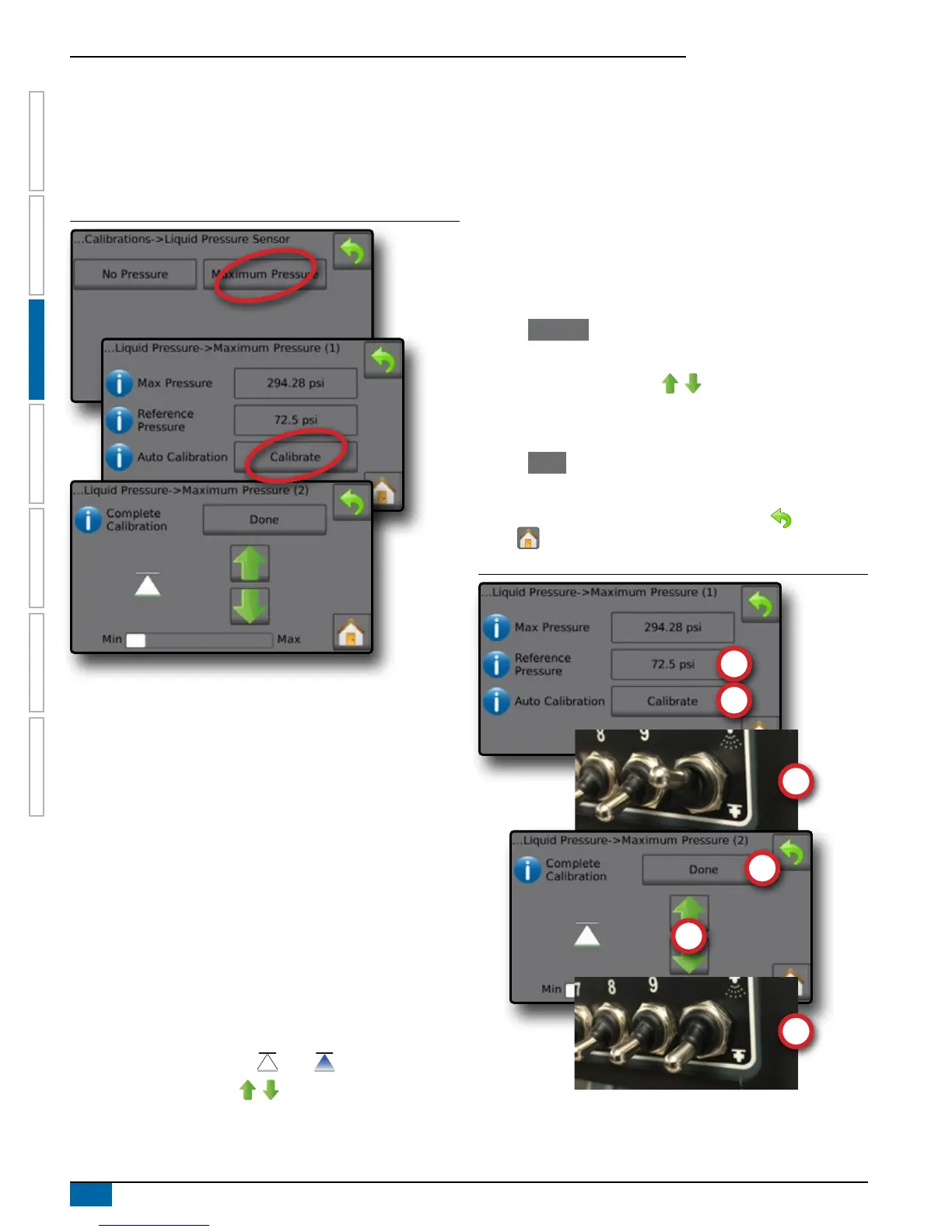
Figure 3-21: Liquid Pressure Sensor->Maximum Pressure
Maximum Pressure
Enter the maximum allowed pressure limit for the Liquid Pressure
Sensor. Use Automatic Calibration to calculate the maximum
pressure automatically. Range is 1 to 725.19 psi / 50 bar.
Reference Pressure
Enter the pressure value used as reference for the actual Liquid
Pressure Sensor calibration. The reference pressure can be
changed, but not while in the calibration mode. Range is1 to
725.19 psi / 50 bar.
Automatic Calibration
If the maximum pressure is not known, or to make sure the value is
correct, Automatic Calibration establishes the calibration.
Complete calibration
Apply constant reference pressure to the sensor. Press "Done" when
complete.
Master Switch Status / Pressure Adjustment
Shows if the Master Switch is off or on .
Press the UP/DOWN arrows to increase/decrease the
pressure until reaching and maintaining the reference pressure.
Minimum/Maximum Pressure Bar
Illustrates the change in pressure from minimum to maximum.
Maximum Pressure Automatic Calibration
IMPORTANT: Make sure all section valves are open before opening
the Master Valve; otherwise, the pressure could build and
damage the system.
1. Press the Reference Pressure value .
2. Enter the pressure value used as reference for the actual Liquid
Pressure Sensor calibration.
3. Press Calibrate to start an automatic calibration of the sensor.
4. Turn on Master Switch .
5. Press the UP/DOWN arrows to increase/decrease the
pressure until reaching and maintaining the reference pressure.
6. Apply constant reference pressure to the sensor.
7. Press Done when complete.
8. Turn off Master Switch to stop calibration.
To cancel the calibration, press the RETURN arrow or the Home
button .
Figure 3-22: Manual Maximum Pressure



 To Next Page