40
INTRODUCTION
www.teejet.com
OPERATION DATA APPENDIXTOOLSCONSOLE
Radion 8140 Automatic Sprayer Control
SETTINGS
Screen (2)
Regulation Deadband
Regulation Deadband establishes an acceptable regulation dead
band in percent. Regulation will stop when the difference between
the target rate and the actual rare is lower than the entered
deadband (percent of the target rate). This is to prevent the valve
from oscillating when the actual rate is near the target rate.
Regulation Valve Capacity
Regulation Valve Capacity establishes the capacity for the regulation
valve. Range is 0 to 264 gallons/minute / 999 liters/minute.
Regulation Start Delay
Regulation Start Delay is the delay in seconds from when the main
valve is witched on until regulation starts. Range is 0.0 to 9.9 seconds.
Manual Regulation Speed
Manual Regulation Speed encodes, in percent of the Regulation
Valve Time, the pace at which the regulation valve should move in
manual operation.
Screen (3)
Restrictor Plate Flow
Restrictor Plate Flow establishes the capacity of the restrictor plate
at 2 bar to be used when working with return ow (Circulation).
Range is 0.00 to 21.99 gal/min / 0.00 to 99.99 l/min.
Default Valve Position
Default Valve Position establishes the percentage of the regulation
valve activation time. Range is 0 to 100%.
NOTE: 15 minutes after the master switch has been turned off, the valve
will completely close then open the the percentage specified.
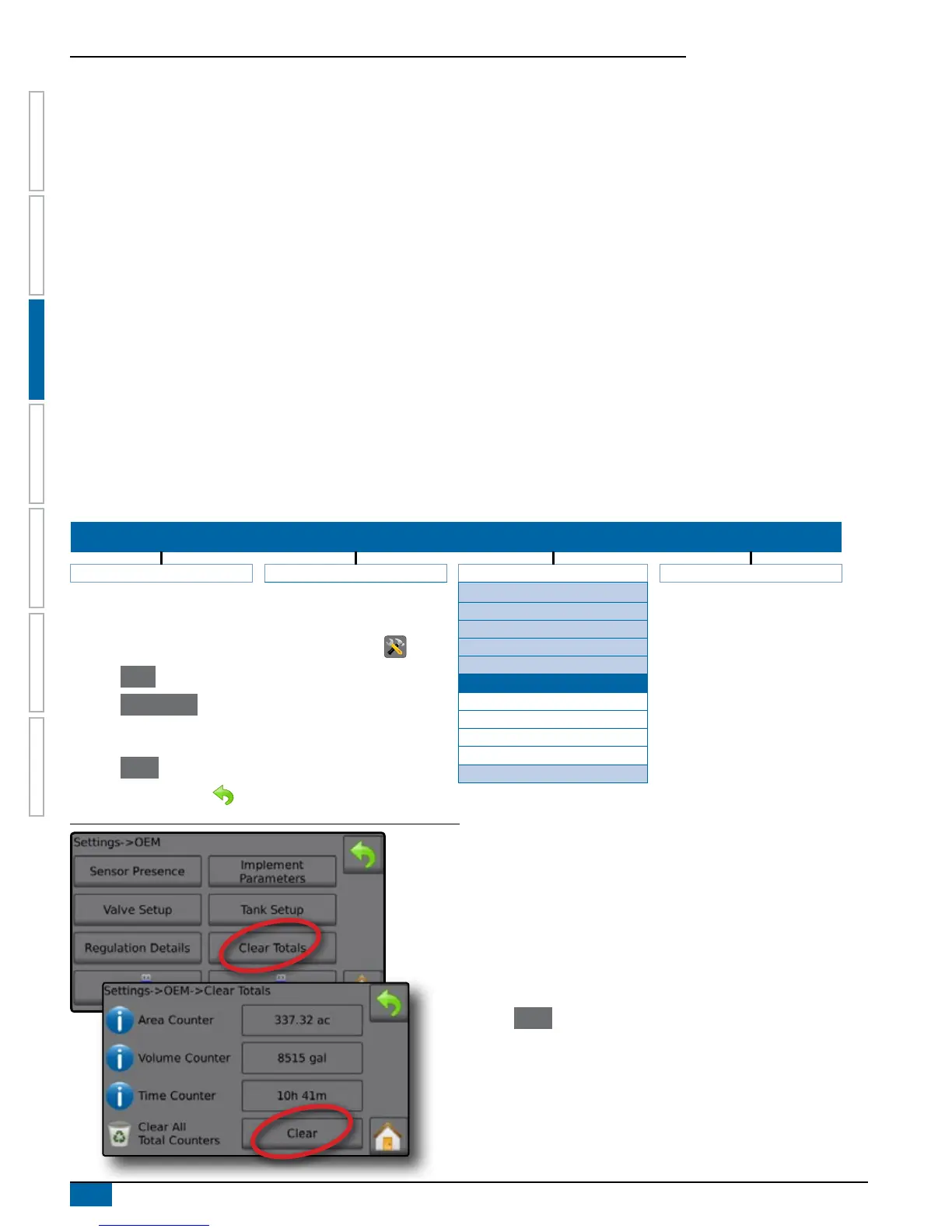
Clear Totals
Clear Totals deletes Total Count system counters for Area, Volume and Time and returns all back to default settings.
Clearing totals here also affects the Data->Totals screen.
NOTE: To save current Area, Volume and Time totals before clearing, insert a USB drive and save a CSV file on the Data screen.
SETTINGS MENU STRUCTURE
| | | |
Job Parameters Machine OEM Diagnostics
Sensor Presence
Implement Parameters
1. From the Home screen, press the SETTINGS button .
2. Press OEM .
3. Press Clear Totals .
4. Enter password.
5. Press Clear to clear all accumulated total counters.
6. Press RETURN arrow to return to the OEM screen.
Valve Setup
Tank Setup
Regulation Details
Clear Totals
Area Counter
Volume Counter
Time Counter
Clear All Total Counters
Import/Export Calibrations
Figure 3-45: Clear Totals
Area Counter
Area Counter displays total applied area for all jobs.
Volume Counter
Volume Counter displays total volume of material applied during all
jobs.
Time Counter
Time Counter displays time traveled for all jobs.
Clear All Total Counters
Press Clear to clear all accumulated total counters.
NOTE: Password access for the Clear All Total Counters function is
only available from the machine manufacturer and/or TeeJet
Technologies.



 To Next Page