10
INTRODUCTION
www.teejet.com
DATA APPENDIXSETTINGS TOOLSCONSOLE
Radion 8140 Automatic Sprayer Control
OPERATION
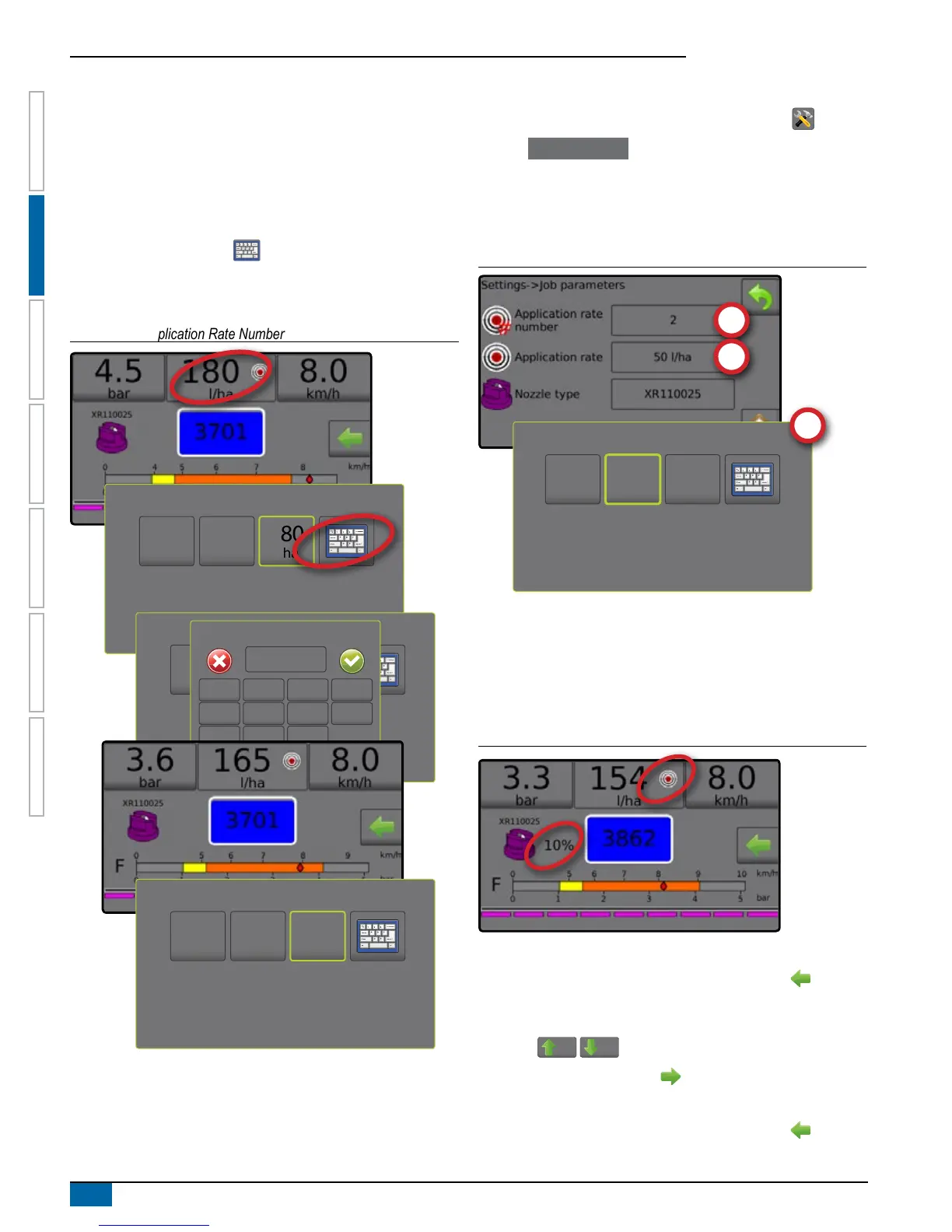
Change Preset Target Application Rate
The selected target rate can be changed either on the Operation
screen or in Settings->Job Parameters.
Operation
1. Press the Application Rate section.
2. Select the Target Application Rate to be changed.
3. Press KEYBOARD button .
4. Select an application rate.
NOTE: Value must be between 0 and 6,554 litres/hectare.
Figure 2-12: Application Rate Number
140
l/ha
225
l/ha
180
l/ha
140
l/ha
225
l/ha
180
l/ha
Application Rate (l/ha)
1 2 3
165
Clear
4 5 6 <--
7 8 9
0 . +/-
140
l/ha
225
l/ha
165
l/ha
Settings
1. From the Home screen, press the SETTINGS button .
2. Press Job Parameters .
3. Select Application Rate Number 1 .
4. Select an application rate to be associated with Number 1.
5. Repeat steps 3 and 4 for Application Rate Numbers 2 and 3.
Figure 2-13: Establish Preset Target Application Rate 2
225
l/ha
50
l/ha
100
l/ha
Target Rate Percentage Increase/Decrease
Target Rate Boost/Step Percent Increase/Decrease buttons
increase/decrease the application target rate per the established
percentage set in the Settings->Machine->Operation setup screen
under Application Rate Step.
Figure 2-14: Target rate boost/step percent
Increase/Decrease Percentage
1. From the Operation screen, press the OPTIONS tab to
display the Operation menu.
2. Press the Boost/step percent increase/decrease
buttons
5%
/
5%
to adjust application rates.
3. Press the Close menu button .
Return to Preset Target Rate
1. From the Operation screen, press the OPTIONS tab to
display the Operation menu.



 To Next Page