50
INTRODUCTION
www.teejet.com
OPERATION APPENDIXSETTINGS TOOLSCONSOLE
Radion 8140 Automatic Sprayer Control
DATA
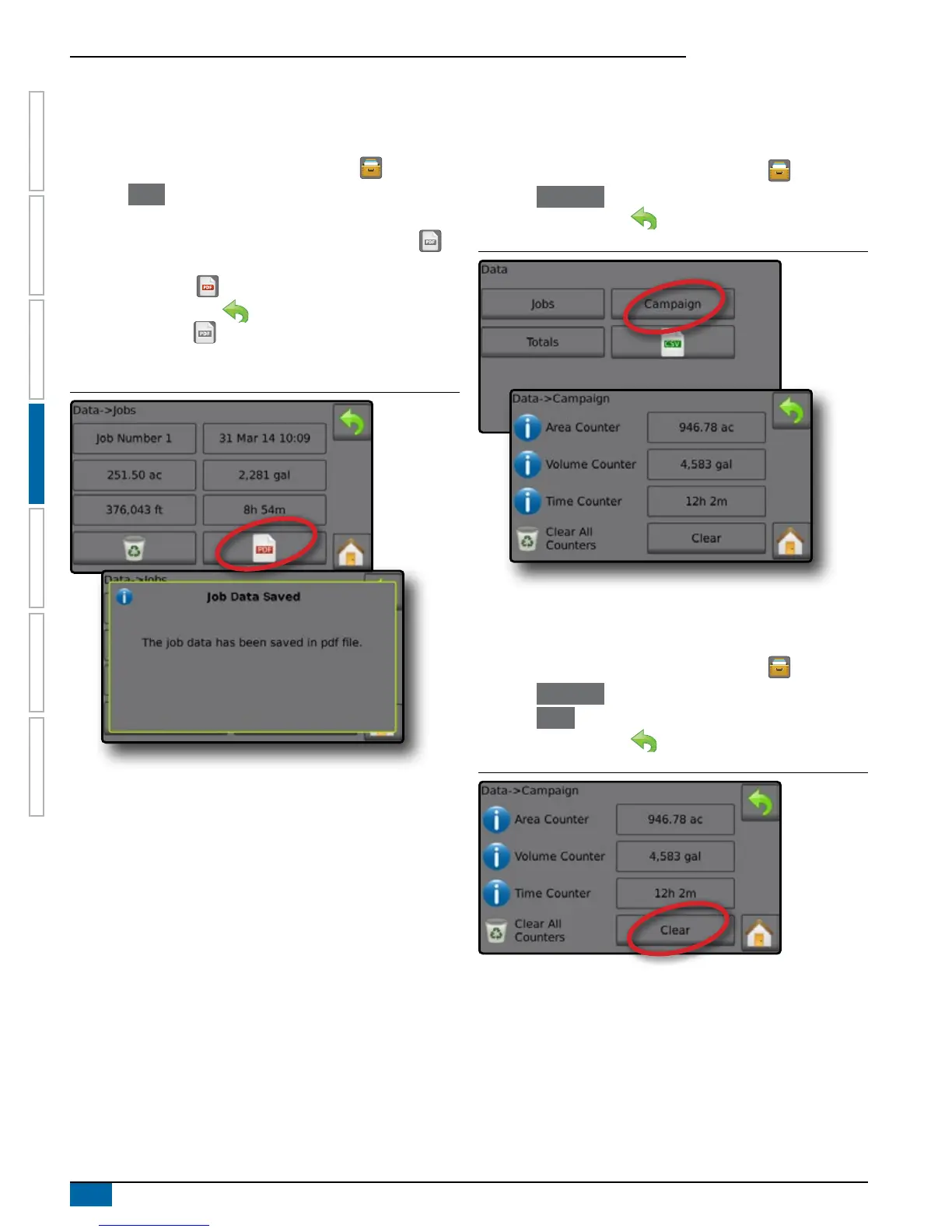
Job Data Report
The PDF button compiles active job information to be exported as a
PDF report.
1. From the Home screen, press the DATA button .
2. Press
Jobs .
3. Select the job from which to create a report.
4. Insert USB drive into the console and wait for PDF button
to
activate.
5. Press PDF button .
6. Press RETURN arrow to return to the main Data screen.
NOTE: The PDF icon
is not available for selection (grayed out)
until a USB drive is inserted properly.
Figure 4-3: Job Data
Campaign
Campaign displays information for all jobs including Applied
Coverage Area, Volume of Material Applied and Time Traveled.
1. From the Home screen, press the DATA button .
2. Press Campaign .
3. Press RETURN arrow to return to the main Data screen.
Figure 4-4: Campaign Data
Clear All Campaign Counters
Clear all information for all jobs including Applied Coverage Area,
Volume of Material Applied and Time Traveled.
1. From the Home screen, press the DATA button .
2. Press Campaign .
3. Press Clear .
4. Press RETURN arrow to return to the main Data screen.
Figure 4-5: Clear All Campaign Counters



 To Next Page