3
98-05311-ENUS R2
OPERATIONDATA APPENDIX SETTINGSTOOLS CONSOLE
Radion 8140 Automatic Sprayer Control
INTRODUCTION
Options Tab
The Options tab is always available on the Operation screen.
This tab opens the Operation menu which accesses the Home
button and regulation controls.
Operation menu settings buttons
Home
Auto
reg
Man
reg
Automatic/Manual Regulation Mode
0%
Return to Target Rate
5% 5%
Target Rate Percentage Boost Increase/Decrease
Regulation Valve Manual Open/Close
Close Menu
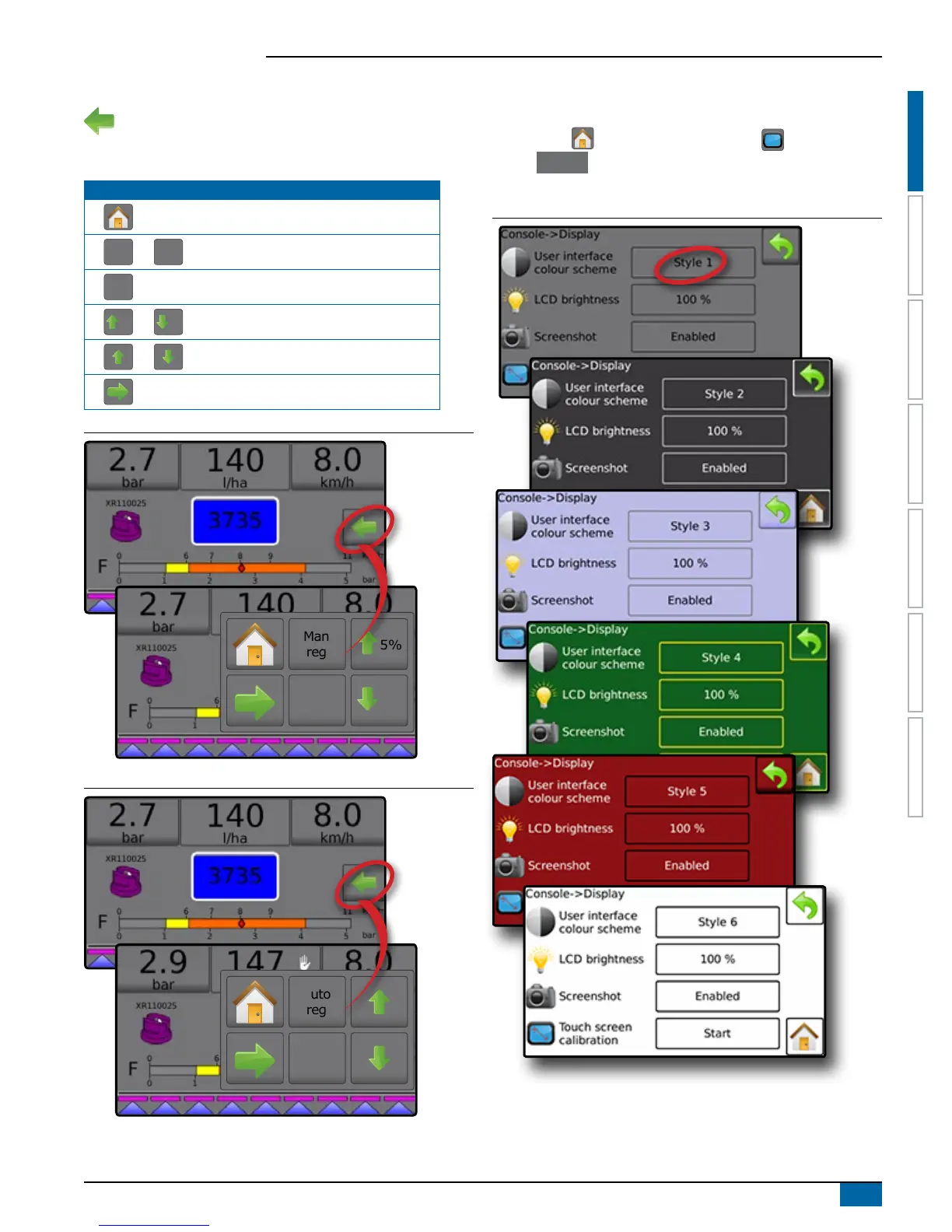
Figure 1-4: Options Tab – Automatic Regulation Mode
0%
Man
reg
5%
5%
Figure 1-5: Options Tab - Manual Regulation Mode
Auto
reg
Console Screen Colors
The console is available in six (6) color schemes. From the
Home screen
,
press the CONSOLE button and
choose Display . Press the current selection to access color
scheme options and select a color style.
Figure 1-6: Color Schemes
NOTE: When changing screen Styles, there is a slight delay in the
screen displaying the new selection.



 To Next Page