22
INTRODUCTION
www.teejet.com
OPERATION DATA APPENDIXTOOLSCONSOLE
Radion 8140 Automatic Sprayer Control
SETTINGS
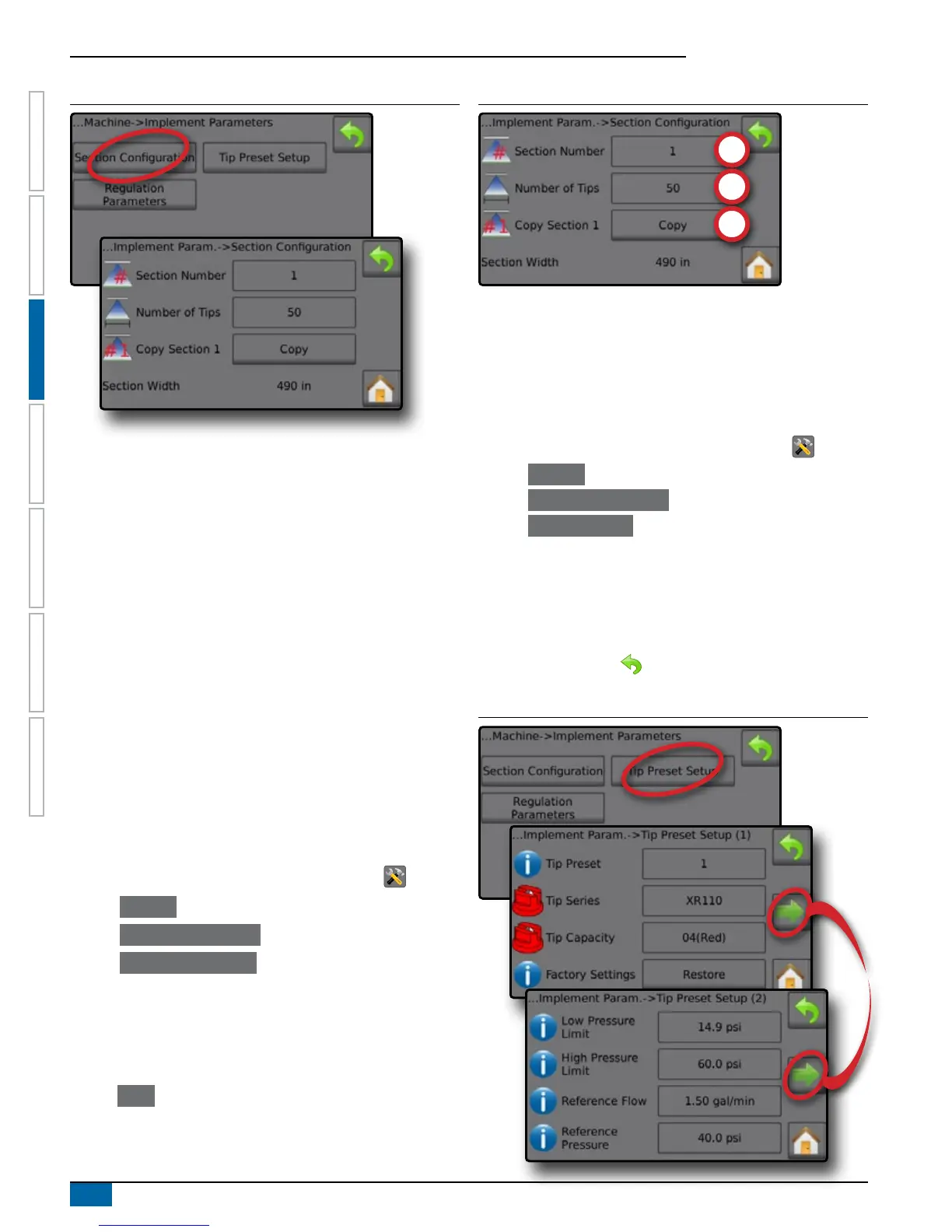
Figure 3-10: Section Configuration
Section Number
Section Number establishes the current section number to which
changes can be made. Sections are numbered from left to right while
facing in the machine forward direction.
NOTE: The number of available sections is established in the
OEM menu and limited by the sections available on the
console.
Number of Tips
The number of tips in the current section number. Range is 0 to 200.
Copy Section
Copy Section sets all Number of Tips counts to the same count for
all boom sections based upon the current Section Number.
Section Width
Section Width displays the width for the current section. The width
is calculated based on the number of tips established in the Number
of tip section and tip spacing established under: Settings->Machine-
>Implement Parameters->Regulation Parameters->Tip Spacing.
Establish Number of Tips
1. From the Home screen, press the SETTINGS button .
2. Press Machine .
3. Press Implement Parameters .
4. Press Section Conguration .
5. Select Section Number .
6. Set the Number of Tips for the selected section number.
7. Repeat steps 5 and 6 for additional Section Numbers as available.
8. OPTIONAL: If all sections have the same number of tips,
press Copy to set all sections to the current number of tips.
Figure 3-11: Establish Number of Tips
Tip Preset Setup
Tip Preset Setup establishes up to ve (5) sets of tip options setting
the Tip Type, Capacity, Low/High Pressure Limit, Reference ow and
Reference Pressure.
NOTE: Settings on both screen 1 and screen 2 are specific to the
currently selected Tip Preset number.
1. From the Home screen, press the SETTINGS button .
2. Press Machine .
3. Press Implement Parameters .
4. Press Tip Preset Setup .
5. Press setting value to adjust settings as needed:
◄Tip Preset (number)
◄Tip Series
◄Tip Capacity
◄Factory Settings
◄Low Pressure Limit
◄High Pressure Limit
◄Reference Flow
◄Reference Pressure
6. Press RETURN arrow to return to the Implement Parameters
screen.
Figure 3-12: Tip Preset Setup



 To Next Page