6
INTRODUCTION
www.teejet.com
DATA APPENDIXSETTINGS TOOLSCONSOLE
Radion 8140 Automatic Sprayer Control
OPERATION
CHAPTER 2 – OPERATION
Prior to operation, all settings and congurations must be established. Please contact a dealer or TeeJet Customer service
representative with questions about system operations. TeeJet Technologies is not responsible for misuse or incorrect operation of the
system. Settings are automatically saved when selected. Select functions may not be visible due to OEM settings, available equipment or
sensors.
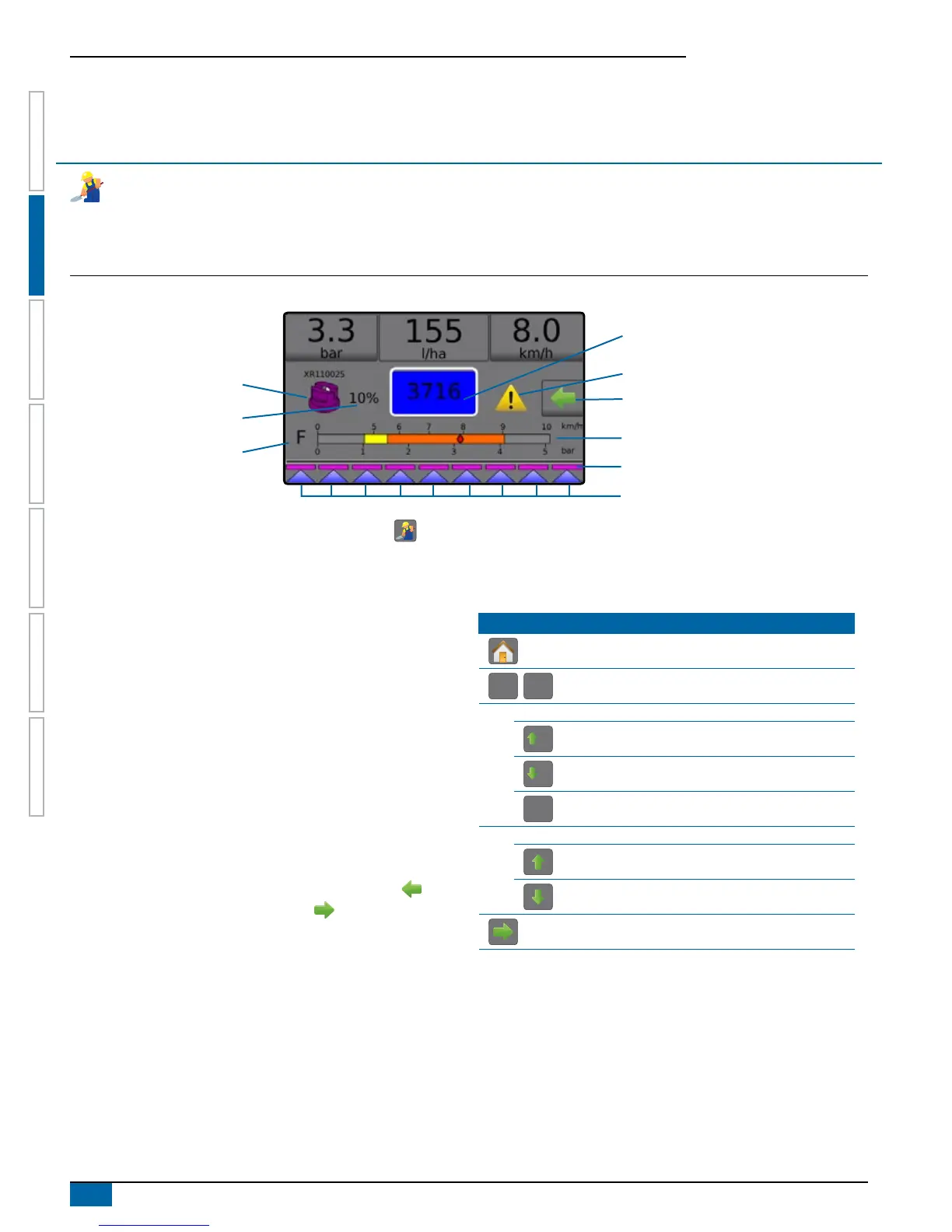
Figure 2-1: Operation Screen Overview
Boom Sections
Spray Status
Pressure Gauge
Current Tip
Information Bar
Current Droplet Size
Tank Contents / Filling Options
Alarm Warning
Options Tab
Application Rate Change
1. From the Home screen, press the OPERATION button .
2. Screen options include:
►Information Bar – displays application rates and selectable
information
►Current Tip – displays current tip and accesses ve (5) preset
tip types
►Application Rate Change – displays rate changes (if in
Automatic Regulation Mode)
►Tank – displays remaining tank contents and accesses lling
options
◄Filling – establishes actual/desired tank material/density
►Alarm Warning – displays active alarm conditions
►Options Tab – accesses the Operation menu
◄Displays Home button, Close Menu button, Regulation
Modes and Target Rate options
NOTE: Toggle between the Operation screen and
Operation menu using the Options tab and
the Close menu button .
►Pressure Gauge – displays current pressure range compared
with recommended pressure range
◄Droplet Size – displays selected droplet size
►Boom Sections – displays congured boom sections
◄Spray Status – displays active/inactive for section
Operation Menu
The Options tab is always available on the Operation screen.
This tab accesses the Operation menu where the Home button,
Regulation Modes and Target Rate options display.
Operation Menu Buttons
Home
Auto
reg
Man
reg
Change Between Automatic/Manual Regulation Modes
Automatic Regulation Mode
5%
Target Rate Boost Percent Increase
5%
Target Rate Boost Percent Decrease
0%
Return to Target Rate
Manual regulation mode
Regulation Valve Manual Open
Regulation Valve Manual Close
Close Menu


 To Next Page