Operating Instructions Model 400E Ozone Analyzer
Instruction Manual
154 P/N 04316 Rev: B
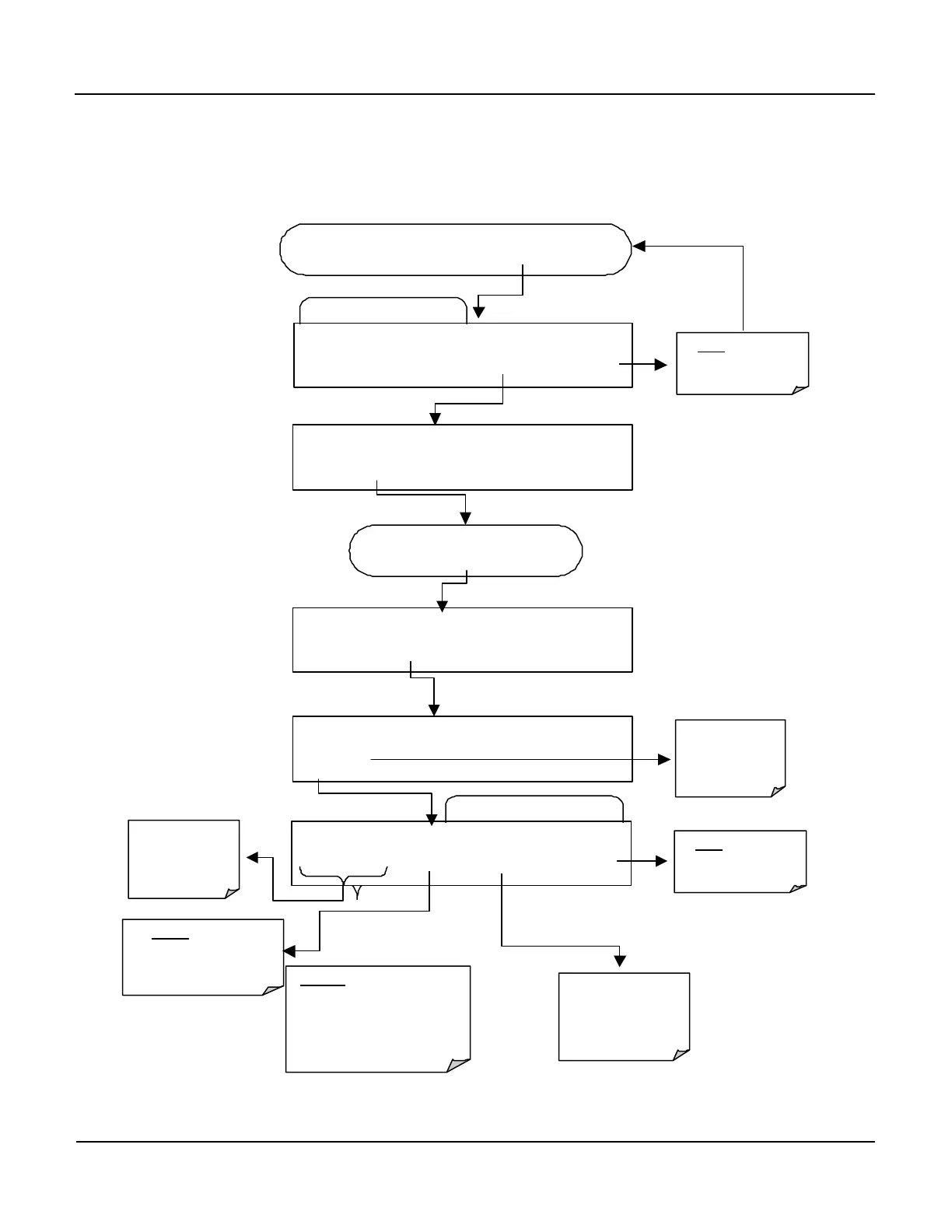
6.12.4. Adding or Deleting Data Parameters
To add or delet a Data Parameter to a Data Channel, press:
Edit Data Parameter Menu
Edit Data Channel Menu
SETUP X.X 0) CONC: ATIMER, 2, 900
PREV NEXT INS DEL EDIT PRNT EXIT
FROM THE DATA CHANNEL PASSWORD MENU
Exits to the Main
Data Acquisition
Menu
SETUP X.X NAME:CONC
<SET
SET>
EDIT
PRINT EXIT
SETUP X.X PARAMETERS:2
<SET SET> EDIT PRINT EXIT
SETUP X.X 0) PARAM=DETREP, MODE=INST
PREV NEXT INS DEL EDIT EXIT
Press SET> key until…
SETUP X.X
NO returns to
the previous
menu.
Moves the
display up &
Parameters
Inserts a new Data
Parameter into the list
BEFORE the one
currently being displayed
Deletes
currently being displayed
AND ALL DATA
RECORDED FOR THAT
PARAMETER TO DATE
User to configure
the FUNCTIONS
for this Data
Parameter.
Exits to the Main
Data Acquisition
Menu


 To Next Page