Model 400E Ozone Analyzer
Instruction Manual
Operating Instructions
P/N 04316 Rev: B 59
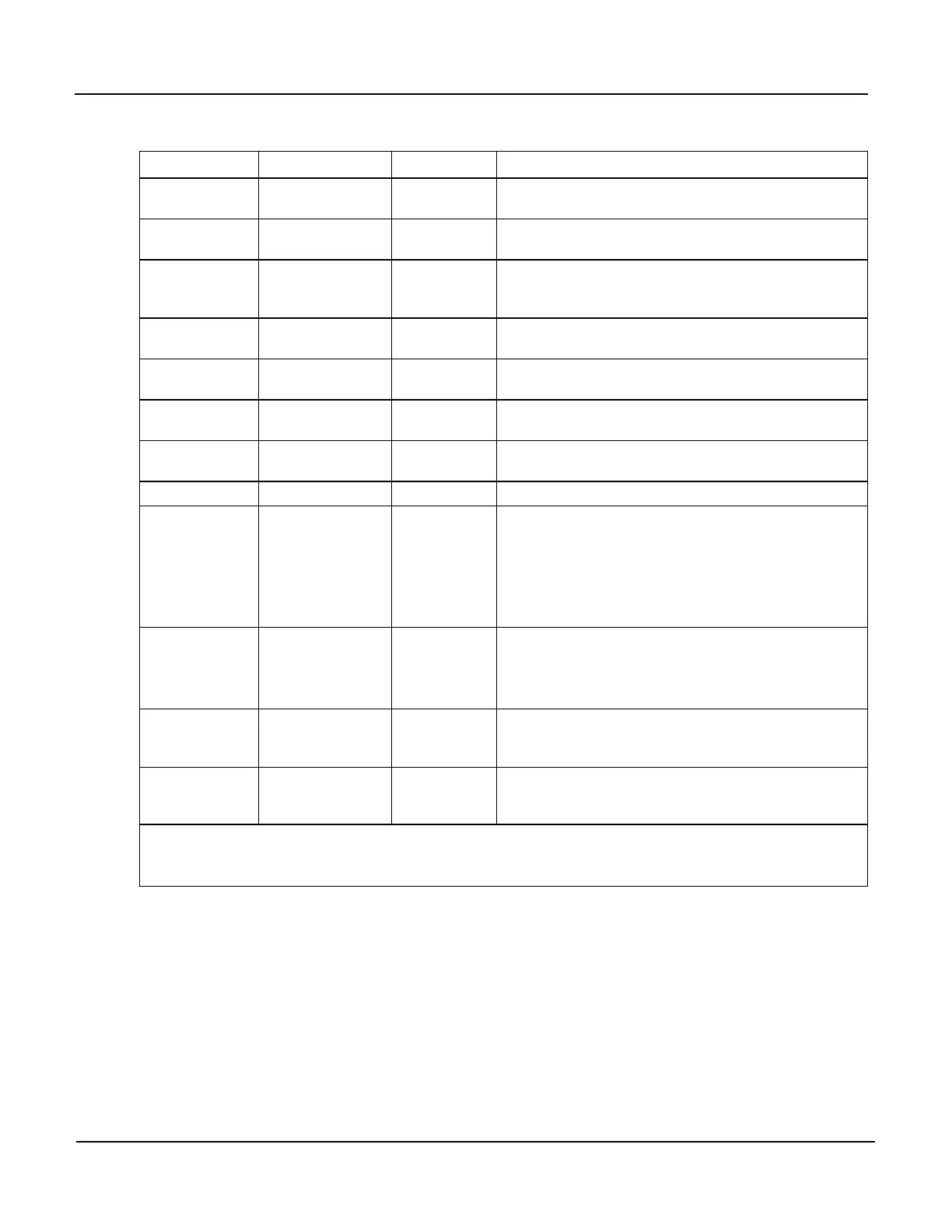
Table 6-2: Test Functions Defined (continued)
Parameter Display Title Units Meaning
O3GENDRIVE O3 DRIVE
(1)
mV
The Drive voltage used to control the intensity of
the O
3
generator UV Lamp.
(1)
SAMPPRESS PRES
In-Hg-A
The absolute pressure of the Sample Gas as
measured by a solid state pressure sensor.
SAMPFLOW SAMP FL cc/min
Sample Gas mass flow rate as measured by the
Flow Sensor located between the Optical Bench
and the Sample Pump.
SAMPTEMP SAMPLE TEMP
°C
The Temperature of the gas inside the Sample
Chamber.
PHOTOLTEMP PHOTO LAMP °C
The Temperature of the UV Lamp in the Optical
Bench.
O3SCRUBTEM
P
O3 SCRUB
(3)
°C
The current temperature of the Metal Wool
Scrubber.
(3)
O3GENTEMP O3 GEN TMP
(1)
°C
The Temperature of the UV Lamp in the O
3
Generator.
(1)
BOXTEMP BOX TEMP °C The temperature inside the analyzer chassis.
SLOPE SLOPE - -
The Slope of the instrument as calculated during
the last calibration activity.
When the unit is set for SINGLE or DUAL Range
mode, this is the SLOPE of RANGE1.
When the unit is set for AUTO Range mode, this
is the SLOPE of the current range.
OFFSET OFFSET PPB
The Offset of the instrument as calculated during
the last calibration activity.
When the unit is set for SINGLE or DUAL Range
mode, this is the OFFSET of RANGE1.
TESTCHAN TEST
(4)
mV
Displays the signal level of whatever Test
function is currently being output by the Analog
Output Channel A4.
(4)
CLOCKTIME TIME HH:MM:SS
The current time. This is used to create a time
stamp on iDAS readings, and by the AutoCal
feature to trigger calibration events.
(1)
Only appears if IZS option is installed.
(2)
Only appears if IZS Reference Sensor option is installed.
(3)
Only appears if Metal Wool Scrubber option is installed.
(4)
Only appears if Analog Output A4 is actively reporting a Test Function.


 To Next Page