User Manual for Oscar GNSS Receiver v2.4
73
For Ultimate and Advanced versions, you can also check the firmware version
by switching the button. In the [device information] -[GNSS information]-
[firmware version], you can view the firmware version of the GNSS board
inside Oscar. In the [device information] - [software version], you can view
Oscar firmware version.
Please note: your Oscar firmware version is V2.0.1 or higher, you can use
the WiFi web upgrade mode.
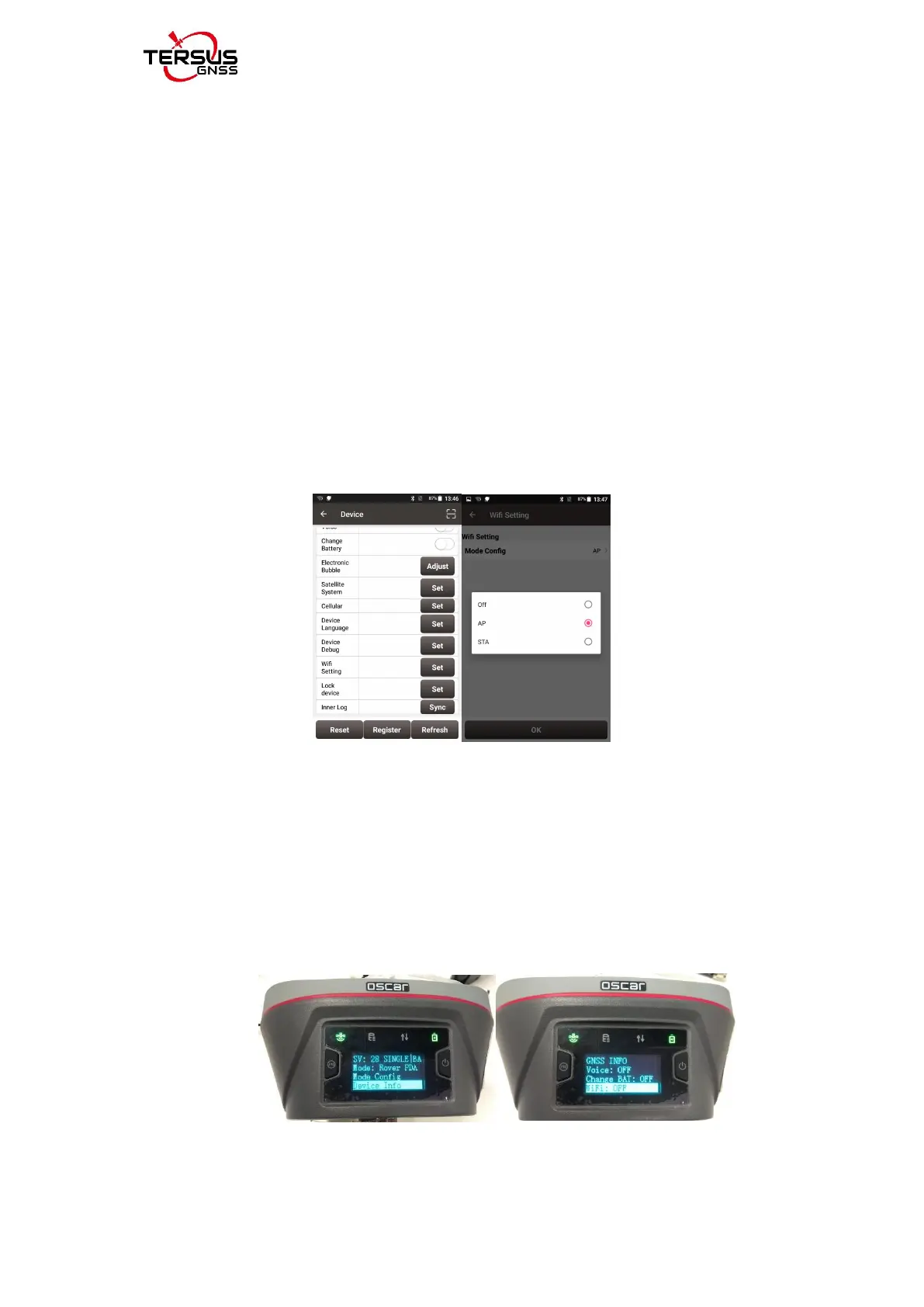
2) Turn on the WIFI function of Oscar GNSS receiver.
Switch to [Device] -- [WIFI Setting] -- [Set] -- [Mode Config], select [AP] --
[confirm] via NUWA, as shown below.
Figure 2.39 Open WIFI function
Note: the version of NUWA app must be upgraded to V2.2.9 or above.
For Advanced and Ultimate versions, we can also open WIFI through the
button on the host: switch to [Device info] -- [GNSS info]-- [WIFI] and ensure
that the WIFI mode screen is displayed. Click [confirm] after WIFI mode to
switch to [AP] mode. As shown in the figure below.



 To Next Page