102 Chapter 5: Additional Home Screen Topics
-
-
92 Plus: Additional Home Screen To
p
ics (English) Susan Gullord Revised: 02/23/01 10:55 AM Printed: 02/23/01 2:13 PM Page 102 of
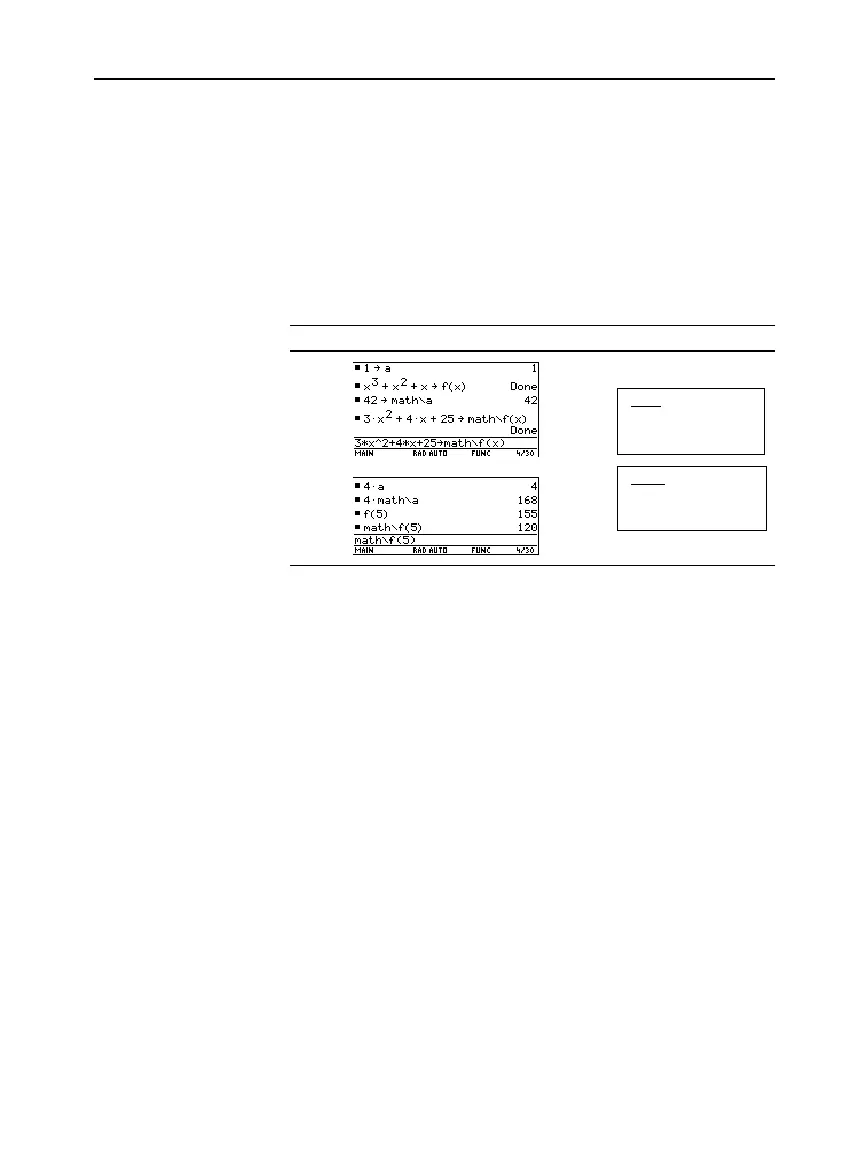
You can access a user-defined variable or function that is not in the
current folder. Specify the complete
pathname
instead of only the
variable name.
A pathname has the form:
folderName
\
variableName
— or —
folderName
\
functionName
For example:
If Current Folder =
MAIN
Folders
To see a list of existing folders and variables, press
2°
. On
the
VAR-LINK
screen, you can highlight a variable and press
¸
to
paste that variable name to the Home screen’s entry line. If you paste
a variable name that is not in the current folder, the pathname
(
folderName\variableName
) is pasted.
Before deleting a folder, you must delete all the variables stored in
that folder.
¦ To delete a variable, enter the
DelVar
command.
DelVar
var1
[,
var2
] [,
var3
] ...
¦ To delete an empty folder, enter the
DelFold
command.
DelFold
folder1
[,
folder2
] [,
folder3
] ...
VAR-LINK
lets you delete a folder and its variables at the same time.
Refer to Chapter 21.
1. Press
2°
.
2. Select the item(s) to delete and press
ƒ
1
or
0
. (If you use
†
to select a folder, its variables are selected automatically.)
3. Press
¸
to confirm the deletion.
Using Variables in
Different Folders
Note: This example
assumes that you have
already created a folder
named
MATH
.
Note: For information about
the
VAR-LINK
screen, refer
to Chapter 21.
Deleting a Folder
from the Home
Screen
Note: You cannot delete the
MAIN
folder.
Deleting a Folder
from the
VAR-LINK
Screen
MAIN
a=1
f(x)=x
3
+x
2
+x
MATH
a=42
f(x)=3x
2
+4x+25


 To Next Page
 Loading...














