276 Chapter 17: Programming
17PROGRM.DOC TI-89/TI-92 Plus: Programming (English) Susan Gullord Revised: 02/23/01 1:14 PM Printed: 02/23/01 2:18 PM Page 276 of 40
Steps
³
TI
.
89
Keystrokes
›
TI
.
92 Plus
Keystrokes Display
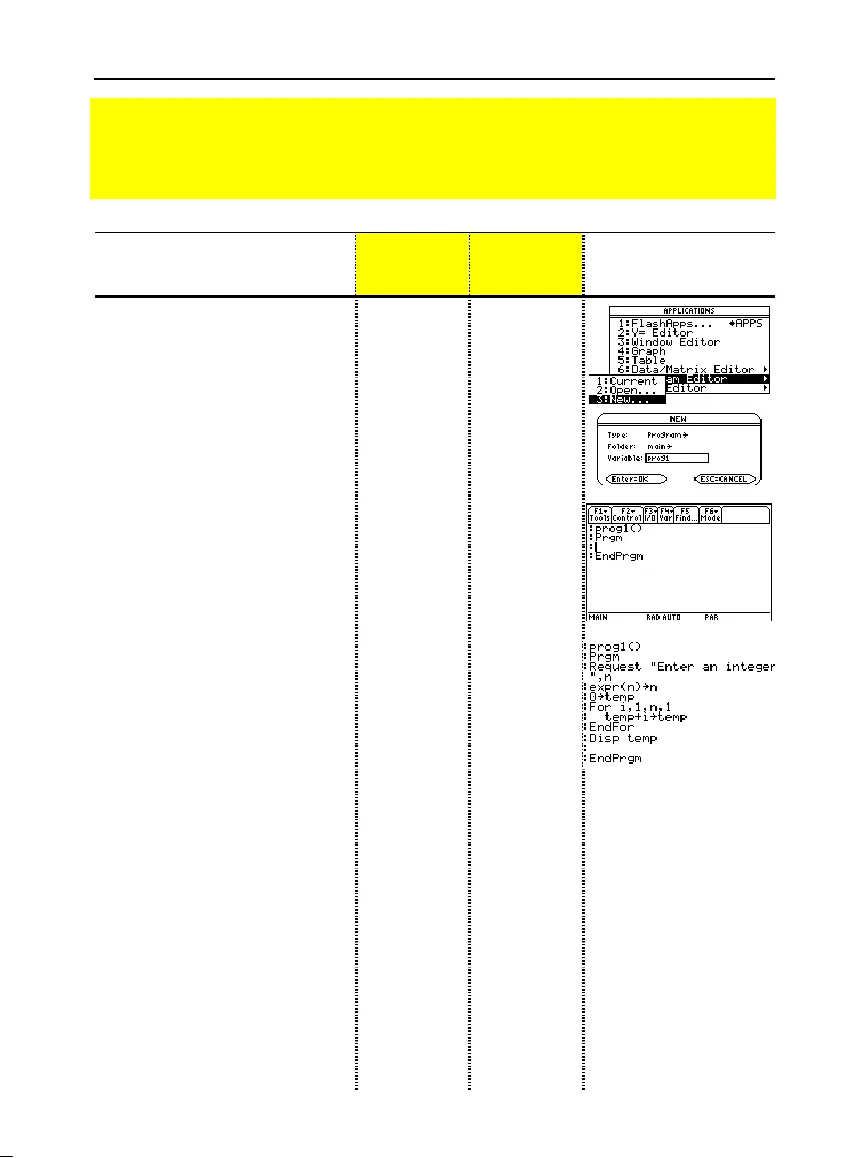
1. Start a new program on the
Program Editor.
O
73
O
73
2. Type
PROG1
(with no spaces) as
the name of the new program
variable.
DD
PROG
j
1
DD
PROG1
3. Display the “template” for a new
program. The program name,
Prgm
, and
EndPrgm
are shown
automatically.
After typing in an input box such as
Variable, you must press
¸
twice.
¸¸
¸¸
4. Type the following program
lines.
Request "Enter an
integer",n
Displays a dialog box that
prompts “Enter an integer”, waits
for the user to enter a value, and
stores it (as a string) to variable n.
expr(n)
!
n
Converts the string to a numeric
expression.
0
!
temp
Creates a variable named temp
and initializes it to 0.
For i,1,n,1
Starts a For loop based on
variable i. First time through the
loop, i = 1. At end of loop, i is
incremented by 1. Loop continues
until i > n.
temp+i
!
temp
Adds current value of i to temp.
EndFor
Marks the end of the For loop.
Disp temp
Displays the final value of temp.
Type the
program lines
as shown.
Press
¸
at the end of
each line.
Type the
program lines
as shown.
Press
¸
at the end of
each line.
Preview of Programming
Write a program that prompts the user to enter an integer, sums all integers from 1 to the
entered integer, and displays the result.



 To Next Page
 Loading...













