Chapter 10: 3D Graphing 173
10_3D.DOC TI-89/TI-92 Plus: 3D Graphing (English) Susan Gullord Revised: 02/23/01 11:00 AM Printed: 02/23/01 4:22 PM Page 173 of 22
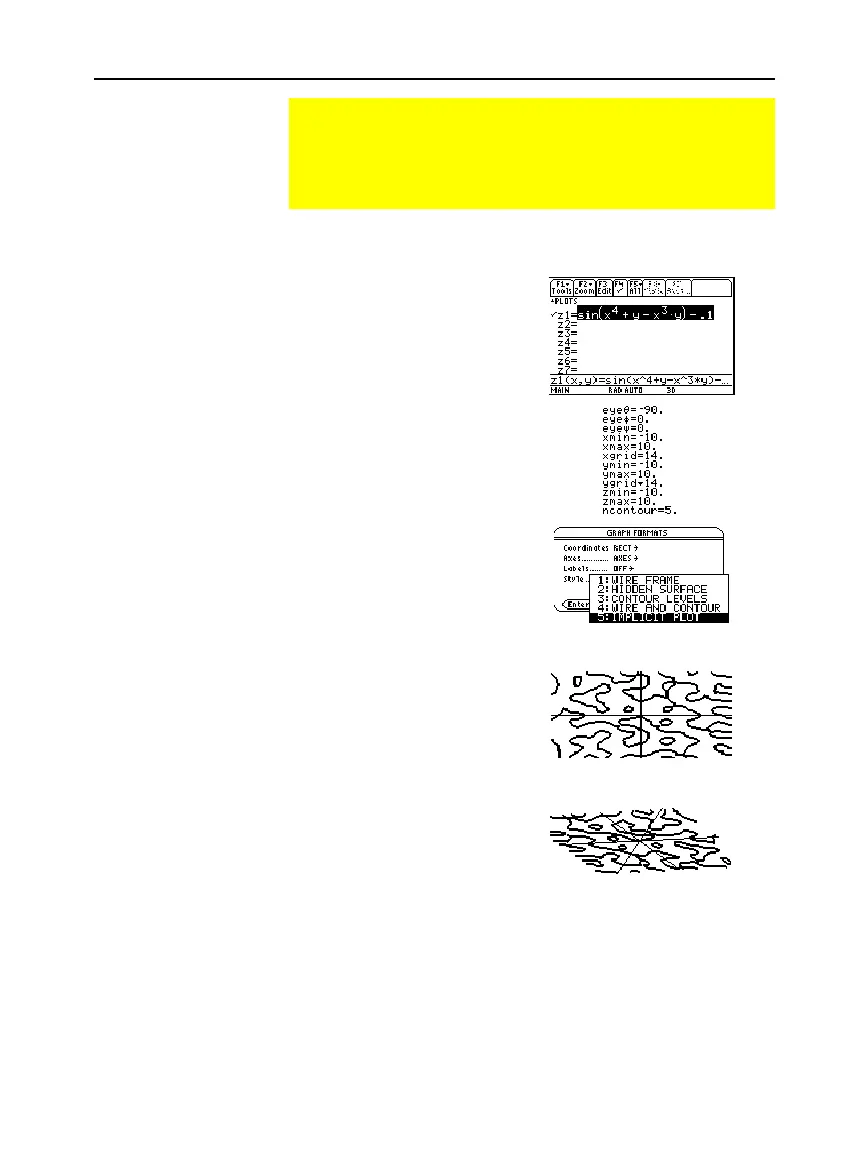
Graph the equation
sin(x
4
+y
ì
x
3
y) = .1
.
1. Use
3
to set
Graph
=
3D
.
2. Press
¥#
, and define the
equation:
z1(x,y)=sin(x^4+y
ì
x^3y)
ì
.1
3. Press
¥$
, and set
the Window variables as
shown.
4. Press:
TI
-
89:
¥Í
TI
-
92 Plus
:
¥
F
T
urn on the axes, set
Style = IMPLICIT PLOT
, and
return to the Window
editor.
5. Press
¥%
to graph
the equation.
It will take awhile to
evaluate the graph; so be
patient.
6. Use the cursor keys to
animate the graph and view
it from different
eye
angles.
Example: Implicit Plot of a More Complicated Equation
You can use the IMPLICIT PLOT graph format style to plot and
animate a complicated equation that cannot be graphed
otherwise. Although it may take a long time to evaluate such a
graph, the visual results can justify the time required.
Example
Note: For more detail,
increase the
xgrid
and
ygrid
Window variables. However,
this increases the graph
evaluation time.
Tip: When you animate the
graph, the screen changes
to normal view. Press
p
to
switch between normal and
expanded views.
The graph shows where
sin(x
4
+y
ì
x
3
y) = .1
In expanded view, this example
shows eye
q
=
ë
127.85, eye
f
=52.86,
and eye
ψ
=
ë
18.26.



 To Next Page
 Loading...













