Chapter 15: Data/Matrix Editor 241
15DATAMA.DOC TI-89/TI-92 Plus: Data/Matrix Editor (English) Susan Gullord Revised: 02/23/01 1:10 PM Printed: 02/23/01 2:17 PM Page 241 of 16
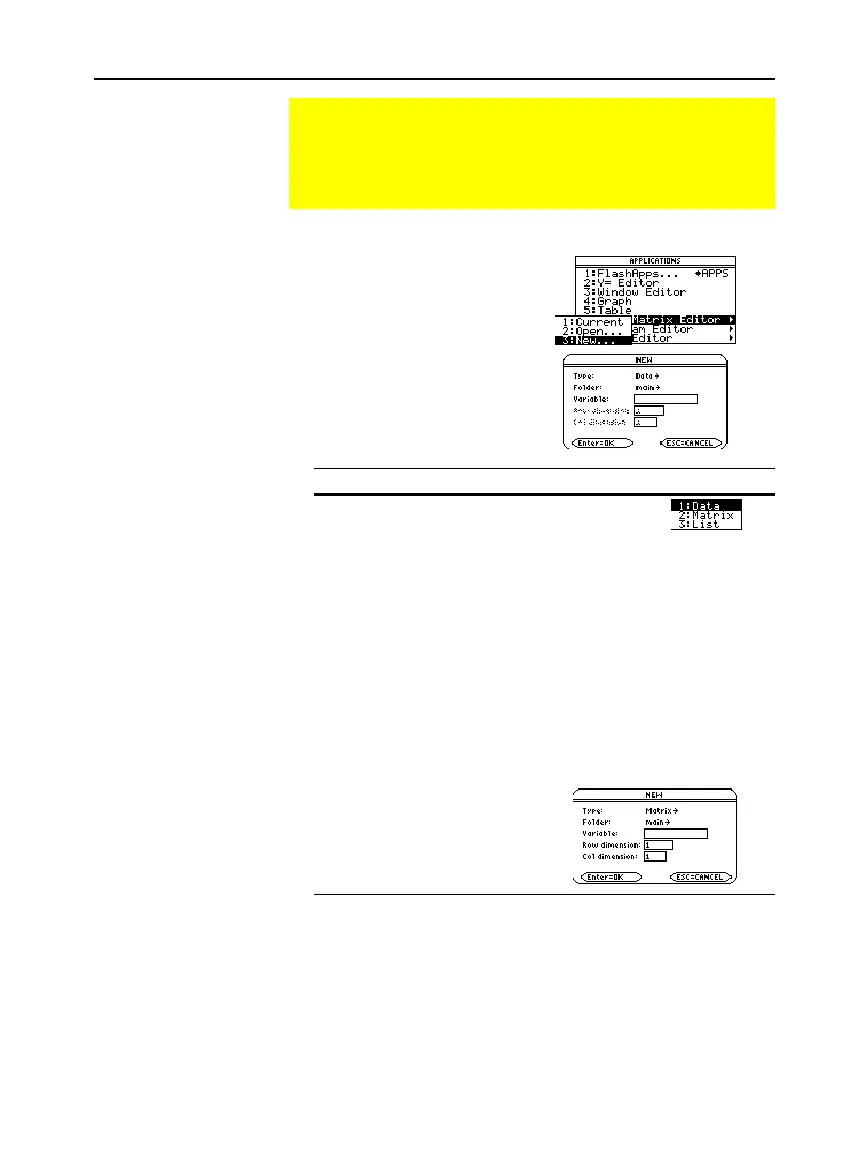
1. Press
O
and then select
6:Data/Matrix Editor
.
2. Select
3:New
.
3. Specify the applicable
information for the new
variable.
Item Lets you:
Type
Select the type of variable to
create. Press
B
to display a
menu of available types.
Folder
Select the folder in which the new variable will
be stored. Press
B
to display a menu of existing
folders. For information about folders, refer to
Chapter 5.
Variable
Type a new variable name.
If you specify a variable that already exists, an
error message will be displayed when you press
¸
. When you press
N
or
¸
to
acknowledge the error, the
NEW
dialog box is
redisplayed.
Row dimension
and
Col dimension
If
Type = Matrix
,
type the number
of rows and
columns in the
matrix.
4. Press
¸
(after typing in an input box such as
Variable
, press
¸
twice) to create and display an empty variable in the
Data/Matrix Editor.
Starting a Data/Matrix Editor Session
Each time you start the Data/Matrix Editor, you can create a
new variable, resume using the current variable (the variable
that was displayed the last time you used the Data/Matrix
Editor), or open an existing variable.
Creating a New
Data, Matrix, or List
Variable
Note: If you do not type a
variable name, the
TI
-
89 / TI
-
92 Plus
will display
the Home screen.



 To Next Page
 Loading...













