Chapter 11: Differential Equation Graphing 187
11DIFFEQ.DOC TI-89/TI-92 Plus: Differential Equation (English) Susan Gullord Revised: 02/23/01 11:04 AM Printed: 02/23/01 2:15 PM Page 187 of 26
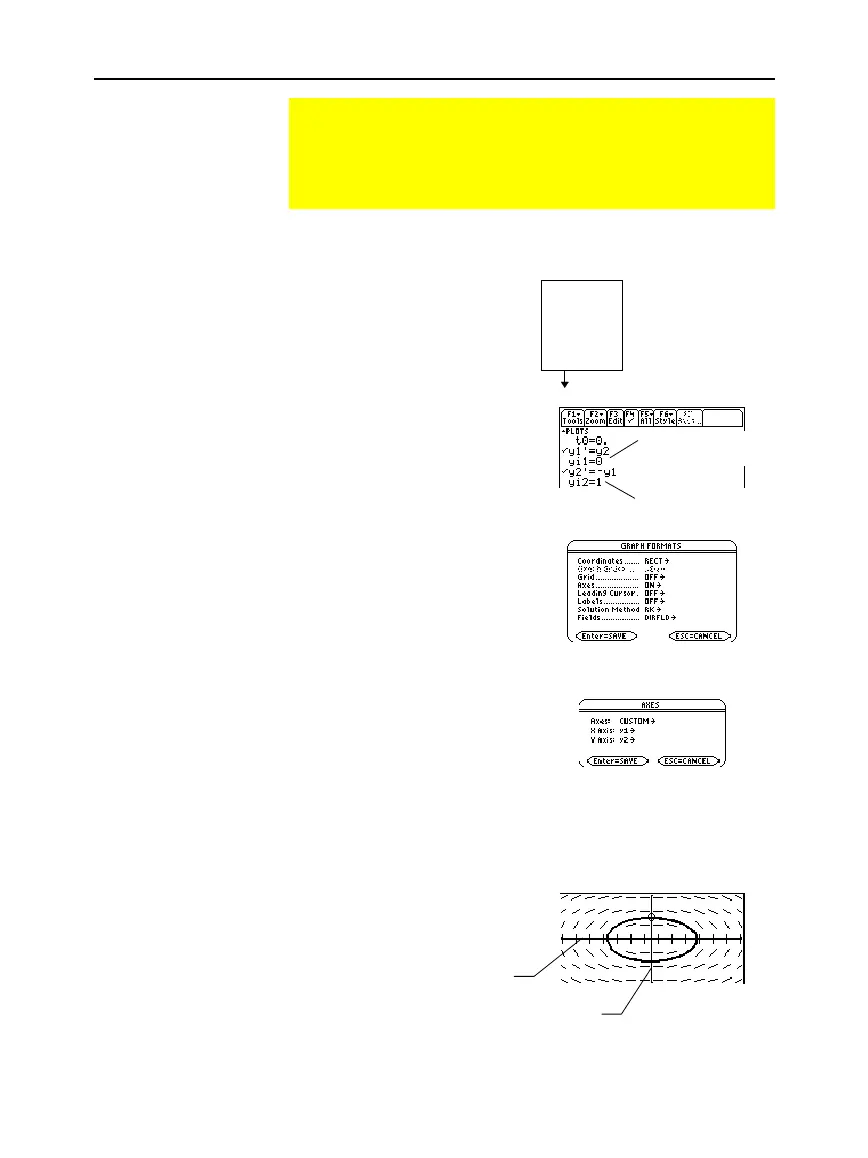
1. Press
3
and set
Graph=DIFF EQUATIONS
.
2. Define a system of equations
for the 2nd-order equation as
described on page 186.
Rewrite the equation and
make the necessary
substitutions.
3. In the Y= Editor (
¥#
),
enter the system of equations.
4. Enter the initial conditions:
yi1=0
and
yi2=1
5. Press:
ƒ
9
—
or
—
TI
-
89:
¥
Í
TI
-
92 Plus:
¥
F
and set
Axes = ON
,
Labels =
OFF
,
Solution Method = RK
, and
Fields
=
DIRFLD
.
6. In the Y= Editor, press:
TI
-
89
:
2‰
TI
-
92 Plus:
‰
and make sure
Axes = CUSTOM
with
y1
and
y2
as the axes.
7. In the Window Editor
(
¥$
), set the
Window variables.
t0=0. xmin=
ë
2. ncurves=0.
tmax=10. xmax=2. diftol=.001
tstep=.1 xscl=1. fldres=14.
tplot=0. ymin=
ë
2. dtime=0.
ymax=2.
yscl=1.
8. Display the Graph screen
(
¥%
).
If you select
ZoomSqr
(
„
5
), you can see that the phase-plane orbit
is actually a circle. However,
ZoomSqr
will change your Window
variables.
Example of a 2nd-Order Equation
The 2nd-order differential equation y''+y = 0 represents a
simple harmonic oscillator. Transform this into a system of
equations for the Y= Editor. Then, graph the solution for initial
conditions y(0) = 0 and y'(0) = 1.
Example
Note: t0 is the time at which
the initial conditions occur. It
is also the first t evaluated
for the graph. By default,
t0=0.
Important: For 2nd-order
equations, you must set
Fields=
DIRFLD
or
FLDOFF
.
Important:
Fields=
DIRFLD
cannot plot a time axis. An
Invalid Axes
error occurs if
Axes=
TIME
or if t is set as a
CUSTOM
axis.
y'' + y = 0
y'' =
ë
y
y'' =
ë
y1
y2' =
ë
y1
yi2 is the initial
condition for y'(0).
yi1 is the initial
condition for y(0).
x axis = y1 = y
y axis = y2 = y'


 To Next Page
 Loading...














