400 Chapter 23: Activities
23ACTS.DOC TI-89/TI-92 Plus: Activities (English) Susan Gullord Revised: 02/23/01 1:24 PM Printed: 02/23/01 2:20 PM Page 400 of 26
Perform the following steps to study the flight of a hit baseball that
has an initial velocity of 95 feet per second and an initial angle of 32
degrees.
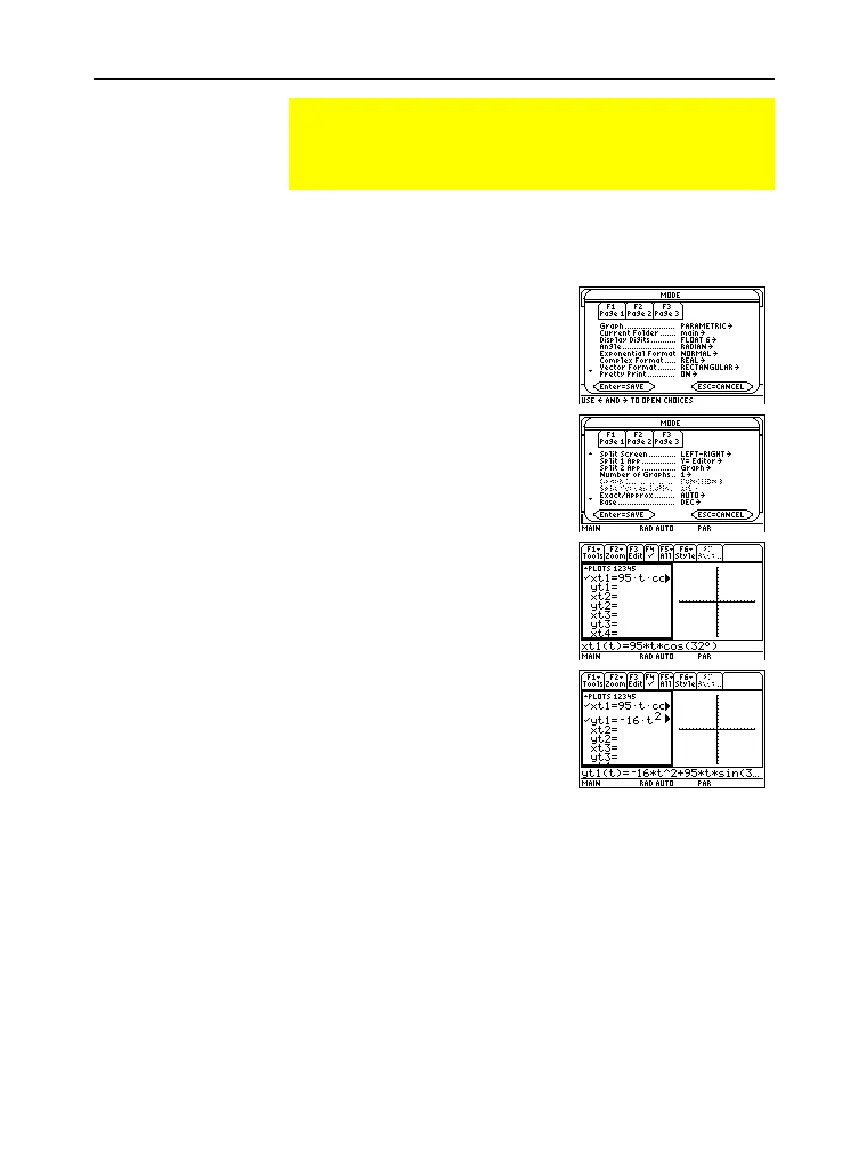
1. Set the modes for
Page 1
as
shown in this screen.
2. Set the modes for
Page 2
as
shown in this screen.
3. In the Y= Editor on the left
side, enter the equation for the
distance of the ball at time
t
for
xt1(t
).
xt1(t)=95
ù
t
ù
cos(32
¡
)
4. In the Y= Editor, enter the
equation for the height of the
ball at time
t
for
yt1(t
).
yt1(t)=
M
16
ù
t^2+95
ù
t
ù
sin(32
¡
)
Studying the Flight of a Hit Baseball
This activity uses the split screen settings to show a
parametric graph and a table at the same time to study the
flight of a hit baseball.
Setting Up a
Parametric Graph
and Table
Hint: Press
2“
to obtain
the degree symbol.


 To Next Page
 Loading...














