Chapter 23: Activities 401
23ACTS.DOC TI-89/TI-92 Plus: Activities (English) Susan Gullord Revised: 02/23/01 1:24 PM Printed: 02/23/01 2:20 PM Page 401 of 26
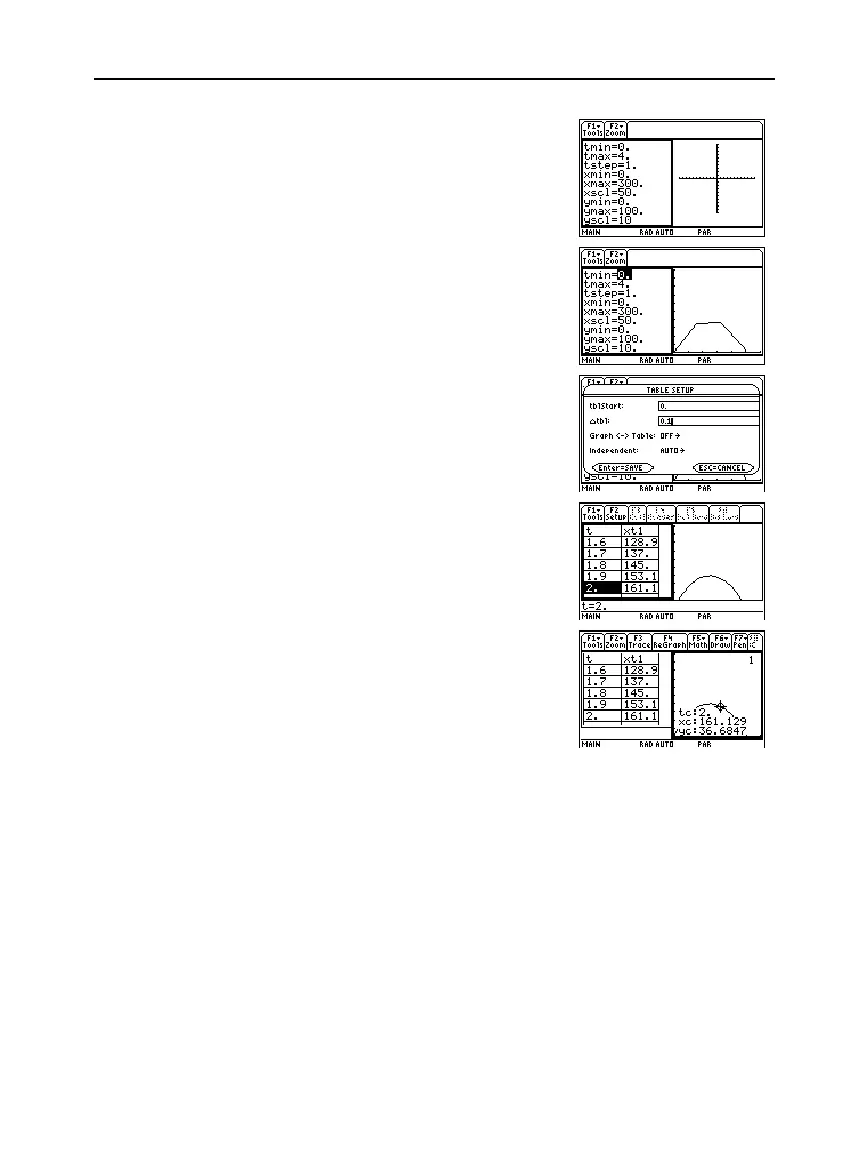
5. Set the Window variables to:
t values= [0,4,.1]
x values= [0,300,50]
y values= [0,100,10]
6. Switch to the right side and
display the graph.
7. Display the
TABLE SETUP
dialog box, and change
tblStart
to
0
and
@
tbl
to
0.1
.
8. Display the table in the left
side and press
D
to highlight
t=2
.
9. Switch to the right side. Press
…
, and trace the graph to
show the values of
xc
and
yc
when
tc=2
.
Assuming the same initial velocity of 95 feet per second, find the
angle that the ball should be hit to achieve the greatest distance.
Hint: Press
2a
.
Hint: Press
¥&
.
Hint: Press
¥'
.
Note: As you move the
trace cursor from
tc=0.0
to
tc=3.1
, you will see the
position of the ball at time
tc
.
Optional Exercise


 To Next Page
 Loading...














