366 Chapter 22: Linking and Upgrading
22LINK.DOC TI-89/TI-92 Plus: Linking and Upgrading (English) Susan Gullord Revised: 02/23/01 1:23 PM Printed: 02/23/01 2:20 PM Page 366 of 1822LINK.DOC TI-89/TI-92 Plus: Linking and Upgrading (English) Susan Gullord Revised: 02/23/01 1:23 PM Printed: 02/23/01 2:20 PM Page 366 of 18
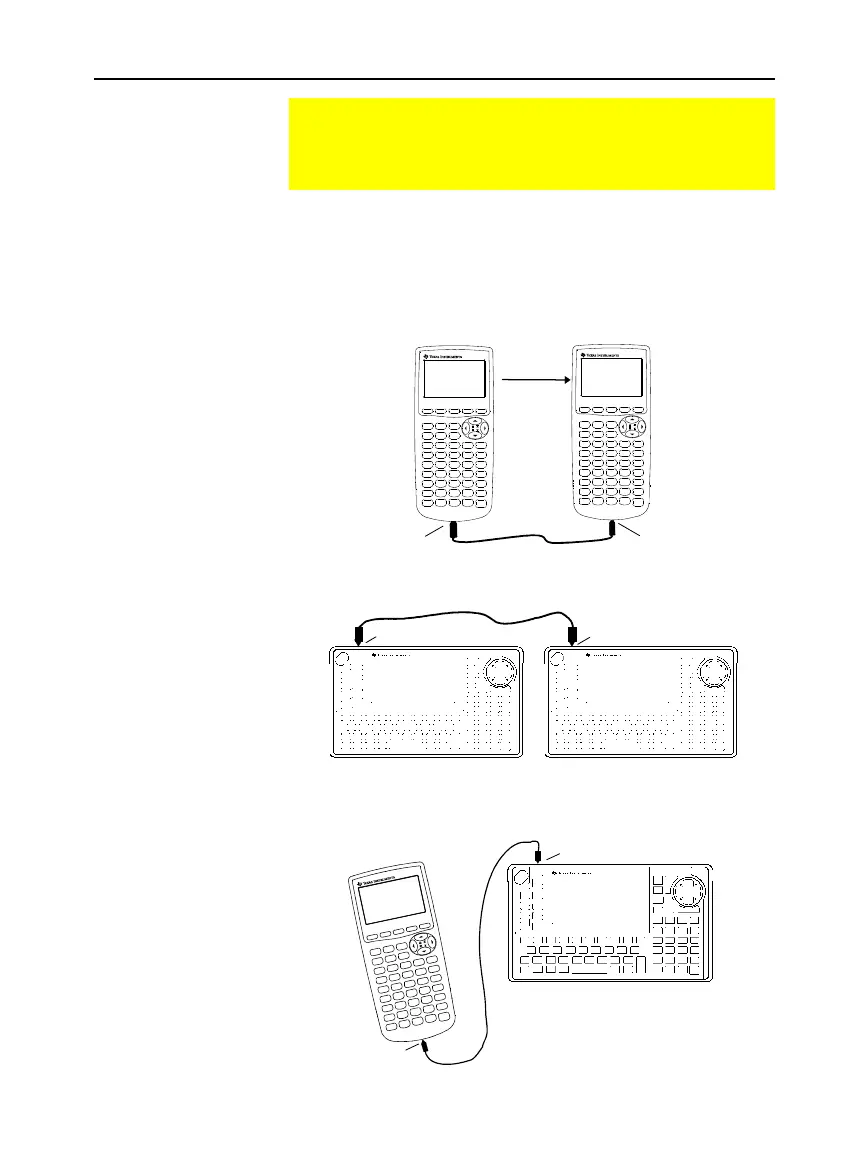
Using firm pressure, insert one end of the cable into the I/O port of
each unit. Either unit can send or receive, depending on how you set
them up from the
VAR-LINK
screen.
This shows how to link two
TI
-
89
units together:
TI-89
TI-89
This shows how to link two
TI
-
92 Plus
units together:
TI-92 Plus TI-92 Plus
You can also use the unit-to-unit cable that came with your
calculator to link a
TI
-
89
and a
TI
-
92 Plus
together.
TI-89
TI-92 Plus
Linking Two Units
The TI
-
89 and the TI
-
92 Plus each come with a cable that lets
you link two units. Once connected, you can transmit
information between two units.
Connecting before
Sending or
Receiving
Note: You can link a
TI
-
89
or
TI
-
92 Plus
to another
TI
-
89, a TI
-
92 Plus,
or a
TI
-
92,
but not to a graphing
calculator such as a
TI
-
81
,
TI
-
82
,
TI
-
83, TI
-
83 Plus,
TI
-
85,
or
TI
-
86.
I/O Port
I/O Port
Sending
unit
Receiving
unit
Cable
I/O Port
I/O Port
I/O Port
I/O Port



 To Next Page
 Loading...













