Chapter 10: 3D Graphing 161
10_3D.DOC TI-89/TI-92 Plus: 3D Graphing (English) Susan Gullord Revised: 02/23/01 11:00 AM Printed: 02/23/01 4:22 PM Page 161 of 22
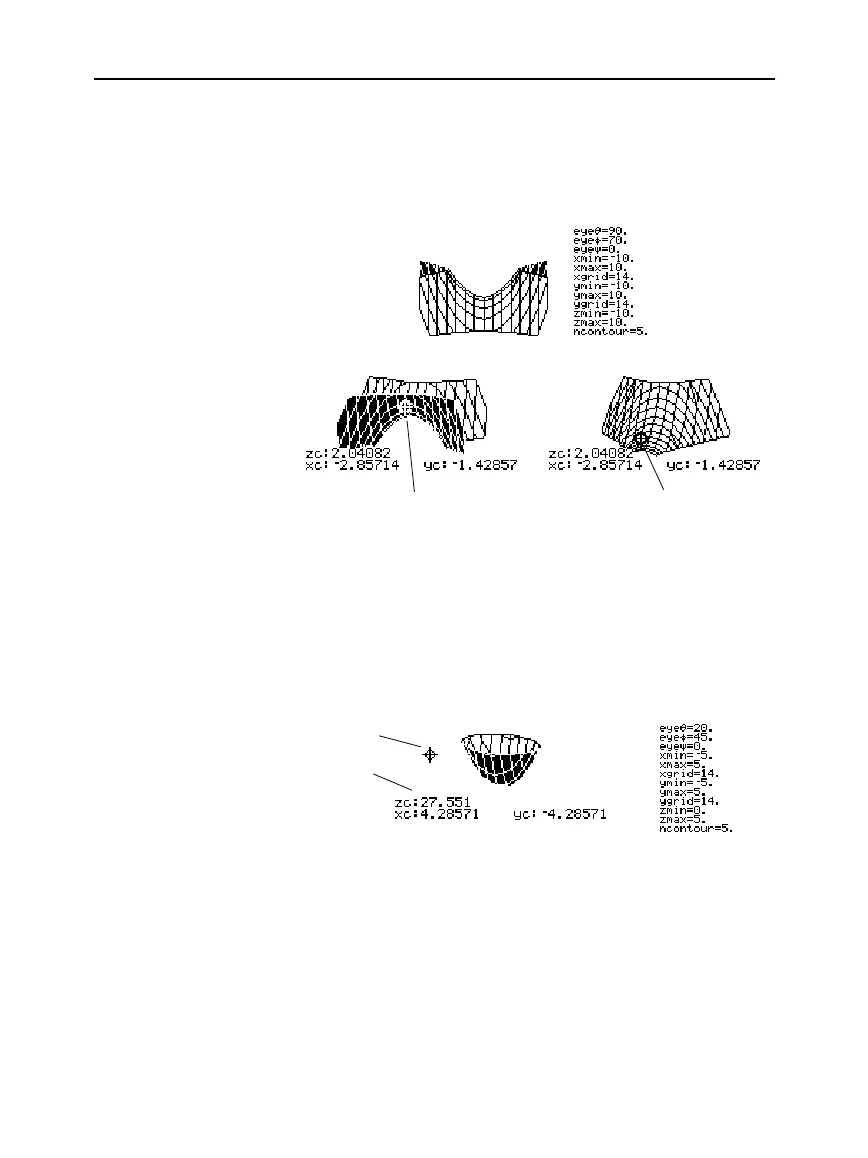
On more complex shapes, the cursor may appear as if it is not on a
grid point. This is an optical illusion caused when the cursor is on a
hidden surface.
For example, consider a saddle shape
z1(x,y) = (x
ñì
y
ñ
) / 3
. The
following graph shows the view looking down the y axis.
Now look at the same shape at 10
¡
from the x axis (
eye
q
= 10
).
Although the cursor can move only along a grid wire, you will see
many cases where the cursor does not appear to be on the 3D
surface at all. This occurs when the z axis is too short to show
z(x,y)
for the corresponding
x
and
y
values.
For example, suppose you trace the paraboloid
z(x,y) = x
ñ
+ .5y
ñ
graphed with the indicated Window variables. You can easily move
the cursor to a position such as:
Although the cursor is actually tracing the paraboloid, it appears off
the curve because the trace coordinates:
¦
xc
and
yc
are within the viewing cube.
— but —
¦
zc
is outside the viewing cube.
When
zc
is outside the
z
boundary of the viewing cube, the cursor is
physically displayed at
zmin
or
zmax
(although the screen shows the
correct trace coordinates).
Example of the
Cursor on a Hidden
Surface
Tip: To cut away the front of
the saddle in this example,
set xmax=0 to show only
negative x values.
Example of an “Off
the Curve” Cursor
Tip: QuickCenter lets you
center the viewing cube on
the cursor’s location. Simply
press
¸
.
You can move the cursor so that it
does not appear to be on a grid
point.
Trace cursor
Valid trace
coordinates
If you cut away the front side, you
can see the cursor is actually on a
grid point on the hidden back side.



 To Next Page
 Loading...













